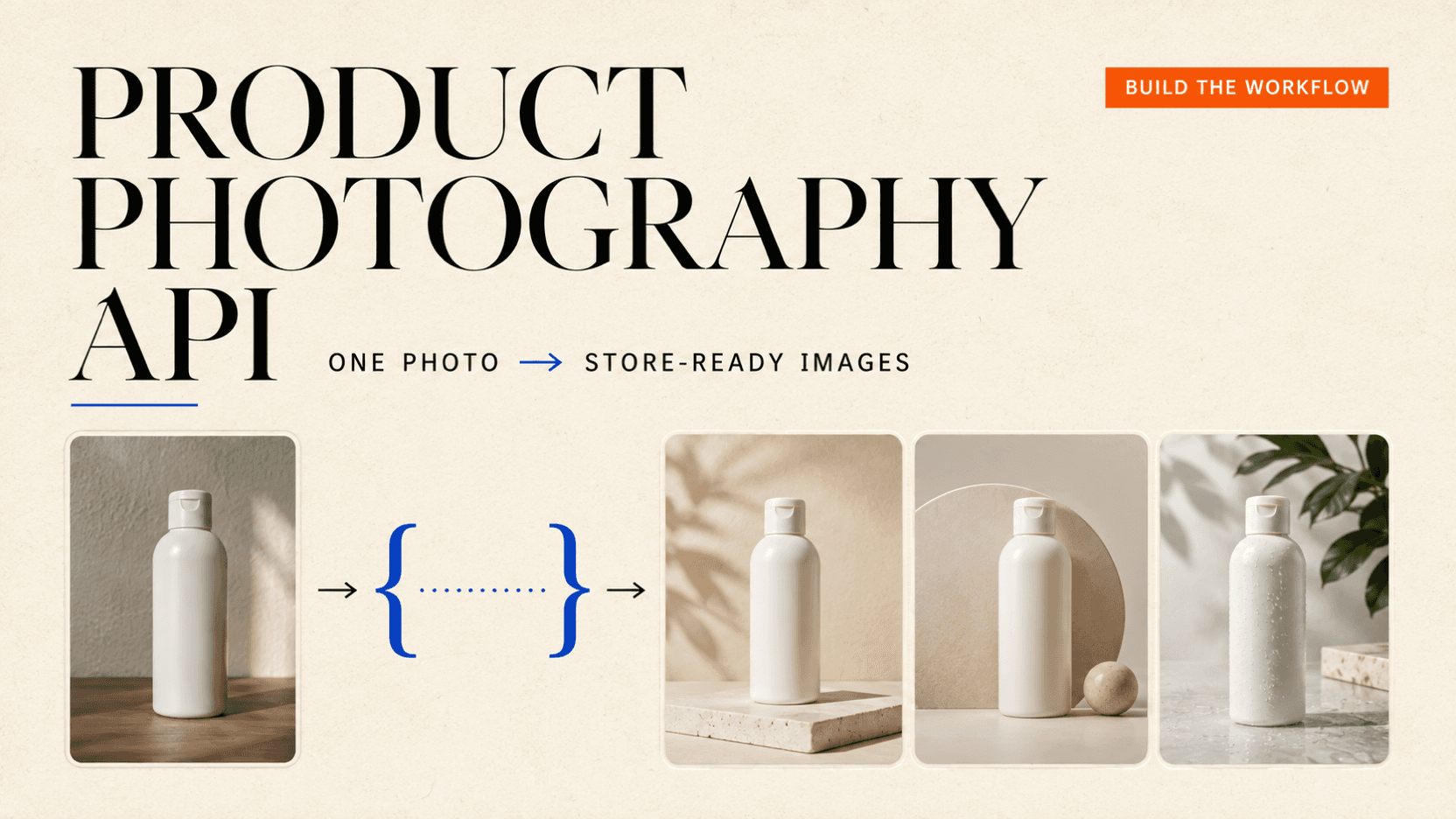
Product Photography API: Turn One Product Photo Into Store-Ready Images
Build a product photography API workflow that preserves product identity, starts at 1K, validates every output, and tracks cost per approved image.
One ordinary product photo can be enough for a constrained set of front or three-quarter store images, provided the API is asked to change the set, not reinvent the product. The practical workflow is simple: write down the details that cannot move, generate one inexpensive 1K candidate, reject it against a fixed checklist, and increase quality or change models only for a named failure.
That last part matters. A model call can finish successfully and still give you a bottle with a different cap, a softened logo, or a shadow that makes the item float. The number worth tracking is therefore not the advertised generation price. It is cost per approved image, including every completed candidate you rejected.
The rates in this guide were checked on September 3, 2026. They can move, so read the live model page before turning them into a customer quote or a hard budget limit.
TL;DR
- Start with a product photo you own, showing one unobstructed item from the angle you intend to sell.
- Write an identity contract for shape, proportions, material, color breaks, hardware, and existing label marks. Let the scene change; do not let those details change.
- The lowest-cost first pass here is Nano Banana 2 Lite at 15 credits, or $0.015, for one completed 1K image when checked on September 3, 2026.[1]
- Use one candidate to validate the prompt. Do not order a batch before the product survives review.
- Read the settled
usage.creditsfrom every terminal task. Divide the total charged credits for completed attempts by the number a person approves. - Keep exact prices, dosage, ingredients, certification marks, and legal copy out of the generated pixels. Preserve or composite the verified artwork.
A product photo is not store-ready just because it looks polished
Can users upload a simple product photo and get a clean e-commerce result without changed shapes, damaged label text, artificial lighting, or inconsistent outputs? Cost matters because every rejected result can trigger another generation.
That is a better definition of the problem than “make this photo professional.” A store-ready asset has to pass observable checks:
| Check | Pass condition | Reject when |
|---|---|---|
| Product count | Exactly one requested item | A duplicate, lid, or loose part appears |
| Geometry | Silhouette and proportions match the source | Cap, handle, pump, edge, or package width changes |
| Material | Finish and texture remain recognizable | Matte turns glossy, clear turns opaque, or grain disappears |
| Color | Product color blocks stay in the same places | White balance changes the product rather than the set |
| Label | Existing marks remain in place and no new claims appear | Words mutate, vanish, or are invented |
| Crop | The whole item is visible with useful safe space | The base, cap, handle, or shadow is clipped |
| Grounding | Contact shadow agrees with the surface and light | The item floats or casts an impossible shadow |
| Delivery | Aspect, pixel size, and file format fit the destination | The file needs an unsafe crop or has unusable edges |
A beautiful image can fail this table. Conversely, a restrained white sweep that preserves every product fact can be the more valuable asset.
Choose a model by the failure you need to solve
There is no universal “best product photography model.” Start with the least expensive route that can express the edit, then move only when the review tells you why the first route is insufficient.
| Stage | Model and request tier | Live generation rate | Use it when |
|---|---|---|---|
| Layout pass | nano-banana-2-lite, 1K | $0.015 / 15 credits | One source, one simple background-and-lighting change |
| Flexible edit | gpt-image-2, 1K | $0.030 / 30 credits | You need more aspect-ratio choices or a targeted edit workflow |
| Production still | doubao-seedream-5-0-pro, basic 1K | $0.032 / 32 credits | Material, lighting, composition, or multi-reference control is the harder part |
| Complex or larger asset | gemini-3-pro-image-preview, 1K or 2K | $0.030 / 30 credits | The brief is dense, references are numerous, or a later 4K pass is justified |
These are current reAPI rates, not upstream vendor list prices. Nano Banana 2 Lite returns one 1K image and accepts up to ten public image references. GPT Image 2 offers 1K, 2K, and 4K tiers. Seedream 5.0 Pro offers basic 1K and high 2K output, with up to ten references. Nano Banana Pro also reaches 4K; its settled 4K price was $0.033, or 33 credits, on the same date.[1][2][3][4]
The stage labels are workflow recommendations, not vendor rankings. ByteDance positions Seedream 5.0 Pro around structural coherence, material and lighting control, multi-image fusion, and production-oriented editing; the source photo and your acceptance test still decide whether those capabilities help this particular product.[8]
Resolution is not a repair tool for wrong geometry. If the 1K draft changes the cap, a 4K rerun can give you a sharper wrong cap. First repair the identity instruction or add a useful reference. Increase resolution only after the composition and product have passed.
For broader capability trade-offs, use the full GPT Image 2 versus Nano Banana Pro comparison or the Seedream 5.0 Pro versus GPT Image 2 comparison. The rest of this guide stays with the product-photo job.
Prepare the source photo before spending a credit
Confirm that you own the source or have permission to transform it before you submit it. Do not assume that a marketplace listing, another catalog, or a customer upload is cleared for a new commercial asset; check the applicable license, terms, and customer consent.
The source does not need a studio background. It does need to make the product legible:
- show one complete item, including its base and top;
- use the same broad angle you want in the result;
- keep fingers, tape, glare, and props away from important edges;
- avoid crushed blacks and blown highlights that hide the material;
- make the cap, handle, pump, fastener, and color boundaries easy to inspect;
- supply another owned angle when the requested result exposes a side the first photo does not show.
One photo is not a 3D model. It cannot prove what is printed on a hidden back panel or how an unseen mechanism is shaped. When the evidence is absent, either capture another reference or keep that surface out of view.
The API accepts media as public HTTP(S) URLs. Base64 strings and data: URLs
are rejected, so upload the source to your own R2, S3, or equivalent object
storage first.[1]
Write a product identity contract
Before writing the visual prompt, turn the source into a short inspection record. This is not prose for the model yet; it is the specification both the prompt and the reviewer will use.
{
  "product": "250 ml skincare bottle",
  "must_keep": [
    "exactly one bottle",
    "tall rounded-rectangle silhouette",
    "short matte-white pump",
    "cobalt band at the lower quarter",
    "warm-white body with a satin finish",
    "front label position and all existing marks",
    "height-to-width ratio"
  ],
  "may_change": [
    "background",
    "surface",
    "lighting direction",
    "contact shadow",
    "crop room"
  ],
  "must_not_create": [
    "new words or logos",
    "price or discount badge",
    "ingredients or certification claim",
    "extra bottle, cap, pump, or packaging"
  ]
}
“Keep it consistent” gives a reviewer nothing to point at. “The cobalt band stays at the lower quarter” does.
Build the first product-photography prompt
Put the non-negotiable identity first, then say what may change, then describe the shot. Models tend to follow a concrete boundary better than a long list of photography adjectives.
Use Image 1 as the exact product identity.

Keep exactly one product. Preserve its silhouette, dimensions, pump position,
warm-white satin material, cobalt color boundary, surface texture, and every
existing label mark. Do not redesign, relabel, remove, or add branding.

Change only the setting: place the product centered on a warm-white seamless
studio sweep. Use a large soft key light from the upper left, even front detail,
and a natural contact shadow directly below the bottle. Keep the whole product
visible with at least 10% crop room on every side.

No hands, people, props, boxes, extra products, added text, badges, dramatic
reflections, clipped edges, or floating object.
The prompt does not ask the model to improve the label. If label typography is commercially important, “improvement” is an invitation to redraw it. Preserve the original plate or add verified artwork after generation.
Submit your first product photography API job
Create a media API key, replace the example URL with your public source image, and submit one Nano Banana 2 Lite task. This is a paid request; it is deliberately one candidate rather than a batch.
curl https://reapi.ai/api/v1/images/generations \
  -H "Authorization: Bearer $REAPI_API_KEY" \
  -H "Content-Type: application/json" \
  -d '{
    "model": "nano-banana-2-lite",
    "prompt": "Use Image 1 as the exact product identity. Keep exactly one product. Preserve its silhouette, dimensions, pump position, material, color boundaries, surface texture, and every existing label mark. Do not redesign, relabel, remove, or add branding. Change only the setting: center it on a warm-white seamless studio sweep with a soft key light from upper left and a natural contact shadow. Keep the whole product visible with at least 10% crop room. No hands, people, props, extra products, added text, badges, clipped edges, or floating object.",
    "image_urls": ["https://assets.example.com/my-product.jpg"],
    "aspect_ratio": "1:1"
  }'
The response contains an id and status: "processing". Save the ID. Then
poll the task endpoint every two or three seconds until it reaches completed
or failed:
TASK_ID="task_replace_me"

curl "https://reapi.ai/api/v1/tasks/$TASK_ID" \
  -H "Authorization: Bearer $REAPI_API_KEY"
Polling does not consume credits. A completed image task returns the file in
output.image_urls and the settled charge in usage.credits.[5]
Do not blindly repeat the POST when a client loses its connection before it reads the response. The first request may already have created a paid task. Log the response and task ID as soon as they arrive; retry the GET safely, but make a deliberate decision before creating another generation.
A complete Node.js runner with bounded polling
The following script works in Node.js 20 or later without an SDK. It supports the four 1K request shapes used in this guide, submits exactly once, uses a five-minute local polling deadline, prints the settled credits, and copies a successful file to the current directory.
import { writeFile } from 'node:fs/promises';

const apiKey = process.env.REAPI_API_KEY;
const sourceUrl = process.env.SOURCE_IMAGE_URL;
const model = process.env.IMAGE_MODEL || 'nano-banana-2-lite';

if (!apiKey || !sourceUrl) {
  throw new Error('Set REAPI_API_KEY and SOURCE_IMAGE_URL first.');
}

const prompt = `Use Image 1 as the exact product identity.
Keep exactly one product. Preserve its silhouette, proportions, hardware,
material, color boundaries, surface texture, and every existing label mark.
Do not redesign, relabel, remove, or add branding.
Change only the setting: center it on a warm-white seamless studio sweep with
a soft key light from upper left and a natural contact shadow. Keep the whole
product visible with at least 10% crop room. No hands, people, props, added
text, badges, extra products, clipped edges, or floating object.`;

function requestBody(selectedModel) {
  const common = {
    model: selectedModel,
    prompt,
    image_urls: [sourceUrl],
  };

  if (selectedModel === 'nano-banana-2-lite') {
    return { ...common, aspect_ratio: '1:1' };
  }
  if (selectedModel === 'gpt-image-2') {
    return { ...common, size: '1:1', resolution: '1k' };
  }
  if (selectedModel === 'doubao-seedream-5-0-pro') {
    return { ...common, aspect_ratio: '1:1', quality: 'basic' };
  }
  if (selectedModel === 'gemini-3-pro-image-preview') {
    return { ...common, size: '1:1', resolution: '1k' };
  }
  throw new Error(`Unsupported IMAGE_MODEL: ${selectedModel}`);
}

const headers = {
  Authorization: `Bearer ${apiKey}`,
  'Content-Type': 'application/json',
};

async function readJson(response) {
  const body = await response.json();
  if (!response.ok) {
    const message = body.error?.message || JSON.stringify(body);
    throw new Error(`HTTP ${response.status}: ${message}`);
  }
  return body;
}

const sleep = (ms) => new Promise((resolve) => setTimeout(resolve, ms));

async function getTask(taskId) {
  for (let attempt = 0; attempt < 4; attempt += 1) {
    let response;
    try {
      response = await fetch(`https://reapi.ai/api/v1/tasks/${taskId}`, {
        headers: { Authorization: `Bearer ${apiKey}` },
        signal: AbortSignal.timeout(15_000),
      });
    } catch (error) {
      if (attempt === 3) throw error;
      await sleep(1000 * 2 ** attempt);
      continue;
    }

    if (response.status === 429) {
      const seconds = Number(response.headers.get('retry-after'));
      await response.body?.cancel();
      await sleep(Number.isFinite(seconds) ? seconds * 1000 : 5000);
      continue;
    }

    if ([502, 503, 504].includes(response.status)) {
      await response.body?.cancel();
      await sleep(1000 * 2 ** attempt);
      continue;
    }

    return readJson(response);
  }

  throw new Error(`Task ${taskId} could not be read after transient errors`);
}

// Submit once. If this connection fails ambiguously, reconcile before
// re-running the script: the server may already have accepted the task.
const submission = await readJson(
  await fetch('https://reapi.ai/api/v1/images/generations', {
    method: 'POST',
    headers,
    body: JSON.stringify(requestBody(model)),
    signal: AbortSignal.timeout(30_000),
  }),
);

console.log(`submitted ${submission.id}`);

const deadline = Date.now() + 5 * 60 * 1000;
let task;

while (Date.now() < deadline) {
  await sleep(3000);
  task = await getTask(submission.id);
  if (task.status === 'completed' || task.status === 'failed') break;
}

if (!task || task.status === 'processing') {
  throw new Error(
    `Local polling deadline reached. Resume GET for ${submission.id}; do not POST again.`,
  );
}

console.log(`status=${task.status} credits=${task.usage.credits}`);

if (task.status === 'failed') {
  const credits = task.usage?.credits ?? 'unknown';
  throw new Error(
    `${task.error?.code || 'task_failed'}: ${task.error?.message || 'unknown error'}; task=${task.id}; settled_credits=${credits}`,
  );
}

const outputUrl = task.output?.image_urls?.[0];
if (!outputUrl) throw new Error('Task completed without an image URL.');

const imageResponse = await fetch(outputUrl, {
  signal: AbortSignal.timeout(30_000),
});
if (!imageResponse.ok) {
  throw new Error(`Image download failed: HTTP ${imageResponse.status}`);
}

const contentType = (imageResponse.headers.get('content-type') || '')
  .split(';')[0]
  .trim()
  .toLowerCase();
const extensionByType = {
  'image/jpeg': 'jpg',
  'image/png': 'png',
  'image/webp': 'webp',
};
const extension = extensionByType[contentType];
if (!extension) throw new Error(`Unexpected output type: ${contentType}`);
const outputPath = `product-candidate.${extension}`;

await writeFile(outputPath, Buffer.from(await imageResponse.arrayBuffer()));
console.log(`saved ${outputPath} from ${outputUrl}`);
Run it like this:
export REAPI_API_KEY="rk_live_replace_me"
export SOURCE_IMAGE_URL="https://assets.example.com/my-product.jpg"
export IMAGE_MODEL="nano-banana-2-lite"
node product-photo.mjs
To try GPT Image 2, Seedream 5.0 Pro, or Nano Banana Pro after review, change
only IMAGE_MODEL. The request builder supplies the correct size field for
each model.
What one live 15-credit test returned
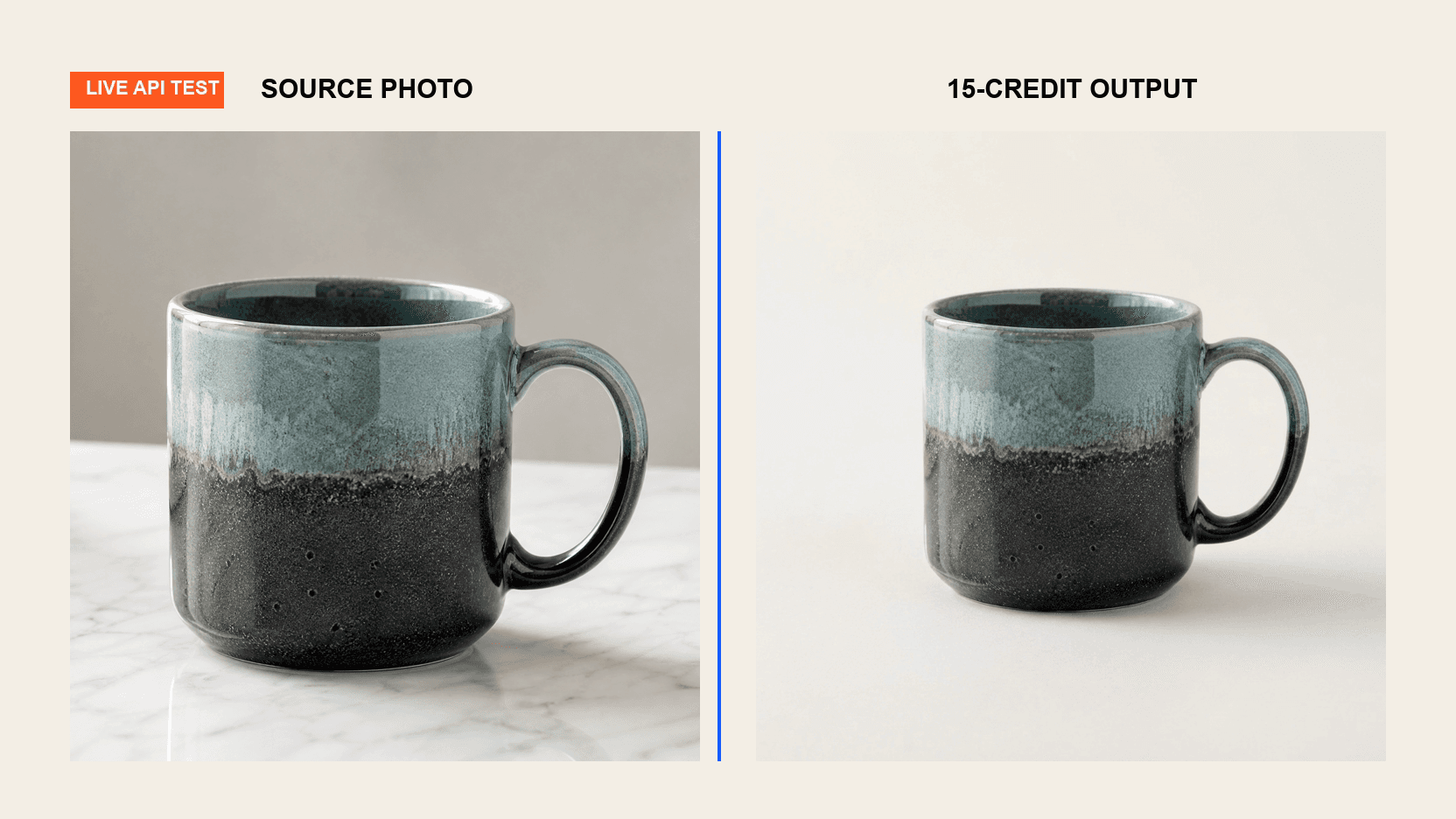
On September 3, 2026, we sent one reAPI-hosted 2,048 × 1,152 source PNG
through the exact Nano Banana 2 Lite request above, with a square output ratio.
Task task_01a065bb951c735fab44b38c778e069e completed, returned one 1,024 ×
1,024 JPEG, and settled at 15 credits
($0.015). The image URL was downloadable without authentication when we
checked it.
The result did what the first pass was meant to test: it kept one mug, showed the full outline and handle opening, removed the books and plant, and placed the product on a neutral sweep with a contact shadow. It also changed small glaze speckles and reflections. That makes it a useful layout candidate, not proof that a unique handmade SKU remained pixel-identical. One run validates the request shape, output shape, and charge; it does not establish latency, acceptance rate, or a model winner.[1]
Review the first result at 100% size
Do not decide from a thumbnail. Open the source and candidate side by side, zoom to 100%, and fill a record like this:
{
  "task_id": "task_replace_me",
  "decision": "reject",
  "passed": [
    "one product",
    "complete crop",
    "background",
    "contact shadow"
  ],
  "failed": [
    "pump became taller",
    "lower cobalt band moved upward"
  ],
  "usage_credits": 15,
  "reviewer": "initials",
  "prompt_revision": 1
}
Check the outline first. Then compare fixed landmarks: cap height, handle opening, corners, seams, button count, color boundaries, label position, and surface finish. Read every visible word. Finally inspect the crop and shadow.
This order is intentional. A tasteful light setup should not persuade you to approve a different product.
Retry one failed condition, not the whole brief
“Try again” teaches you nothing. Carry the passing parts forward and change one instruction tied to the failure.
| Failure | Better next move |
|---|---|
| Cap or handle changes | Name its position and proportions; add another owned view if the shape is obscured |
| Product becomes too glossy | State the observed finish and remove words such as “luxury shine” |
| Label letters mutate | Reject the label pixels; preserve or composite verified artwork instead of prompting new copy |
| Item floats | Ask for a contact shadow directly beneath it and a surface plane at the base |
| Crop cuts the product | Require the complete item plus a numerical safe margin |
| Background remnants remain | Use a cutout and deterministic template rather than asking the generator again |
| Color shifts | Describe the product color as fixed and make the requested light neutral |
Give a nearly correct model one targeted retry. If the same identity condition fails again, switch the method: provide a better reference, use a localized edit, or keep the original product pixels and rebuild only the background. The background removal API pricing guide shows how to price that deterministic route.
Calculate what an approved image actually cost
One credit is $0.001. The useful formula is:
cost per approved image =
  sum of settled credits for completed creative attempts × $0.001
  ----------------------------------------------------------------
                    number of approved images
Suppose three Nano Banana 2 Lite tasks complete at 15 credits each. You reject two for product drift and approve one:
(15 + 15 + 15) × $0.001 / 1 approved image = $0.045The API unit price is still $0.015. Your accepted-image cost is $0.045. Both numbers are true; they answer different questions.
Provider failures normally settle at zero credits after the reservation is
refunded. Completed images you reject creatively remain paid. A model-specific
post-generation safety check may also retain a charge even when it hides the
output, so use status together with usage.credits instead of assuming every
failed task cost zero.[5]
If you want a small cross-model smoke test, one 1K attempt each from Nano Banana 2 Lite, GPT Image 2, and Seedream 5.0 Pro currently budgets:
15 + 30 + 32 = 77 credits = $0.077That is an unrun planning budget, not a measured benchmark, acceptance rate, or model ranking. One output per model would not support any of those claims. A cheaper and more useful first move is still the single 15-credit layout candidate, followed by a failure-specific decision.
Put the workflow into production without losing the audit trail
For each generation, persist:
- a hash or durable ID for the source asset;
- the exact model ID, output tier, prompt, and prompt revision;
- the submission time and returned task ID;
- terminal
status,usage.credits, and any error code; - the returned URL and the location of your archived copy;
- approval status, reviewer, and a short rejection reason.
Keep submission and polling as separate jobs. A worker can submit once, store the task ID, and let another worker resume GET requests after a restart. Set a local polling deadline, but do not confuse that deadline with an API failure: if your process stops waiting, resume the same task later.
Archive approved files to storage you control. The Tasks contract does not promise that a deployment's CDN lifecycle will match the lifetime of your catalog, and a product page should not depend on a temporary generation record.[5]
For a no-code batch after the first prompt has passed, the n8n product-ad workflow shows the same submit-and-poll structure. If you later want motion, carry the approved still and identity contract into the one-product-photo video workflow.
When generation is the wrong tool
Keep the original product pixels and change only the surrounding canvas when:
- the exact label, serial number, or regulatory mark must remain readable;
- geometry must be pixel-identical across a large catalog;
- the product is transparent, reflective, or covered in fine repeated text;
- the destination uses one fixed white-background template;
- a wrong color or package detail could create a material customer complaint.
In those cases, remove the background, clean the mask, place the cutout on a known surface, and create the shadow with a deterministic design template. A generative API can still make a background plate, but it does not need to redraw the product.
FAQ
What is the cheapest API route to try first?
Among the routes in this guide, Nano Banana 2 Lite was $0.015, or 15 credits, for one completed 1K image on September 3, 2026. Check the live model page before budgeting because rates can change.
Can one photo preserve the back and sides of a product?
No. It can guide visible shape, material, and label placement. It cannot reliably reconstruct facts the source does not show. Supply another owned angle or avoid exposing the unseen surface.
Should I ask the model to rewrite a blurry label?
Not for production truth. Use verified label artwork or the original product plate. A plausible new ingredient, dosage, certification, or warranty is still false information.
Should I generate at 2K or 4K immediately?
Start at 1K to validate identity, composition, and crop. Move up only after the image passes those checks and the delivery channel genuinely needs more pixels. OpenAI and Google both document multiple output sizes for their current image models, while model-specific availability and billing differ.[6][7]
Which aspect ratio should I use for product listings?
Use the ratio required by the destination. For a cross-model trial, 1:1 is a safe shared setting. Seedream 5.0 Pro's current public request accepts 1:1, 4:3, 3:4, 16:9, 9:16, 2:3, and 3:2, but not 4:5.[3]
Can the API return a transparent product image?
It depends on the model and request surface. Seedream 5.0 Pro exposes a transparent-background option only for one reference image that already has an alpha channel, and it cannot be combined with layer decomposition. If your starting photo has a normal background, a dedicated removal workflow is the clearer first step.[3]
Are failed tasks charged?
Provider failures and timeouts are normally refunded, but the definitive
answer is the terminal task's usage.credits. Some post-generation safety
decisions can retain a model-specific charge even with status: "failed".
Never calculate the bill from status alone.[5]
Can I automate approval?
You can automate mechanical checks such as dimensions, file decoding, alpha, and product count. Geometry, fine label accuracy, color, and claim safety still need a human gate unless you have a validated product-specific comparison system. Automation should route uncertain images to review, not quietly publish them.
Start at 1K and escalate only for a named failure
A useful product photography API workflow is conservative. It begins with the source as evidence, freezes the product identity, and stays at 1K until the product itself is correct. It records completed rejects, because those are part of the real cost. And it knows when a cutout plus a template is safer than another imaginative generation.
That is how one ordinary photo becomes store-ready images without treating a good-looking render as proof that the product survived.
References
- reAPI. Nano Banana 2 Lite API: live pricing, request schema, and task lifecycle. Retrieved September 3, 2026 from the Nano Banana 2 Lite model page.
- reAPI. GPT Image 2 API: live pricing and request schema. Retrieved September 3, 2026 from the GPT Image 2 model page.
- reAPI. Seedream 5.0 Pro API reference. Retrieved September 3, 2026 from the Seedream 5.0 Pro documentation.
- reAPI. Gemini 3 Pro Image Preview API: live pricing and request schema. Retrieved September 3, 2026 from the Nano Banana Pro model page.
- reAPI. Tasks API: states, usage, polling, output, and refund semantics. Retrieved September 3, 2026 from the Tasks API reference.
- OpenAI. Image generation guide and GPT Image 2 model reference. Retrieved September 3, 2026 from the OpenAI developer documentation.
- Google. Gemini API image generation guide. Retrieved September 3, 2026 from the Google AI for Developers documentation.
- ByteDance Seed. Beyond Generation, It Understands Design: Introducing Seedream 5.0 Pro. Retrieved September 3, 2026 from the Seed product blog.
Further reading
Author

Categories
More Posts
OpenRouter Pricing: Fees, Free Model Limits and a Cheaper Option
OpenRouter pricing explained: list-price tokens, the 5.5% credit fee, free model daily limits, credit expiry and refunds, and where reAPI charges less per token.
How to Use Claude Fable 5: Refusals, Fallback, and Cost
How to use Claude Fable 5: the full benchmark table, the refusal and fallback contract that changes your code, mandatory retention, and what Opus 5 changed.
Is GPT-5.6 Out Yet? Yes — and Here Is What Shipped
GPT-5.6 is released. It shipped as three tiers, the rollout was gated for weeks which is why answers conflict, and Terra is the one worth migrating to.