n8n Image Generation: Five Product Ad Candidates Under $0.20
Build an n8n workflow for five product-ad candidates using a tested $0.075 batch, with bounded polling, retry budgeting, and a practical review checklist.
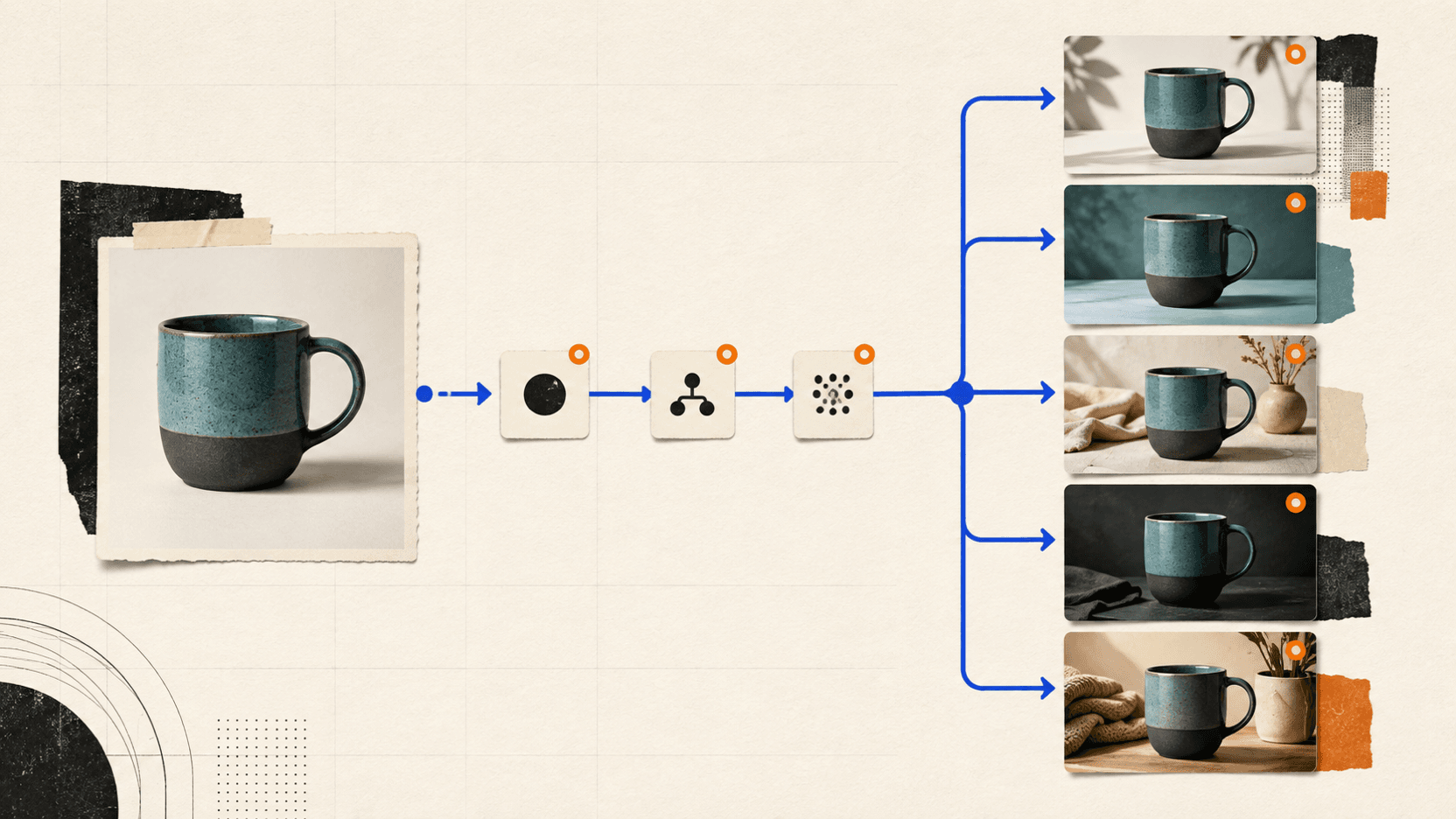
Five product-ad candidates can fit inside a $0.20 media-API budget. In a five-request test on September 3, 2026, Nano Banana 2 Lite returned five candidates for 75 reAPI credits, or $0.075 total. Each completed 1K image cost 15 credits. This guide turns the same request bodies into an n8n workflow you can download and adapt.
The measured run was sent directly to the API. The workflow JSON was checked for import structure, node fields, branches, and loop connections, but was not executed in a live n8n instance. Import it and attach your own credential before running it.
The $0.075 figure covers five completed API tasks, not five publish-ready ads. Retries for product drift, misspelled copy, or unsafe crops count against the same $0.20 budget.
TL;DR
- The measured test completed five product-ad candidates for $0.075 through reAPI, leaving the batch well below the $0.20 media-API ceiling.
- The live rate was 15 credits, or $0.015, per completed Nano Banana 2 Lite image when checked on September 3, 2026.[1]
- A $0.20 ceiling allows 13 completed generations at that rate. After the first five, there is room for eight retries while keeping the bill at $0.195 or less.
- Download the n8n workflow JSON. It uses a manual trigger, five briefs, asynchronous task polling, bounded status checks, and no embedded API key.
- Download the test summary with task IDs, output URLs, recorded credits, and the cost calculation.
- Keep legal copy, prices, coupon codes, and pixel-exact layouts outside the generated image. Let the model create the scene, then add exact text with a normal design template.
Why five completed files are not the whole cost
If an n8n workflow generates five different product-ad concepts per run, what should the budget include? The visible bill covers completed API calls, but product drift, misspelled copy, and unsafe crops can trigger paid retries. Reliability, latency, and predictable outputs also matter when the workflow is expected to run with little intervention.
Track the following number:
cost per approved image = total generation cost / approved imagesTrack total generation spend against the number of images that pass review. A low unit price is not useful if most outputs need to be generated again.
The $0.20 test: one product, five different briefs
The input was a publicly accessible reAPI demo image of an unbranded,
two-tone ceramic mug. Every request used that image, a 4:5 canvas, and a
different ad direction. For your own workflow, use a product photo you own or
are licensed to use. Nano Banana 2 Lite accepts up to ten public image URLs and
returns exactly one 1K image per request; it has no n parameter, so five
candidates require five tasks.[2]

| Test setting | Value |
|---|---|
| Test date | September 3, 2026 |
| Model | nano-banana-2-lite |
| Endpoint | POST /api/v1/images/generations |
| Input | One public PNG product photo |
| Output request | Five separate images with aspect_ratio: "4:5" |
| Live unit price | 15 credits / $0.015 per completed image |
| Target API budget | Less than $0.20 |
| Included in cost | Completed image tasks |
| Not included | n8n hosting, storage, human review, later text compositing |
The batch uses five distinct directions. Five near-duplicate studio prompts would make consistency easier, but they would reveal little about how the same product holds up across different settings.
| Concept | Required headline |
|---|---|
| Bright minimal studio | MORNING, MADE BETTER. |
| Rainy reading nook | SLOW DOWN. SIP. |
| Cobalt graphic layout | YOUR DESK DESERVES BETTER. |
| Restrained gift scene | A MUG WORTH KEEPING. |
| Dark glaze-detail shot | FROM FIRST SIP TO LAST. |
Four review conditions were defined before submission: preserve the mug's right-side handle, proportions, two-tone glaze, and surface texture; reproduce only the requested headline; show one mug; and keep both product and copy inside safe crop margins.
That rubric matters because it stops the review from changing after the images arrive. It also makes a retry actionable: you can identify the failed condition instead of asking the model to "make it better."
Results: five completed candidates cost $0.075
All five API tasks reached completed. Each response reported 15 credits of
usage, for a measured total of 75 credits, or $0.075. There were no failed API
tasks. No API retry was made during this completion-and-cost test.
All five files loaded successfully at 928 × 1152 pixels. That is close to the requested 4:5 shape, but it is not mathematically exact. If a destination requires fixed pixel dimensions, crop or pad after generation instead of assuming an aspect-ratio label guarantees the final dimensions.
| Submitted | Completed | Failed | Credits | API cost | Budget left |
|---|---|---|---|---|---|
| 5 | 5 | 0 | 75 | $0.075 | $0.125 |
The dated test summary records the task ID, temporary output URL, credits, and dimensions for every request. A completed task status confirms delivery, not creative approval. Review product fidelity, wording, unwanted text, and crop room separately.
| Concept | Status | Credits | Recorded size |
|---|---|---|---|
| Minimal studio | Completed | 15 | 928 × 1152 |
| Rainy reading nook | Completed | 15 | 928 × 1152 |
| Cobalt graphic layout | Completed | 15 | 928 × 1152 |
| Restrained gift scene | Completed | 15 | 928 × 1152 |
| Dark glaze detail | Completed | 15 | 928 × 1152 |
The model documentation warns that generated task URLs expire. Download files you approve to storage you control before placing their URLs in a catalog, CMS, or scheduled post.[2]
How much retry room does $0.20 buy?
At $0.015 per completed generation, the ceiling is 13 attempts:
13 × $0.015 = $0.195
14 × $0.015 = $0.210
That leaves eight additional attempts after the initial five. Here is the same budget viewed by retry count, assuming the final approved set contains five images:
| Total generations | Retries | Total cost | Cost per approved image |
|---|---|---|---|
| 5 | 0 | $0.075 | $0.015 |
| 6 | 1 | $0.090 | $0.018 |
| 8 | 3 | $0.120 | $0.024 |
| 10 | 5 | $0.150 | $0.030 |
| 13 | 8 | $0.195 | $0.039 |
| 14 | 9 | $0.210 | Over budget |
In batch terms, five approvals from at most 13 attempts require a realized acceptance rate of about 38.5%. That is the minimum acceptance rate needed to remain under budget; it does not remove the need for product and copy review. A broken price, false product label, or mutated package can cost far more than the image call.
Pricing is time-sensitive. Check the live Nano Banana 2 Lite model page before using these figures in a customer quote or automated budget rule.
Build the n8n image generation workflow
Start with the downloadable workflow JSON, then make the following changes in your own n8n editor. n8n supports importing a workflow from a file through the editor menu.[5]
1. Create a Bearer credential
Create a reAPI key in the dashboard. In n8n, create a Generic Credential Type and choose Bearer Auth, then paste the key there. Select that credential on both HTTP Request nodes. Do not type the key into the workflow body or a Code node. Exported workflows can contain credential names and IDs, so the shared file omits the credential binding.[3]
The workflow uses a Manual Trigger. Importing it cannot start paid requests by itself. Keep it manual until you have reviewed at least one complete run.
2. Replace the demo product URL and briefs
Open Build Five Ad Briefs. The Code node returns five n8n items, each with
a concept, an exact headline, a prompt, and one source_image_url. Replace the
demo URL with a public JPEG, PNG, or WebP URL for your product. Base64 and
data: URLs are not accepted by this image endpoint.[2]
You do not need a Loop Over Items node here. Normal n8n nodes process incoming items, so the next HTTP Request node submits one task for each of the five briefs. Add Loop Over Items only when you need deliberate batching or rate limiting.
3. Submit one image task per item
The Create Image Tasks node sends this n8n expression as JSON:
={{ {
  model: 'nano-banana-2-lite',
  prompt: $json.prompt,
  image_urls: [$json.source_image_url],
  aspect_ratio: '4:5'
} }}
The endpoint responds immediately with an id and a processing status. It
does not hold the HTTP connection open until the image is finished, so a
single long HTTP timeout is the wrong design.
Do not enable blind automatic retries on this POST. If the client loses the response after the server accepted the request, a second POST may create and charge for a duplicate task. Keep the returned task ID and retry the status request instead.
4. Wait, poll, and stop cleanly
After submission, the workflow waits 15 seconds and calls:
={{ 'https://reapi.ai/api/v1/tasks/' + $json.id }}The GET node retries transport errors up to three times. The two IF nodes then handle the task state:
completedgoes to Successful Images.failedstops with the API error instead of silently returning an empty image URL.- Any other status loops back to Wait 15 Seconds.
- A separate IF stops after the twentieth incomplete check, which is roughly five minutes of scheduled waiting.
n8n documents this condition-loop pattern: connect a later node back to an
earlier one and use an IF node as the exit condition.[4]
The limit expression uses n8n's zero-based $runIndex, so the twentieth pass
is index 19.[6]
The cap is shared by this five-item batch; it is not a durable per-item retry
counter. For a larger production queue, put the single-task poll sequence in
a sub-workflow or persist a pollCount with each job.
5. Run once and read the output
Click Execute workflow. When tasks finish, Successful Images returns the concept, requested headline, task ID, status, credits, and image URL for each completed item. Download the files you approve to durable storage. Then record the review decision and retry only the concept that failed.
The API-layer test in this article used the same five request bodies and endpoint. n8n does not change the per-image API price, but its own cloud plan, self-hosting, storage, and staff review are separate operating costs.
Review product ads before anything is published
Do not connect Successful Images straight to Shopify, a social scheduler,
or an ad account. Put a review step between generation and publication, even
if it is only a spreadsheet row with an approved checkbox.
Review each candidate in this order:
- Product identity: Compare silhouette, handle position, colors, label, closures, buttons, and distinctive material details against the source.
- Copy: Check every character. Look for extra microcopy, punctuation changes, and invented logos as well as obvious spelling errors.
- Claim safety: Reject any unsupported benefit, price, certification, or ingredient the model inserted.
- Layout: Preview the actual crop used by the destination. A clean 4:5 image can still lose its headline inside a feed overlay.
- Artifacts: Inspect edges, shadows, reflections, repeated objects, and physically impossible joins at full size.
When a candidate fails, revise one thing. If the product drifted, strengthen the preservation sentence and simplify the scene. If the copy is wrong, do not keep paying the image model to typeset a legal disclaimer. Generate a clean scene with reserved negative space and add the exact words afterward.
For fixed-layout assets such as coupons, tickets, and gift cards, use programmatic rendering because the layout has to remain exact. The same engineering rule is useful for prices, dates, and regulated copy: put those fields in a deterministic HTML, Canvas, SVG, or design-template layer. The image model can still supply the background or product setting.
Make a cheap workflow safe enough for production
The sample stops on a failed task and does not retry the paid POST automatically. Before scheduling it, add the controls your workload needs:
- A spend guard before submission. Calculate
items × unit priceand compare it with a per-run limit. Do not rely on a monthly invoice to catch a runaway schedule. - Durable result storage. Copy approved output away from the temporary task URL, then store the task ID beside the permanent object URL.
- A review state. Use
pending_review,approved, andrejectedrather than one vaguedoneflag. - Selective retry. Resubmit only the rejected concept and save its reason, so later cost analysis can separate copy, fidelity, and layout failures.
- A failure route. Production runs should usually place failed task IDs in a queue or table for investigation instead of terminating every unrelated item.
- A small canary batch. Run five or ten inputs after changing the model, prompt template, source-image preprocessing, or output ratio. Current price does not guarantee current acceptance rate.
Track approved / completed by prompt template and product category, then use
that acceptance rate to estimate the cost of future batches.
FAQ
Is n8n image generation free?
n8n can orchestrate the requests, but the image model and your n8n hosting may both have costs. In this test, reAPI charged $0.075 for five completed images. No claim of a permanent free image API is being made.
Why does the workflow create five tasks instead of setting n to 5?
Nano Banana 2 Lite returns exactly one 1K image per request and does not expose
an n parameter. Five concepts therefore need five request items.[2]
Can I use my own product photo?
Yes. Replace source_image_url with a public HTTP or HTTPS JPEG, PNG, or WebP
URL. The model accepts up to ten reference images per request, though this
tutorial deliberately uses one clear anchor.
What should I do when the headline is misspelled?
For short exploratory headlines, retry once with only the exact copy and a simpler layout. For prices, coupon codes, disclaimers, dates, or any text that must be exact, remove it from the generation prompt and apply it with a normal template after the image is approved.
Should the POST node use Retry On Fail?
Not by default. A blind POST retry can duplicate a task if the first request was accepted but its response was lost. The included workflow retries the GET status request, not the paid submission.
What to measure after the first run
The API test completed five product-ad candidates for $0.075, leaving room for eight more attempts before crossing $0.20 at the rate tested. The downloadable n8n workflow uses the same request bodies and adds bounded status polling.
Keep the review step. Check the product and copy, store approved files somewhere durable, and measure cost per approved image. If exact text keeps driving retries, stop asking the image model to typeset it. Use generation for the scene and a deterministic template for the words.
References
- reAPI. Nano Banana 2 Lite model page and live rate card. Retrieved September 3, 2026. reapi.ai/models/nano-banana-2-lite
- reAPI. Nano Banana 2 Lite API reference: request fields, one-image output, async task flow, pricing rules, and URL retention note. Retrieved September 3, 2026. reapi.ai/docs/nano-banana-2-lite
- n8n. HTTP Request node and HTTP Request credentials. Retrieved September 3, 2026. HTTP Request node and HTTP Request credentials
- n8n. Loop over data and Wait node documentation. Retrieved September 3, 2026. Loop logic and Wait node
- n8n. Export and import workflows. Retrieved September 3, 2026. docs.n8n.io export and import
- n8n. Built-in methods and variables:
$runIndex. Retrieved September 3, 2026. docs.n8n.io metadata
Further reading
Author

Categories
n to 5?Can I use my own product photo?What should I do when the headline is misspelled?Should the POST node use Retry On Fail?What to measure after the first runReferencesFurther readingMore Posts
Is FLUX 3 Image Open Source? Weights and Local Access
Check FLUX 3 Image public downloads, commercial weights, and API access. Learn why FLUX 3 Action files and open-source clients are different from Image weights.

Seedance 2.0 vs Kling 3.0: Benchmarks, Prices, Verdict
Seedance 2.0 vs Kling 3.0 across blind-test Elo, specs, and per-second prices: where ByteDance's leaderboard lead holds, and where Kling's 4K and audio win.
Use ChatGPT Without Sounding Like AI: A Human-First Workflow
Use ChatGPT without generic AI prose. Turn a real thesis, evidence, constrained drafting, and careful human editing into publishable writing.