Seedream 5.0 Pro vs GPT Image 2: Editing, 4K, API, and Price
Compare Seedream 5.0 Pro and GPT Image 2 for references, editing, masks, transparency, resolution, batches, API controls, and current pricing.
Seedream 5.0 Pro is the cleaner choice when a request should produce one finished 1K or 2K image from a tightly directed set of references. GPT Image 2 is the better foundation when the product needs an editing surface: masks, transparent backgrounds, output formats, batches, or 4K.
That distinction is more useful than calling either model “better.” Seedream 5.0 Pro vs GPT Image 2 is a comparison between two different API contracts, not just two renderers. reAPI exposes both through one image endpoint, so the decision can be made per task rather than per vendor account.
TL;DR
- Choose Seedream 5.0 Pro for a single, directed image using up to ten references, especially when a simple basic/high quality switch is enough.
- Choose GPT Image 2 when you need masks, transparent output, JPEG/PNG/WebP control, up to four images, or a documented 4K path.
- Current reAPI pricing starts at $0.032 for Seedream 5.0 Pro and $0.03 for GPT Image 2's basic channel. Prices alone do not compare equivalent controls.
- There is no credible public benchmark proving a universal quality winner. Run the same acceptance test on your own products, faces, typography, and layouts.
Seedream 5.0 Pro vs GPT Image 2 comparison
| Requirement | Seedream 5.0 Pro | GPT Image 2 |
|---|---|---|
| reAPI model ID | doubao-seedream-5-0-pro | gpt-image-2 |
| Best fit | One finished, reference-directed image | Generation plus controllable editing |
| Reference images | Up to 10 | Up to 16 basic |
| Outputs per request | Exactly 1 | 1 basic; up to 4 stable |
| Output sizing | Basic/high pixel bands | 1K, 2K, selected 4K basic; broader stable controls |
| Aspect-ratio control | 9 ratios | 14 basic-channel ratios |
| Mask input | No | Stable channel |
| Transparent background control | No | Stable channel |
| Output format control | No public selector | JPEG, PNG, or WebP on stable |
| Starting reAPI price | $0.032/image | $0.03/image basic |
The rates above were checked on August 13, 2026. They describe reAPI's live routes, not a vendor price cut. Check the Seedream 5.0 Pro model page and GPT Image 2 model page before publishing your own price calculator.[4][5]
Seedream's smaller contract is sometimes the advantage
Seedream 5.0 Pro accepts a prompt, up to ten image references, one of nine aspect ratios, and a basic or high quality tier. It returns one image. The current reAPI route does not expose batch count, 4K, negative prompts, masks, transparent background control, web search, or streaming.[1]
That sounds limited next to GPT Image 2. In a production queue, it can also be refreshingly clear. The caller chooses references, composition, and a quality band; the model returns one candidate for review. There are fewer combinations to validate and fewer fields for an end user to put into a contradictory state.
Seedream is therefore a sensible fit for tools where the product itself has already made most decisions:
- one campaign image per approved brief;
- a catalog scene built from product and material references;
- a fixed set of aspect ratios in a template-driven workflow;
- an image editor that expresses revisions in prose rather than a pixel mask.
The last case needs care. Seedream can edit from references, but the API does not let the application mark a protected region with a mask. The prompt must carry more of that burden.
GPT Image 2 exposes the controls an editor needs
OpenAI documents GPT Image 2 for high-fidelity generation and editing. On
reAPI, the basic channel offers a compact, flat-priced route, while the stable
channel exposes a larger OpenAI-style schema: mask, quality, background,
output_format, output_compression, and n.[2][3]
Those fields turn a prompt box into a product feature.
Masks define where change is allowed
“Replace the label and change nothing else” is an aspiration when it lives only in a prompt. A mask gives the system a spatial boundary. Review is still necessary, but the application can express the edit instead of hoping the model infers it.
Transparency is a delivery requirement
An explicit transparent-background option is important for product cutouts, stickers, game assets, and layout systems. Asking Seedream to render an object “on a transparent background” does not create the same API guarantee.
Format and compression belong in the pipeline
PNG is useful for alpha and lossless artwork; JPEG and WebP often make more sense for photographic delivery. GPT Image 2's stable channel lets the caller choose. Seedream 5.0 Pro's current public route does not expose that field.
Batch output reduces orchestration
GPT Image 2 stable can return up to four outputs. That works for a review tray or A/B variants. Seedream Pro returns exactly one, so four candidates mean four tasks and four independently tracked results.
Reference capacity is not reference discipline
GPT Image 2 basic accepts up to 16 references; Seedream 5.0 Pro accepts up to ten. Neither number tells you how well a model will preserve the specific object you care about.
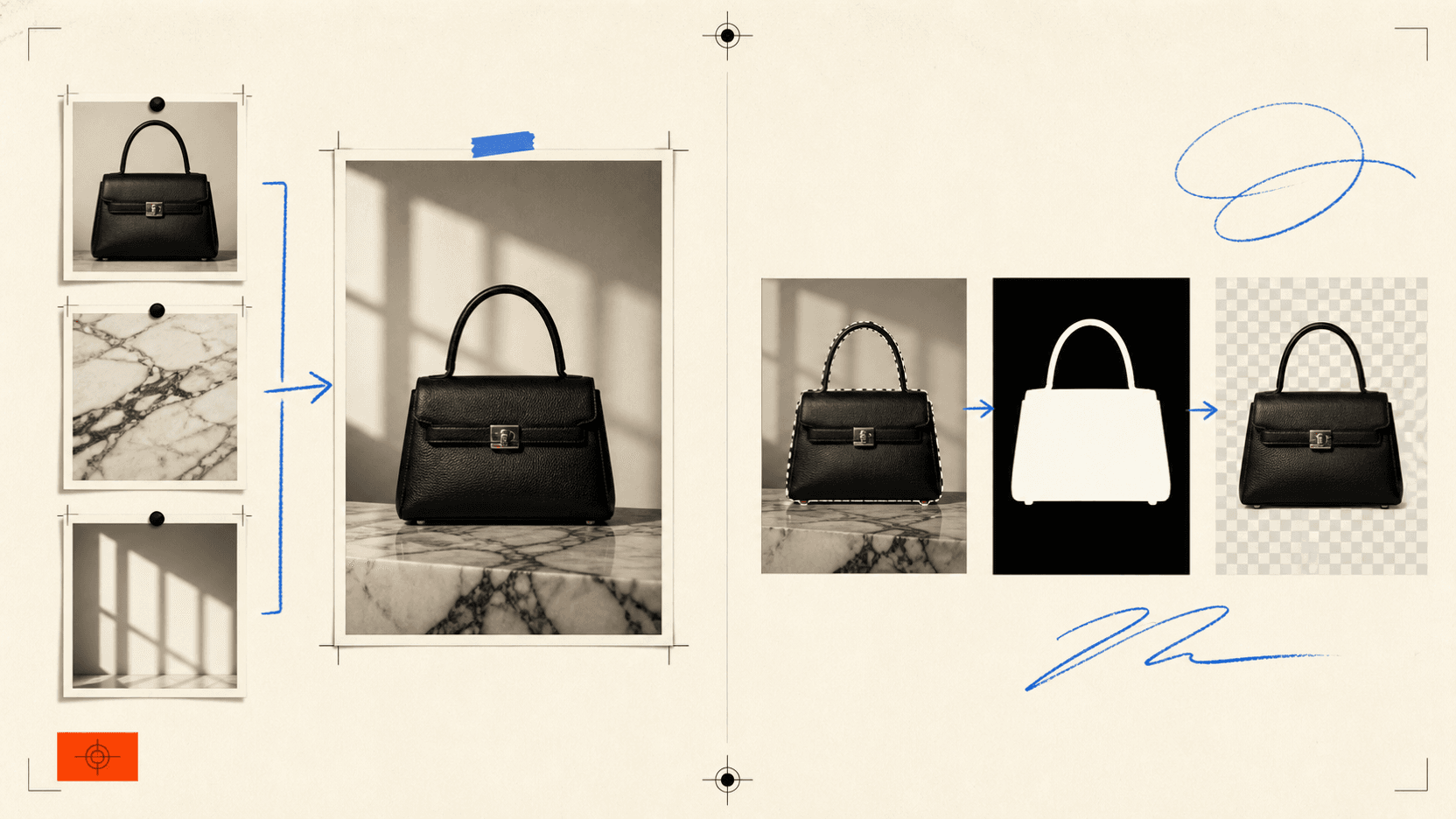
A reference stack should read like a shot list:
Image 1 is the product. Preserve its shape, proportions, label, and cap.
Image 2 supplies the stone surface only.
Image 3 supplies the side-light direction and shadow softness only.
Image 4 supplies the cobalt and orange color palette; do not copy its layout.

Make one 16:9 editorial still. Product on the left third, camera at table
height, warm ivory wall, clear negative space on the right. No added logo.
The wording does two things: it separates identity references from style references, and it writes down what a reviewer must inspect. If the output changes the cap or label, the failure is unambiguous.
Resolution and price need to be read together
Seedream 5.0 Pro uses two pixel bands. The live reAPI page currently lists $0.032 for the basic band at or below 2.36 million pixels and $0.063 for the high band above that threshold. An optional route with the additional output checker disabled has separate rates. Disabling that gateway check does not remove upstream rules or turn the model into an unrestricted endpoint.
GPT Image 2 basic currently lists $0.03 at 1K, $0.05 at 2K, and $0.08 for its supported 4K widescreen output. Its stable channel starts lower at low quality, then rises by quality and size; high-quality 4K belongs to a far more expensive tier.
| Example job | Better first test | Why |
|---|---|---|
| One 16:9 campaign still from four references | Seedream 5.0 Pro | Simple one-output contract and flat quality band |
| Four review variants in one request | GPT Image 2 stable | Batch count is exposed |
| Transparent product cutout | GPT Image 2 stable | Alpha background is an explicit control |
| Masked label replacement | GPT Image 2 stable | Mask input narrows the editable region |
| Fixed-ratio 1K/2K editorial asset | Test both | Price is close enough that acceptance rate matters more |
| 4K deliverable | GPT Image 2 | Seedream Pro's current reAPI route does not expose 4K |
Cost per image is only the first term. Add rejected outputs, manual background removal, format conversion, and the engineer time spent emulating a missing control.
API requests: similar endpoint, different contracts
A Seedream 5.0 Pro request stays compact:
curl https://reapi.ai/api/v1/images/generations \
  -H "Authorization: Bearer $REAPI_API_KEY" \
  -H "Content-Type: application/json" \
  -d '{
    "model": "doubao-seedream-5-0-pro",
    "prompt": "Create one finished 16:9 editorial product image. Preserve Image 1 exactly; use Image 2 only for surface texture and Image 3 only for side lighting. Leave negative space on the right.",
    "image_urls": [
      "https://example.com/product.png",
      "https://example.com/stone.jpg",
      "https://example.com/light.jpg"
    ],
    "aspect_ratio": "16:9",
    "quality": "high"
  }'
GPT Image 2 uses the same submission URL, but its available fields depend on the channel. Do not take a Seedream payload, replace only the model ID, and assume every field has the same meaning. The Seedream 5.0 Pro API reference and GPT Image 2 API reference are the request contracts.
Both routes are asynchronous. Submission returns a task ID; the application polls the shared task endpoint and reads the final image URL when the task is complete.
A fair evaluation takes one afternoon
Avoid a gallery test built from unrelated showcase images. Use twelve briefs from the work your product actually receives:
- three prompt-only images;
- three edits where one region must change;
- three multi-reference compositions;
- three text-bearing or product-sensitive layouts.
For each output, record instruction errors, protected-detail drift, text errors, manual repair time, total attempts, and billable cost. Do not score “looks good” without writing down what good means.
Seedream may win a job because its first result is already usable. GPT Image 2 may win the same-looking job because a mask saves a ten-minute cleanup. That is why public beauty rankings are a poor substitute for a production acceptance rate.
FAQ
Is Seedream 5.0 Pro better than GPT Image 2?
There is no universal winner supported by a credible public benchmark. Seedream has a focused one-image, reference-led workflow. GPT Image 2 exposes more editing and delivery controls. Test the contract your application needs.
Does Seedream 5.0 Pro support 4K?
The current reAPI Seedream 5.0 Pro route uses basic and high pixel bands and does not expose a 4K selector. GPT Image 2 has documented 4K paths, with availability and price depending on channel and aspect ratio.
Which model is better for image editing?
GPT Image 2 is the clearer choice for a conventional editing product because its stable channel exposes masks and transparent backgrounds. Seedream can perform reference-led edits, but those controls remain prompt-based.
Which model is cheaper?
Their entry rates on reAPI are close: Seedream 5.0 Pro currently starts at $0.032 and GPT Image 2 basic at $0.03. The cheaper production workflow depends on quality tier, resolution, rejected outputs, and manual repair.
Can I route both models through one API?
Yes. Both submit through reAPI's image generation endpoint and use the same task polling flow. Their model-specific request fields remain different.
The practical decision
Use Seedream 5.0 Pro when the application hands a well-defined brief and a small reference board to a model, then expects one finished image back. Use GPT Image 2 when the application itself must expose editing, transparency, format, batch, or 4K controls.
If neither condition decides the job, run the twelve-brief test and route by accepted-output cost. reAPI's image model catalog keeps that test on one endpoint, and the existing Seedream 5.0 Lite vs Pro comparison helps when the real choice is final quality versus inexpensive variation.
Disclosure: reAPI publishes this comparison and operates both routed APIs. OpenAI model facts come from OpenAI documentation. Seedream route limits and all reAPI prices come from the live reAPI model pages and API references. This article does not claim an independent image-quality benchmark.
References
- reAPI. Seedream 5.0 Pro API reference. Retrieved August 13, 2026. reapi.ai/docs/seedream-5-0-pro
- OpenAI. GPT Image 2 model documentation. Retrieved August 13, 2026. developers.openai.com/api/docs/models/gpt-image-2
- reAPI. GPT Image 2 API reference. Retrieved August 13, 2026. reapi.ai/docs/gpt-image-2
- reAPI. Seedream 5.0 Pro live model page and pricing. Retrieved August 13, 2026. reapi.ai/models/seedream-5-0-pro
- reAPI. GPT Image 2 live model page and pricing. Retrieved August 13, 2026. reapi.ai/models/gpt-image-2
Further reading
Author

Categories
More Posts
Where to Use Seedance 2.0: Consumer Apps vs the API
Where can I use Seedance 2.0: consumer apps wrap it in a subscription, the API bills per second with no plan. Real rates, the 4-15s cap, and how to choose.

MiniMax H3 Local vs API: VRAM, Speed, License, and Cost
What do official MiniMax and ComfyUI docs establish about local H3 hardware? Compare the documented workflow with hosted 768P and 2K API costs.
Seedance 2.5 4K: Output Limits and Upscaling Options
Check Seedance 2.5 4K claims against its actual output limits. Compare 1080p costs, Seedance 2.0 4K generation and a separate video upscaling workflow on reAPI.