MiniMax H3 Prompt Guide: Motion, Camera, Sound, and References
Write better MiniMax H3 prompts for text-to-video, first/last-frame animation, mixed references, native audio, camera direction, and API workflows.
A good MiniMax H3 prompt does not describe a poster. It directs a shot. Name the subject, the visible change, the camera, the timing, and the sound. If you attach references, assign each one a single job. H3 generates picture and native stereo audio together, so silence, ambience, dialogue, music, and effects belong in the same brief as motion.[1]
The model accepts prompts up to 7,000 characters, but length is not the goal. Six precise lines usually beat a page of adjectives. This MiniMax H3 prompt guide shows how to write those lines for text-to-video, first/last-frame animation, and mixed-reference video on reAPI.
TL;DR
- Write the change over time, not a static inventory of the frame.
- Separate subject action, camera action, and sound so they do not compete in one sentence.
- For first/last-frame video, describe the transition; the images already describe the endpoints.
- For reference-to-video, label the role of every image, video, and audio input.
- Start with six seconds. Add duration only when the action genuinely needs it.
- Timing blocks such as
[0–2 seconds]are a writing technique, not a guaranteed parser command. Use them to make the intended progression unambiguous.
The MiniMax H3 prompt structure
H3 supports three request shapes: prompt-only text-to-video, first/last-frame image-to-video, and reference-to-video with images, video, and audio. The API selects the mode from the attached media; the prompt should change with it. The MiniMax H3 API reference documents the exact validation rules.[2]
For a prompt-only shot, use this order:
SUBJECT — who or what the shot follows
ACTION — one visible progression, with a clear ending
SETTING — only details that affect the shot
CAMERA — framing, movement, focus, and pace
LIGHT — direction, time of day, and material response
SOUND — dialogue, ambience, Foley, music, or deliberate silence
This is not magic syntax. It is a way to stop three different actions and four different camera moves from being buried inside one decorative paragraph.
Start with a change, not a mood board
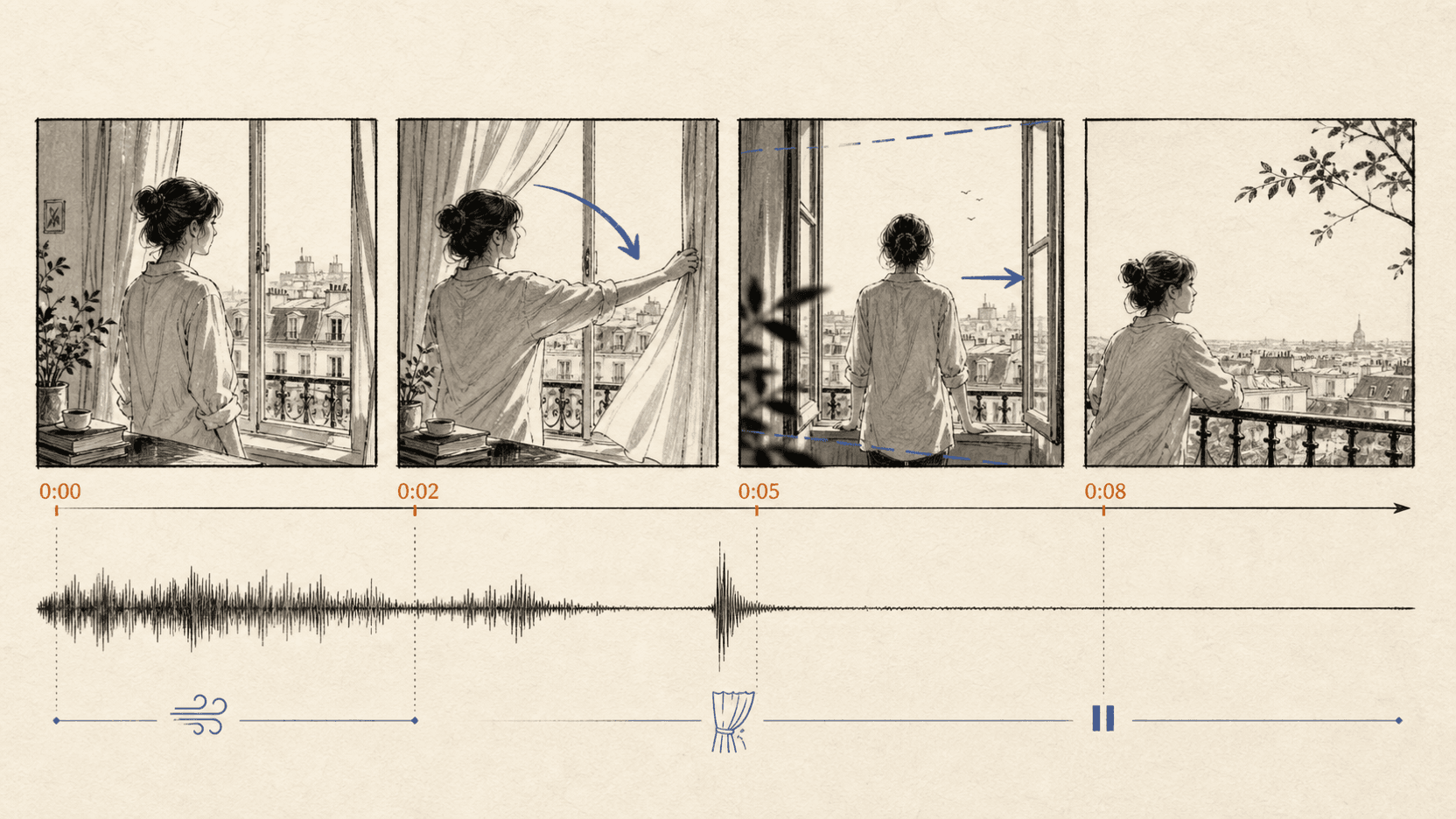
“Cinematic coffee shop, beautiful light, premium, moody” names an aesthetic but gives the video nowhere to go. Add a physical event and an endpoint:
Six-second close-up of a brushed-steel espresso machine at sunrise. A barista locks the portafilter, presses the switch, and the first dark stream of coffee reaches the cup by the final second. Slow left-to-right dolly, shallow focus, warm window reflections. One switch click, rising steam, quiet room tone. No dialogue or music.
The shot now has a beginning, a middle, and a reviewable finish. The camera has one move. The sound bed is small enough to mix. “Premium” is gone because the materials, light, pace, and restraint already do that work.
Keep one dominant action
Short clips punish overloaded choreography. If a six-second prompt asks a person to enter, sit, open a package, speak, drink, look outside, and leave, the model must compress or omit something. Pick the action the clip is about. Move the rest to another shot.
Give the camera one verb
Pan, tilt, dolly, crane, orbit, handheld track, and rack focus are not synonyms. Choose one primary camera move. A second instruction can describe focus or a small finish, but a “dolly in while orbiting, craning up, and whip-panning” shot is usually a request for conflict.
Describe material response instead of quality
Words such as “stunning,” “epic,” and “high quality” give a reviewer nothing to check. Describe what light does: a narrow reflection sliding over brushed metal, soft window light wrapping a face, or rain breaking a neon reflection on wet asphalt.
A MiniMax H3 text-to-video prompt template
Text-to-video has no source frame, so the prompt must establish both the image and the motion. The request also needs an explicit aspect ratio on reAPI.
[Duration and framing]
A [shot size] of [subject] in [setting].

[Action]
The subject [single action], ending with [visible final beat].

[Camera and light]
[One camera move], [focus behavior]. [Specific light and material response].

[Audio]
[Dialogue if any]. [Ambience]. [Foley]. [Music or no music].

[Guardrails]
One continuous shot. No cuts. No added text or logos.
Filled example:
Eight-second medium-wide shot of a cyclist waiting beneath an overpass in light rain. She tightens one glove, looks toward the road, then pushes off and exits frame right. Slow handheld track forward; focus stays on her face until the bicycle moves. Cool daylight, wet concrete, small amber reflections from passing cars. Rain on concrete, a freewheel click, one distant bus, no music, no dialogue. One continuous shot, no cuts, no on-screen text.
The corresponding request is small:
curl https://reapi.ai/api/v1/videos/generations \
  -H "Authorization: Bearer $REAPI_API_KEY" \
  -H "Content-Type: application/json" \
  -d '{
    "model": "minimax-h3",
    "prompt": "Eight-second medium-wide shot of a cyclist waiting beneath an overpass in light rain. She tightens one glove, looks toward the road, then pushes off and exits frame right. Slow handheld track forward; focus stays on her face until the bicycle moves. Cool daylight, wet concrete, small amber reflections from passing cars. Rain on concrete, a freewheel click, one distant bus, no music, no dialogue. One continuous shot, no cuts, no on-screen text.",
    "aspect_ratio": "16:9",
    "duration": 8
  }'
Submission returns a task ID. Poll the shared task endpoint until the result is complete. The finished MP4 includes the generated audio track.
Write first/last-frame prompts as transitions
In image-to-video mode, a first frame, last frame, or both already establish appearance and orientation. Repeating every visual detail wastes prompt space and can pull the generation away from the supplied images.
Tell H3 what must happen between them:
Move continuously from the first frame to the last frame.
The paper package unfolds along its existing creases; no new panels appear.
Camera remains locked. The product does not rotate.
Soft paper rustle, one small table tap, quiet studio room tone, no music.
End on the exact composition of the last frame.
On reAPI, image-to-video derives orientation from the frame. Do not send an
aspect_ratio field in this mode. Crop the source images to the intended
delivery ratio before submission.[2]
If the start and end frames disagree on subject scale, camera height, or lighting, the prompt cannot fully repair the contradiction. Fix the endpoints first. The model should spend its effort on motion, not on reconciling two different shoots.
Assign every reference one job
Reference-to-video is H3's most distinctive workflow. A request can include up to nine images, three videos, and three audio clips. More inputs do not automatically create better continuity. An unlabeled reference stack asks the model to guess what to copy from each file.
Use an explicit reference map:
Reference Image 1: preserve this person's face, hair, coat, and proportions.
Reference Image 2: use only the train-car interior and seat materials.
Reference Video 1: use its walking pace and shoulder movement, not its camera.
Reference Audio 1: use this voice identity and cadence for the quoted line.

Create one seven-second shot. The character walks down the aisle toward camera,
touches the top of one seat, and says, “We are almost there.” Slow stabilized
dolly backward at eye level. Late-afternoon light moves across the windows.
Keep the voice clear over low rail noise; no music and no extra speakers.
This separates identity, environment, motion, and voice. It also tells a human reviewer where to look when a result fails.
Reference videos are not free context. On the reAPI route, their duration is added to the billable generated duration. The first five reference images are included, while images six through nine add a per-image charge. Use the MiniMax H3 model page for current rates rather than padding a request with unused references.[3]
Direct sound as part of the shot
MiniMax H3 generates native stereo audio with the picture. A useful sound brief answers five questions:
| Question | Example answer |
|---|---|
| Who speaks? | The woman in the blue coat, and nobody else |
| What is exact? | “We are almost there.” |
| What establishes place? | Low rail noise and two soft carriage rattles |
| What should be foregrounded? | Voice clear and centered above the ambience |
| What must be absent? | No music, crowd chatter, announcement, or subtitles |
“Cinematic audio” does not answer any of them.
When there is dialogue, keep the line short enough for the clip. Read it aloud at the intended pace. A twelve-word line that takes five seconds leaves little room for the action, reaction, and natural silence around it.
Silence should be stated. Without “no music” or “no dialogue,” the model may fill an empty sound bed because the prompt left it open. The same applies to subtitles and on-screen text.
Timing blocks help when order matters
For a shot with several beats, rough timing can clarify sequence:
[0–2 seconds] Locked close-up. The match touches the wick; only room tone.
[2–5 seconds] The flame catches and grows. Very slow dolly in; soft ignition.
[5–7 seconds] A hand shields the flame, then leaves frame. One quiet breath.
No cut, no dialogue, no music.
Treat those brackets as an editorial outline. MiniMax does not promise frame-exact obedience to prose timing, and generated video should not be used for work that requires deterministic frame timing. The blocks still reduce ambiguity about order and emphasis.
Five prompt failures and their smaller fixes
| Failure | Why it happens | Smaller fix |
|---|---|---|
| The shot feels static | Prompt describes appearance, not change | Add one physical action and one final beat |
| The camera lurches | Several camera moves compete | Keep one move; make the rest framing constraints |
| Identity drifts | References have no assigned roles | Name one identity source and protect its invariants |
| Audio is cluttered | “Cinematic sound” leaves everything open | List foreground sound, ambience, and explicit absences |
| Last frame is missed | Endpoints contradict or action is overloaded | Align the source frames and simplify the transition |
Negative instructions work best when they protect a requirement. “No cuts” is useful for a continuous product reveal. Twenty generic prohibitions usually hide the one constraint that mattered.
A compact prompt review before spending a generation
Read the prompt once and underline the answers:
- What changes during the clip?
- What must be true in the final second?
- What is the camera doing?
- Which visual details are protected?
- Who speaks, and what exact words do they say?
- What ambience and effects should be heard?
- Which sounds, cuts, text, or logos must not appear?
- If references are attached, what single role does each one serve?
If two answers contradict each other, fix the brief before increasing duration or adding another reference.
FAQ
How long should a MiniMax H3 prompt be?
The reAPI field accepts 1–7,000 characters, but most single shots do not need the ceiling. Use enough detail to specify action, camera, light, sound, and protected constraints. Remove adjectives that do not change a review decision.
Can MiniMax H3 generate dialogue and sound effects?
Yes. H3 generates native stereo audio and accepts dialogue, music, ambience, and effects in the same prompt as the visual direction.
Does MiniMax H3 understand camera commands?
MiniMax's video documentation gives camera movement directives for its video models, and H3 prompts can describe framing, movement, and focus. Treat them as direction rather than deterministic motion-control data.[1]
Should I use first/last frames or reference images?
Use first/last frames when the shot must begin or end on a specific composition. Use reference mode when separate assets define identity, environment, motion, or voice. The two input families cannot be mixed in one reAPI request.
How many references can MiniMax H3 use?
The current reAPI route accepts up to nine images, three video clips, and three audio clips. Audio cannot be the only reference. Total reference-video and reference-audio duration limits also apply.
Are timing brackets official MiniMax syntax?
No. They are a readable way to communicate order and rough emphasis. Do not present them as frame-accurate controls or guaranteed parser commands.
The prompt is a production note
The best MiniMax H3 prompt resembles a short note from a director to a small crew. It says what happens, where the camera goes, what the microphone hears, and which details cannot drift. It does not ask the model to discover the shot inside a cloud of style words.
Begin with one action and six seconds. Review the motion and sound separately. Only then add references, timing blocks, or a longer duration. The MiniMax H3 playground and API guide use the same request modes, so a prompt can move from a manual test into code without changing its job.
Disclosure: reAPI publishes this guide and operates the routed MiniMax H3 endpoint described here. API limits and billing behavior refer to reAPI's current contract; MiniMax capability descriptions come from MiniMax's official documentation. The sample prompts are writing patterns, not benchmark results.
References
- MiniMax API. Video Generation Guide — MiniMax H3 inputs, output, audio, and camera direction. Retrieved August 13, 2026. platform.minimax.io/docs/guides/video-generation
- reAPI. MiniMax H3 API reference — request modes, limits, and billing. Retrieved August 13, 2026. reapi.ai/docs/minimax-h3
- reAPI. MiniMax H3 model page and live pricing. Retrieved August 13, 2026. reapi.ai/models/minimax-h3
Further reading
Author

Categories
More Posts

How to Restore Old Video with AI (and What It Costs)
Restore old video with AI: the old_film scene preset, field-by-field request, real archive costs from $2.46 a reel, and where automated restoration stops.
Seedance 2.5 Content Filtering: Diagnosing a Refusal
Diagnose a Seedance 2.5 refusal from the submit response, task error, routing parameter, and settled usage instead of guessing which safety check fired.
Seedance 2.5 Features: 30-Second Clips and 50 References
The Seedance 2.5 features ByteDance announced: 30-second single clips, 50 multimodal references, region editing, and why native 4K belongs to Seedance 2.0.