AI Video Generation API: Why the Prices Don't Compare
AI video generation API rates use two incompatible billing units: per second and flat per generation. Where the break-even sits and how to price a real clip.
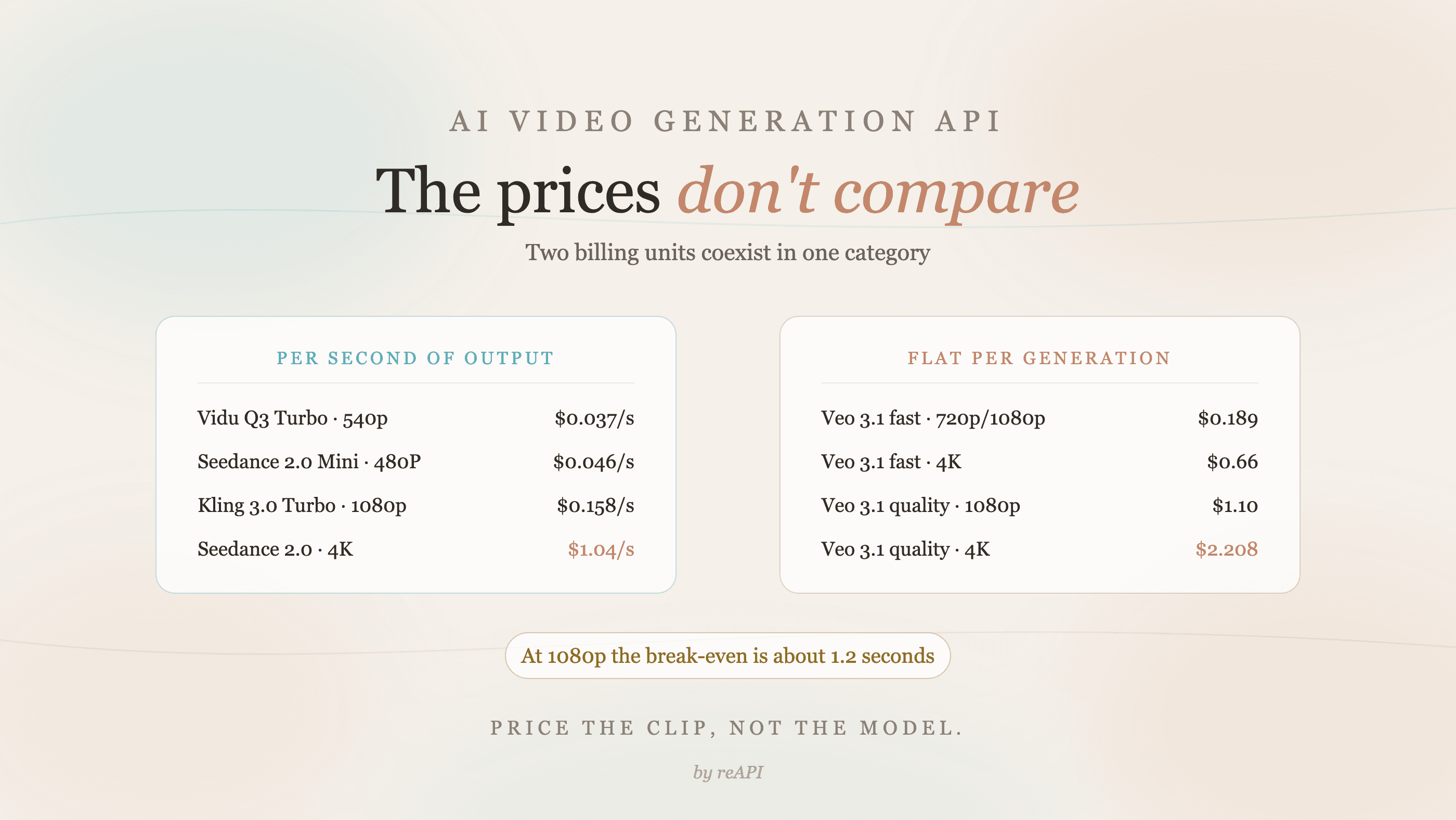
Comparing any AI video generation API by its headline rate breaks almost immediately, because the models in this category do not bill in the same unit. Some charge per second of output. Others charge a flat rate per generation regardless of how long the clip runs. A number like $0.126 and a number like $0.161 are not comparable quantities, and treating them as though they were is how video budgets get written wrong by an order of magnitude.
The fix when evaluating an AI video generation API is not a bigger comparison table. It is knowing which billing unit a model uses, and where the crossover between the two sits for the clip length you actually ship.
TL;DR
- Two billing units coexist across the AI video generation API category: per second of output, and flat per generation.
- Per-second examples: Kling 3.0 Turbo at $0.126/s (720p), Vidu Q3 Turbo at $0.037/s (540p), Seedance 2.0 Face at $0.07125/s (480p, no source video).
- Per-generation example: Veo 3.1 fast at $0.161 per generation at 720p and 1080p.
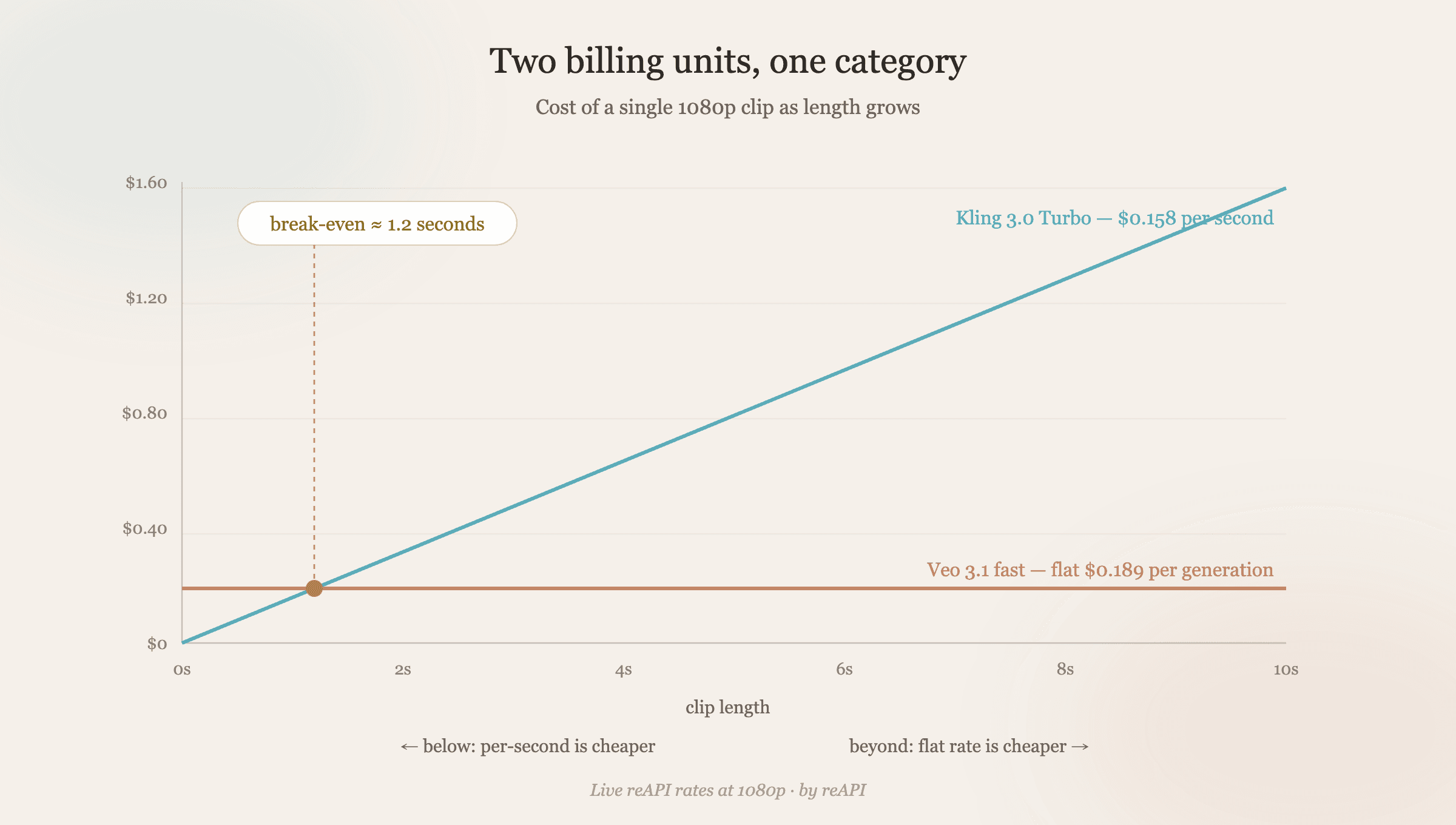
- The crossover is short. Against Kling 3.0 Turbo at 1080p, a flat $0.161 generation breaks even at about 1 second. Past that, flat pricing wins.
- Resolution slopes differ wildly. Seedance 2.0 Face climbs from $0.07125/s at 480p to $0.78/s at 4K, roughly 11x. Vidu Q3 Pro moves from $0.138/s at 720p to $0.148/s at 1080p, about 7%.
- Every AI video generation API here is async. Submit returns a task id; you poll. Design for that before picking a model.
The two billing units in AI video generation API pricing
Every rate below is a per-model figure on reAPI, checked on October 22, 2026 and priced in credits where 1 credit is $0.001.
Per second. You pay for duration, so a 10-second clip usually costs roughly twice a 5-second clip at the same resolution. Seedance source-video requests are an exception to the output-only clock: they add the rounded-up source-video duration to the output duration.
| Model | 540p / 480P | 720p | 1080p |
|---|---|---|---|
| Vidu Q3 Turbo | $0.037/s | $0.056/s | $0.065/s |
| Vidu Q3 Pro | $0.065/s | $0.138/s | $0.148/s |
| Seedance 2.0 Mini, no source video | $0.049875/s | $0.107625/s | n/a |
| Seedance 2.0 Face, no source video | $0.07125/s | $0.15375/s | $0.3825/s |
| Kling 3.0 Turbo | n/a | $0.126/s | $0.158/s |
Flat per generation. You pay once per job, and duration does not move the bill within whatever limit the model allows.
| Veo 3.1 tier | 720p / 1080p | 4K |
|---|---|---|
| fast | $0.161 | $0.66 |
| quality | $1.1 | $1.725 |
Read those two tables as different currencies rather than different prices. Until you fix a clip length, they cannot be ranked against each other.
Where the crossover sits
Pick a target resolution and length, then convert everything into cost-per-clip.
At 1080p, Kling 3.0 Turbo bills $0.158 per second and Veo 3.1 fast bills $0.161 per generation. The break-even is 0.161 / 0.158, about 1 second. Almost every real clip runs longer than that, so for 1080p output at these two tiers, the flat rate is cheaper essentially always.
Against Seedance 2.0 Face at 1080p without source video, which is $0.3825 per second, the same flat $0.161 breaks even at roughly 0.42 seconds — meaning it is cheaper for any usable clip at that resolution.
Run the same arithmetic at a resolution where per-second pricing is cheap and the answer flips. Vidu Q3 Turbo at 540p is $0.037 per second, so a 5-second clip is about $0.185, slightly above a flat $0.161 generation. The break-even sits near 4.4 seconds: below it, per-second wins; above it, flat wins.
The practical rule: flat-rate pricing rewards long clips, per-second pricing rewards short ones and low resolutions. If your product generates 3-second loops, those are different economics than a product generating 15-second spots, and the right model is probably not the same one.
One caveat worth stating rather than glossing: flat-per-generation models have their own duration ceilings. The flat rate applies within that limit, not to arbitrarily long output. Check the limit on the model page before assuming a long clip is free upside.
Resolution is a pricing dimension, not a quality toggle
The slope from low to high resolution differs enormously across this category, and that slope matters more than the entry price for anything shipping at scale.
Seedance 2.0 Face runs $0.07125/s at 480p and $0.78/s at 4K without source video. That is roughly 11x across the range on one model. Choosing 4K there is a budget decision, not a preference.
Vidu Q3 Pro runs $0.138/s at 720p and $0.148/s at 1080p — about 7% for a full step up in resolution. On that model, defaulting to 1080p costs almost nothing.
Veo 3.1 fast goes from $0.161 to $0.66 stepping into 4K, roughly 4.1x.
So "which AI video generation API is cheapest" has no answer independent of resolution. Any AI video generation API comparison that omits the target resolution is incomplete. A model that is cheap at 480P can be the most expensive option at 4K.
Design for async before you pick
An AI video generation API is long-running by nature, and this category is uniformly asynchronous. The shape is the same regardless of which model you land on: POST a job, get a task id back immediately, poll until the status is terminal, then read the output URL.
# submit
curl https://reapi.ai/api/v1/videos/generations \
  -H "Authorization: Bearer YOUR_API_KEY" \
  -H "Content-Type: application/json" \
  -d '{
    "model": "doubao-seedance-2.0-face",
    "prompt": "slow dolly across a rain-streaked window at dusk",
    "resolution": "720p",
    "size": "16:9",
    "duration": 5
  }'

# poll
curl https://reapi.ai/api/v1/tasks/{id} \
  -H "Authorization: Bearer YOUR_API_KEY"
Two consequences people discover late. Your request path cannot block on generation, so a webhook or a job queue belongs in the design from the start rather than bolted on after the prototype. And because jobs fail for reasons outside your control, your cost model needs to account for retries — on reAPI failed generations are refunded automatically, so the meter only moves on output you receive, but that is a platform behavior worth confirming wherever you integrate.
Media inputs: hosted URLs only
Image-to-video and reference-driven generation need their source assets reachable. On this platform, media inputs are public http(s) URLs only, with no base64 accepted on any model, so hosting comes before the API call rather than after.
That constraint is easy to miss in a prototype where everything is a local file, and it shapes your pipeline: you need somewhere to put frames and reference clips that the API can fetch.
Choosing an AI video generation API without a spreadsheet
A short sequence that reaches an AI video generation API decision faster than a feature matrix:
- Fix the output spec first. Resolution and typical clip length. Without these, no price comparison is meaningful.
- Convert every AI video generation API candidate to cost-per-clip at that spec. This is the only step that makes per-second and per-generation models comparable.
- Check the resolution slope, not just the entry price, if you might move up later.
- Confirm the input mode you need — text-only, image-to-video, or reference video — is supported at the tier you priced.
- Prototype on the cheap tier. Draft at a low resolution, then re-run only what survives review at the tier you ship.
That last one is where most of the savings actually live. Generation cost per attempt matters far less than how many attempts you throw away.
FAQ
What is an AI video generation API?
An HTTP endpoint that takes a prompt, and optionally reference images or video, and returns a generated clip. In practice it is asynchronous: you submit a job, receive a task id, and poll for the result.
Why can't I compare AI video generation API prices directly?
Because the AI video generation API category uses two different billing units. Per-second models charge by output duration; per-generation models charge a flat rate per job. Convert both to cost-per-clip at a fixed resolution and length first.
Which is cheaper, per-second or per-generation billing?
It depends entirely on clip length. Against Kling 3.0 Turbo at 1080p ($0.158/s), a flat $0.161 generation breaks even at about 1 second, so flat pricing wins for nearly any real clip. At 540p against Vidu Q3 Turbo ($0.037/s), the break-even stretches to about 4.4 seconds.
How much does resolution change the cost?
More than most people expect, and by wildly different amounts per model. Seedance 2.0 Face spans roughly 11x from 480p to 4K. Vidu Q3 Pro moves about 7% from 720p to 1080p.
Do I need a subscription to use an AI video generation API?
Not on this platform. Billing is pay-as-you-go: $1 buys 1,000 credits, credits do not expire, and new accounts start with 100 credits ($0.10) to verify an integration end to end.
Can I send a local video file to the API?
No. Media inputs are public http(s) URLs only, with no base64 on any model, so assets need hosting before the call.
What happens if a generation fails?
Failed generations are refunded automatically, so you only pay for output you actually receive. Build retry handling anyway, since a failed job still costs you wall-clock time.
Should I use one AI video generation API or several?
Several, if your workloads differ in length or resolution. Because these models sit behind one endpoint and one key, switching is a model-id change rather than a new integration, which makes routing cheap work to a cheap tier practical.
Pricing the clip, not the model
The useful question about any AI video generation API is not what it charges per unit but what it charges for the clip you actually ship. Fix the resolution, fix the length, convert every candidate into cost-per-clip, and the category stops looking like a pile of incomparable numbers.
Do that once for each AI video generation API on your shortlist and the second-order decisions get easier: draft at a cheap tier, escalate only what survives, and check the live rates rather than the ones in an article, because every number here is a value in a table that changes. The rate tables for each model referenced above are on reapi.ai/models, and those are canonical.
References
- reAPI. Model catalog — live per-model rates for video generation. Seedance rates retrieved August 17, 2026 from reapi.ai/models
Further reading
- reAPI. Seedance 2.0 cost per second. reapi.ai/blog/seedance-2-0-cost-per-second
- reAPI. Nano Banana API free tier. reapi.ai/blog/nano-banana-api-free-tier
- reAPI. What reAPI does. reapi.ai/blog/what-is-reapi
Author

Categories
More Posts
Which Kling Model Should You Use? Every Version Compared
Kling 3.0, 3.0 Omni, 3.0 Turbo, O1, 2.6, and 2.5 Turbo compared on duration, resolution, audio, and references, plus which Kling model fits each job.

Kie AI Alternative: Pricing, Legit and Free Credits Compared
Looking for a Kie AI alternative? Compare kie.ai and reAPI prices for Seedance, Wan 3.0, GPT Image and Nano Banana, and see if Kie AI is legit or free.

Best fal.ai Alternatives in 2026: 5 Options Compared
Looking for fal.ai alternatives in 2026? We compare Replicate, Together AI, RunPod, Hugging Face, and reAPI on model range, pricing, speed, and API design.