· reAPI Team
How to Use Claude Code with a Third-Party API (ANTHROPIC_BASE_URL & MCP Setup)
Configure Claude Code with a third-party Anthropic-compatible API gateway using ANTHROPIC_BASE_URL, settings.json, model-tier mapping, and HTTP MCP servers—plus verification and troubleshooting.
To connect Claude Code to a third-party API gateway, point ANTHROPIC_BASE_URL at an Anthropic Messages-compatible origin (for reAPI, https://api.reapi.ai—without a trailing /v1), supply your gateway key through ANTHROPIC_AUTH_TOKEN (or ANTHROPIC_API_KEY depending on the header your gateway expects), and pin an explicit supported model ID such as claude-sonnet-5-5 or claude-opus-5-5. You can pass those variables per terminal session, persist them in ~/.claude/settings.json, or isolate them behind a shell alias so your existing Claude Pro/Max login stays untouched[1][2].
If you only want Claude Code to call external media, video, or search tools while keeping your Anthropic subscription for coding itself, you do not need to touch ANTHROPIC_BASE_URL at all—attach an HTTP MCP server with a single claude mcp add --transport http command instead.
Most setup guides blur these two paths together, or stop after showing a single export command that breaks the moment Claude Code spawns a background Haiku subagent. This guide walks through both architectures, the exact precedence rules across shell variables and settings.json, multi-OS configuration, verification commands, and the five failure modes that actually waste developer time.
Two ways to connect Claude Code to a third-party API
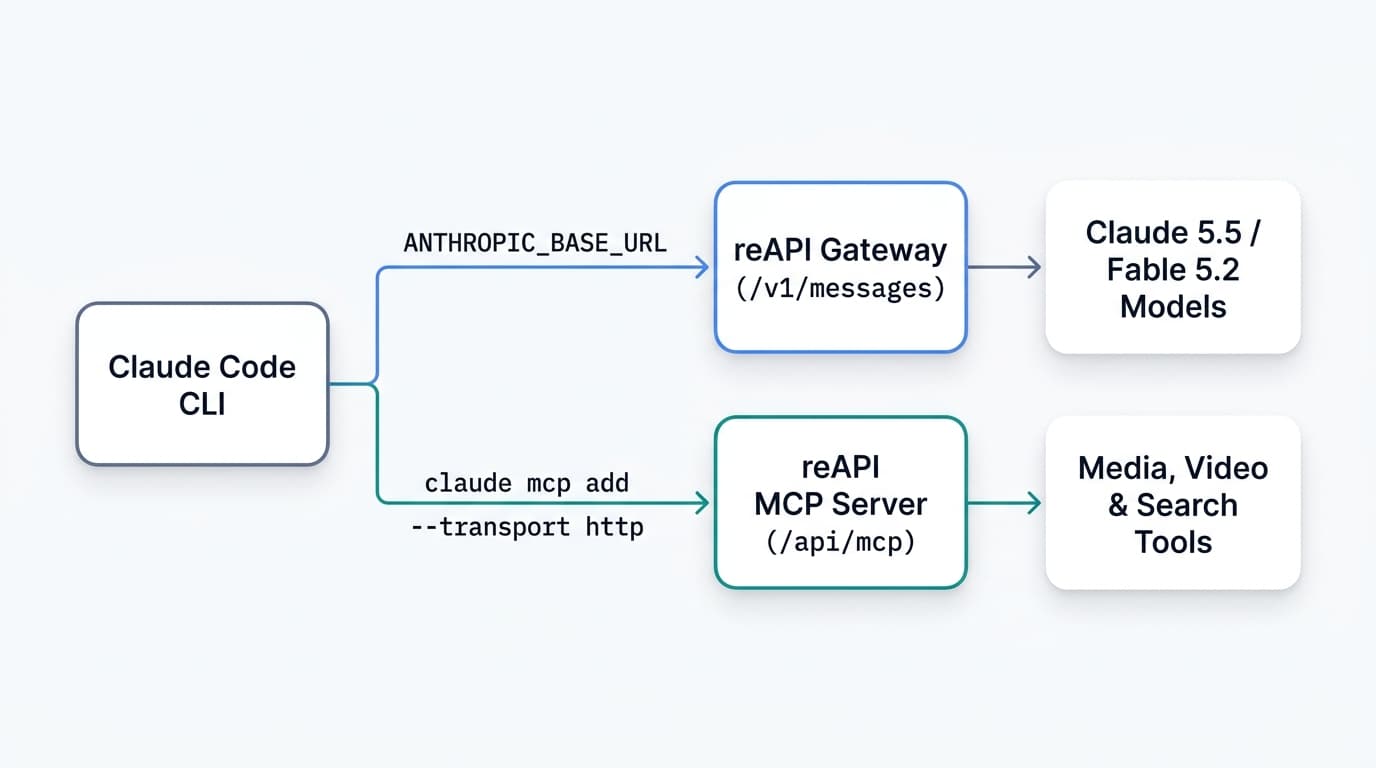
Before editing any file, decide which layer you are replacing. Claude Code talks to two completely separate surfaces, and you can use either one independently or combine both on the same account:
| Connection path | What it replaces or adds | Protocol & endpoint (reAPI example) | Works alongside Claude Pro/Max? |
|---|---|---|---|
Model Gateway (ANTHROPIC_BASE_URL) | Routes every coding turn, tool call, and subagent prompt through your third-party API balance | Native Anthropic Messages (https://api.reapi.ai → /v1/messages) | Replaces the model backend for that session (can be isolated via alias) |
MCP Server (claude mcp add) | Keeps your current coding backend and adds external tools (image, video, audio generation) inside Claude Code | Streamable HTTP MCP (https://api.reapi.ai/api/mcp) | Yes—runs cleanly alongside Claude Pro/Max or any model gateway |
Why developers switch the model gateway in practice usually comes down to three concrete operational limits: hitting the rolling 5-hour cap on a Claude Pro or Max plan mid-refactor, needing unified pay-as-you-go billing across a team without buying seats per developer, or consolidating coding models and multimodal media models under one API key and ledger.
How Claude Code resolves base URLs, auth headers, and settings precedence
Understanding three small mechanics up front prevents almost every "it still asks me to log in" or "404 Not Found" loop.
1. The trailing /v1 trap
Claude Code uses the Anthropic Messages SDK under the hood and appends /v1/messages to ANTHROPIC_BASE_URL. If a gateway already mounts its native Anthropic route at /v1/messages (as reAPI does at https://api.reapi.ai/v1/messages), setting ANTHROPIC_BASE_URL=https://api.reapi.ai/v1 causes Claude Code to send requests to /v1/v1/messages and fail with 404. Always check whether your provider expects the bare origin (https://api.reapi.ai) or a prefixed path[1].
2. ANTHROPIC_AUTH_TOKEN vs ANTHROPIC_API_KEY
Claude Code sends these two variables in different HTTP headers[2]:
| Variable | Outbound HTTP header | When to use it |
|---|---|---|
ANTHROPIC_AUTH_TOKEN | Authorization: Bearer <token> | Standard for Bearer-authenticated gateways and proxies (recommended for reAPI) |
ANTHROPIC_API_KEY | x-api-key: <key> | Direct Anthropic Console keys and gateways that explicitly check x-api-key |
Do not set both at the same time unless your gateway specifically documents dual-header behavior. Equally important: if a gateway credential is active in your environment or settings.json, it takes precedence over a saved browser OAuth session—running /login will not fix a broken gateway key[2].
3. Settings file precedence
Claude Code merges configuration from four scopes, from highest priority to lowest[2]:
- Managed / enterprise policy (organization-enforced
managed-settings.json, cannot be overridden by user files). - CLI flags and current shell environment (
export ANTHROPIC_BASE_URL=...,--model). - Project local settings (
.claude/settings.local.jsoninside a repository, gitignored by default—ideal for per-repo personal keys). - Project shared settings (
.claude/settings.jsoncommitted to git—never put API keys here) and User global settings (~/.claude/settings.json, applies to every repo on your machine).
If an old ANTHROPIC_MODEL or ANTHROPIC_BASE_URL is lingering in your shell profile (~/.zshrc or Windows System Environment Variables), editing ~/.claude/settings.json will appear to do nothing because the shell environment wins.
Step-by-step: connect Claude Code to a third-party Model Gateway
Step 1: Install or verify Claude Code
If you have not installed the CLI yet:
# macOS / Linux
curl -fsSL https://claude.ai/install.sh | bash
# Windows (PowerShell)
irm https://claude.ai/install.ps1 | iexVerify the binary is on your PATH:
claude --versionStep 2: Gather your gateway credentials and supported model IDs
You need three values before touching any config file:
- Base URL: For reAPI's native Anthropic Messages route, use
https://api.reapi.ai. - API Key: Create a dedicated key in your reAPI dashboard under Settings → API Keys so you can track spend and rotate it without affecting production apps.
- Supported Model IDs: Use explicit IDs supported by your gateway rather than assuming every Anthropic alias exists verbatim. On reAPI's native Messages route, current Claude IDs include:
claude-sonnet-5-5— balanced default for everyday coding and multi-file edits (Claude Sonnet 5.5)claude-opus-5-5— deepest reasoning for complex architecture and tricky debugging (Claude Opus 5.5)claude-haiku-5-5— fast, low-cost tier for exploration, grep summaries, and background subagents (Claude Haiku 5.5)claude-fable-5-2— creative and long-form synthesis workloads (Claude Fable 5.2)
Step 3: Choose your configuration method
Pick one of the three methods below depending on how you work.
Method A: Persistent user config via ~/.claude/settings.json (recommended for daily use)
Editing ~/.claude/settings.json keeps your shell startup clean and works identically across terminal CLI, VS Code, Cursor, and JetBrains plugins.
Open (or create) ~/.claude/settings.json on macOS/Linux (or %USERPROFILE%\.claude\settings.json on Windows) and add an env block:
{
  "env": {
    "ANTHROPIC_BASE_URL": "https://api.reapi.ai",
    "ANTHROPIC_AUTH_TOKEN": "sk-your-reapi-key-here",
    "ANTHROPIC_MODEL": "claude-sonnet-5-5",
    "ANTHROPIC_DEFAULT_SONNET_MODEL": "claude-sonnet-5-5",
    "ANTHROPIC_DEFAULT_OPUS_MODEL": "claude-opus-5-5",
    "ANTHROPIC_DEFAULT_HAIKU_MODEL": "claude-haiku-5-5",
    "CLAUDE_CODE_DISABLE_NONESSENTIAL_TRAFFIC": "1"
  }
}
Why the three ANTHROPIC_DEFAULT_*_MODEL lines matter: Claude Code does not send every call to your primary model. When it runs codebase exploration, file summarization, or compaction subagents, it automatically drops down to its configured Haiku tier. If your gateway does not recognize Anthropic's internal dated Haiku string, those background tasks fail with model_not_found even though your main chat works. Pinning all three tier defaults closes that gap cleanly.
Setting CLAUDE_CODE_DISABLE_NONESSENTIAL_TRAFFIC to "1" suppresses non-essential telemetry and update pings that some corporate networks or strict gateways reject[2].
Method B: Isolated shell alias (best if you also keep a Claude Pro/Max login)
If you want claude to keep using your Anthropic subscription and claude-reapi to route through your third-party API when you hit a 5-hour limit or work on a client project, do not modify ~/.claude/settings.json. Add a function to ~/.zshrc or ~/.bashrc:
claude-reapi() {
  ANTHROPIC_BASE_URL="https://api.reapi.ai" \
  ANTHROPIC_AUTH_TOKEN="sk-your-reapi-key-here" \
  ANTHROPIC_MODEL="claude-sonnet-5-5" \
  ANTHROPIC_DEFAULT_SONNET_MODEL="claude-sonnet-5-5" \
  ANTHROPIC_DEFAULT_OPUS_MODEL="claude-opus-5-5" \
  ANTHROPIC_DEFAULT_HAIKU_MODEL="claude-haiku-5-5" \
  claude "$@"
}
Reload your shell (source ~/.zshrc). Now claude uses your normal account and claude-reapi routes cleanly through reAPI—zero config churn when switching back and forth.
On Windows PowerShell, add an equivalent function to $PROFILE:
function claude-reapi {
  $env:ANTHROPIC_BASE_URL = "https://api.reapi.ai"
  $env:ANTHROPIC_AUTH_TOKEN = "sk-your-reapi-key-here"
  $env:ANTHROPIC_MODEL = "claude-sonnet-5-5"
  $env:ANTHROPIC_DEFAULT_SONNET_MODEL = "claude-sonnet-5-5"
  $env:ANTHROPIC_DEFAULT_OPUS_MODEL = "claude-opus-5-5"
  $env:ANTHROPIC_DEFAULT_HAIKU_MODEL = "claude-haiku-5-5"
  try {
    claude @args
  } finally {
    Remove-Item Env:ANTHROPIC_BASE_URL, Env:ANTHROPIC_AUTH_TOKEN, Env:ANTHROPIC_MODEL, Env:ANTHROPIC_DEFAULT_SONNET_MODEL, Env:ANTHROPIC_DEFAULT_OPUS_MODEL, Env:ANTHROPIC_DEFAULT_HAIKU_MODEL -ErrorAction SilentlyContinue
  }
}
Method C: Per-repository .claude/settings.local.json
When a specific client repository must bill to a dedicated API key, place the same env JSON block in <repo>/.claude/settings.local.json. Claude Code automatically ignores .claude/settings.local.json in git, while applying it whenever you launch claude inside that directory[2].
Step 4: Verify the connection before starting real work
Run two quick checks—one outside Claude Code and one inside—so you know immediately whether any error comes from your key or from CLI configuration.
1. Pre-flight curl against /v1/messages
curl -sS https://api.reapi.ai/v1/messages \
  -H "Authorization: Bearer sk-your-reapi-key-here" \
  -H "Content-Type: application/json" \
  -H "anthropic-version: 2023-06-01" \
  -d '{
    "model": "claude-sonnet-5-5",
    "max_tokens": 32,
    "messages": [{"role": "user", "content": "Reply with OK only."}]
  }'
A healthy response returns JSON with "type": "message" and "OK" in content[0].text. If curl fails, fix the key, balance, or network before debugging Claude Code.
2. Inspect active routing inside Claude Code
Launch a non-interactive smoke test first:
claude -p "Reply with the single word: ready"Then start an interactive session (claude) and run:
/statusCheck three lines in /status: the active API base URL, the authentication source (confirm it shows your token/env source rather than a stale OAuth login), and the active model. Run /model to verify you can switch between claude-sonnet-5-5, claude-opus-5-5, and claude-haiku-5-5 on the fly.
Adding a third-party MCP server to Claude Code
Connecting an MCP (Model Context Protocol) server is separate from ANTHROPIC_BASE_URL and lets Claude Code invoke remote tools directly from your terminal—such as generating product visuals, editing video clips, or checking API capabilities without leaving your coding session.
One-command HTTP MCP setup
reAPI exposes a Streamable HTTP MCP endpoint at https://api.reapi.ai/api/mcp. Register it in Claude Code with one command:
claude mcp add --transport http reapi https://api.reapi.ai/api/mcp \
  --header "Authorization: Bearer YOUR_API_KEY"
Confirm the server is registered and reachable:
claude mcp listIf you need to remove or rotate the key later:
claude mcp remove reapiSharing non-secret MCP config across a team with .mcp.json
By default, claude mcp add writes to your local scope. To share an MCP server definition with teammates without committing secrets, create a .mcp.json file at the repository root and reference an environment variable for the token:
{
  "mcpServers": {
    "reapi": {
      "type": "http",
      "url": "https://api.reapi.ai/api/mcp",
      "headers": {
        "Authorization": "Bearer ${REAPI_API_KEY}"
      }
    }
  }
}
Each developer exports REAPI_API_KEY in their local shell, and Claude Code prompts once to approve the project-scoped MCP server. Note that Claude Code and Claude Desktop do not automatically share MCP config files—Claude Desktop reads claude_desktop_config.json separately.
Troubleshooting real third-party API errors
| Symptom / HTTP status | Most common root cause | Exact fix |
|---|---|---|
404 Not Found on first prompt | ANTHROPIC_BASE_URL includes a trailing /v1, producing /v1/v1/messages | Strip /v1 so ANTHROPIC_BASE_URL is https://api.reapi.ai, then restart claude |
| Claude Code still opens browser OAuth login | Shell env vars weren't exported into the active terminal, or settings.json has invalid JSON (trailing comma) | Validate ~/.claude/settings.json with jq . ~/.claude/settings.json and run /status to confirm auth source |
Main chat works, but Explore/Plan subagents fail with model_not_found | Unmapped Haiku/Sonnet tier defaults send an Anthropic dated snapshot ID the gateway doesn't alias | Set ANTHROPIC_DEFAULT_HAIKU_MODEL, ANTHROPIC_DEFAULT_SONNET_MODEL, and ANTHROPIC_DEFAULT_OPUS_MODEL explicitly |
401 Unauthorized vs gateway 502 | 401 means your gateway key is invalid, revoked, or sent in the wrong header (x-api-key vs Bearer); a 502 on reAPI means an upstream provider auth/routing error rather than a bad user key | Test with the curl pre-flight above; rotate your key only on 401, and check gateway status or retry on 502 |
429 Rate Limit or unexpected spend | High-frequency agent loops or parallel subagents hit per-minute limits or drain credits quickly | Track per-key spend in Settings → API Keys and per-request token usage in /activities or /usage-logs; create separate keys per developer or repo |
Security practices when running Claude Code with API keys
- Never commit keys into
.claude/settings.jsonor.mcp.json: Keep credentials in~/.claude/settings.json(withchmod 600 ~/.claude/settings.json),.claude/settings.local.json, or shell environment variables referenced as${VAR}. - Use one API key per machine or project: If a laptop is lost or a CI runner leaks logs, you can delete one key in seconds without breaking other workflows.
- Audit spend early on large refactors: Agentic loops read large context windows repeatedly. Checking prompt-cache hit rates (
cached_tokens) in your usage dashboard after your first 10-minute session tells you immediately whether your gateway preserves Anthropic prompt caching.
Frequently asked questions
Does using a third-party API break Claude Code features like Plan Mode, slash commands, or MCP?
Core CLI features—Plan Mode, multi-file editing, terminal execution, CLAUDE.md, slash commands, and MCP tool calls—run locally in the Claude Code client and continue working as long as the gateway faithfully implements the Anthropic Messages API (including tool use and streaming). Features that depend on Anthropic's hosted web or subscription-only services (such as cloud-hosted remote sessions on claude.ai/code) require an Anthropic account[1].
Can I keep my Claude Pro subscription and still use a third-party API?
Yes. Use the claude-reapi shell function from Method B above, or attach the third-party platform only as an MCP server (claude mcp add). Both approaches leave your default claude login completely intact[1].
How do I switch back to Anthropic's official API?
Remove or comment out the ANTHROPIC_BASE_URL and ANTHROPIC_AUTH_TOKEN entries from ~/.claude/settings.json (and unset them in your current shell with unset ANTHROPIC_BASE_URL ANTHROPIC_AUTH_TOKEN), then restart claude and run /status to confirm the active endpoint reset to Anthropic.
Which model should I set as the default for daily coding?
Start with claude-sonnet-5-5 as ANTHROPIC_MODEL and claude-haiku-5-5 as ANTHROPIC_DEFAULT_HAIKU_MODEL. Switch interactively to claude-opus-5-5 via /model when you hit multi-service architecture design or deep concurrency debugging—that split keeps routine edits fast and affordable without sacrificing peak reasoning when it matters. For a broader introduction to the CLI workflow itself, see our How to Use Claude Code guide and Claude API pricing breakdown.
References
- Anthropic, Other LLM gateways — Claude Code Docs,
https://code.claude.com/docs/en/llm-gateway(reviewed 2026-11-23). - Anthropic, Settings files and precedence — Claude Code Docs,
https://code.claude.com/docs/en/settings(reviewed 2026-11-23). - reAPI, Native Anthropic Messages & Model Catalog,
/models/claude-sonnet-5-5&/models/claude-opus-5-5(reviewed 2026-11-23). - reAPI, MCP Server Integration Configs,
/docs/api/mcp(reviewed 2026-11-23).