Wan 3.0 Prompt Guide: Write Coherent 30-Second Video Scripts
Learn a practical Wan 3.0 prompt structure for coherent 30-second video: timed beats, camera direction, reference roles, audio, examples, and fixes.
A good Wan 3.0 prompt reads like a compact shooting brief, not a pile of visual adjectives. Define the world and subject once, divide the action into timed beats, give the camera one clear job at a time, and write the sound you actually want. That structure becomes more important as a clip approaches Wan 3.0's 30-second limit.[1]
This Wan 3.0 prompt guide focuses on controllable instructions rather than “magic words.” No template can guarantee identity, exact timing, readable text, or physical continuity. It can, however, remove contradictions and make a failed take much easier to diagnose.
TL;DR
- Start with format, duration, and one-sentence intent.
- Lock the subject, setting, lighting, and continuity rules before the timeline.
- Give each timed beat one main action and one camera instruction.
- Name references by position:
Image1,Video1,Audio1on the Prime API; standard Wan 3.0 uses its documented positional reference syntax. - Describe dialogue, ambience, effects, and silence explicitly when audio is enabled.
- Revise one failure at a time instead of making the entire prompt longer.
The Wan 3.0 prompt formula
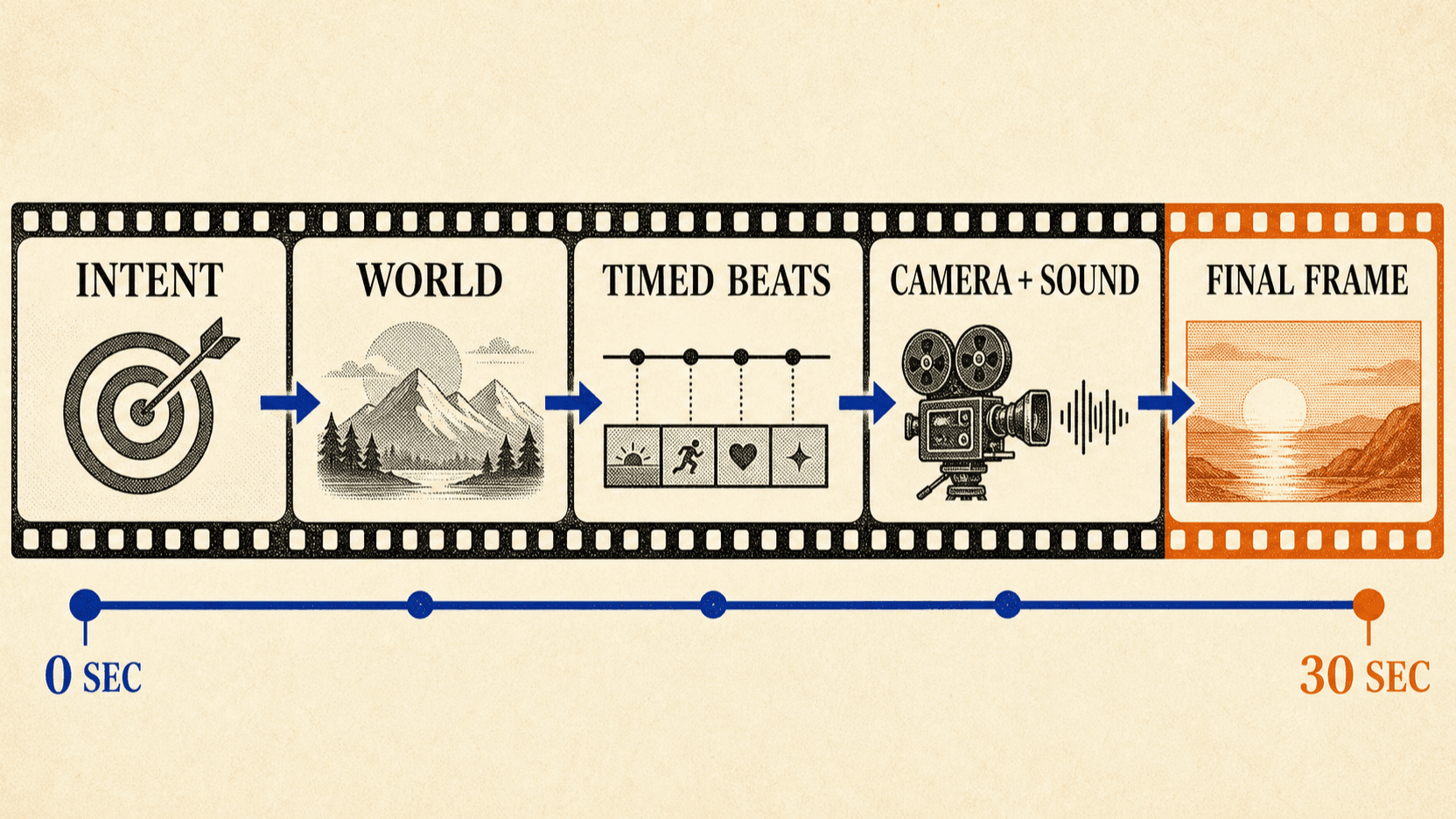
Use five blocks. They do not need labels in the final prompt, but keeping them separate while drafting makes omissions visible.
1. Intent: format, duration, aspect ratio, and the point of the video
2. World: setting, time, weather, visual treatment, and sound environment
3. Anchors: recurring people, objects, wardrobe, and non-negotiable details
4. Timeline: ordered time ranges with action and camera direction
5. Guardrails: what must stay unchanged and what must not appear
The first three blocks describe the stable world. The timeline describes what changes. Mixing both into every sentence produces repetition and often creates small contradictions: the coat becomes a jacket, dawn becomes sunset, or a locked camera starts orbiting halfway through the same beat.
Match the number of beats to the duration
A five-second clip can carry one action. A 30-second clip needs progression, but not necessarily a dozen cuts. Give each beat enough time for the subject and camera to complete what you asked.
| Duration | Useful starting shape | Typical prompt focus |
|---|---|---|
| 2–6 seconds | One beat | One action, one camera move |
| 7–15 seconds | Two to four beats | Setup, action, finish |
| 16–30 seconds | Four to seven beats | Clear progression with transitions |
These are editorial starting points, not model limits. A quiet 30-second push through an empty room may need one sustained instruction. A fast product film may need six short beats. The content sets the count.
Time ranges also communicate order; they are not frame-accurate edit points.
Write 0–5s, 5–11s, and 11–18s to show sequence, then expect some motion
to begin early or settle late. If a cut must happen on an exact frame, finish
the timing in a video editor.
A complete 30-second Wan 3.0 prompt
The following example is deliberately specific without turning into a list of camera jargon. It carries one person, one place, and one physical task through the full clip.
Format: 30-second cinematic documentary scene, 16:9, one continuous morning.

Setting and tone: A small coastal repair workshop at dawn. Cool blue daylight
enters through salt-streaked windows; two warm work lamps remain on. Natural,
restrained photography with worn wood, oxidized tools, damp concrete, and no
glossy commercial styling. Quiet surf outside, soft room tone, occasional
metal contact; no music and no dialogue.

Continuity anchors: The same woman in her late fifties throughout, short silver
hair, dark navy coveralls with one stitched orange patch, brown work boots. The
same red mechanical tide clock remains on the center bench. Keep her clothing,
face, workshop layout, clock shape, and direction of window light unchanged.

0–5s: Wide static view from the doorway. She crosses the workshop carrying the
red tide clock and places it on the center bench. Let the room establish before
the camera moves.

5–11s: Slow push toward a medium shot as she opens the clock's back plate. Her
hands move carefully; small screws are placed in a shallow metal tray.

11–18s: Over-shoulder close view. She cleans one corroded gear with a narrow
brush, rotates it once, then pauses when it catches. One soft scrape and a
single metal click are synchronized to the movement.

18–24s: Gentle lateral move to her profile. She adjusts the gear, closes the
mechanism, and turns the clock upright. Keep the bench and window positions
consistent across the move.

24–30s: Medium close-up. The clock hand begins to move. She listens, exhales,
and gives a small private smile while the camera stops. End on the clock and
her hand resting beside it; hold the final composition for two seconds.

Avoid: extra people, wardrobe changes, moving windows, new tools appearing,
dramatic lens flares, subtitles, logos, narration, or background music.
The prompt has one arc: carry, open, diagnose, repair, confirm. Each beat earns its place. If the result rushes, remove an action before adding more timing language.
Write camera direction as behavior, not decoration
Camera terms help when they change what the viewer sees. “Cinematic, epic, dynamic” says little. “Slow push from a wide doorway view to a waist-up shot” defines position, direction, pace, and destination.
Useful camera instructions usually contain two or three of these elements:
- framing: wide, medium, close-up, overhead;
- movement: locked, pan, track, push, pull back, orbit;
- speed: slow, walking pace, sudden, held still;
- relationship: follow behind, stay at eye level, keep the product centered;
- end state: stop on the face, reveal the room, hold the last composition.
Avoid stacking incompatible instructions in one beat. A locked tripod shot cannot also make a handheld orbit. A macro close-up cannot preserve a full-body view at the same moment. If both views matter, give them separate time ranges.
Reference prompts should assign jobs to assets
Wan 3.0 accepts reference images, videos, and audio, while its document and web-page modes can use structured source material.[2] The prompt should explain what each asset controls instead of merely attaching everything available.
Use Image1 for the performer’s face and hair. Use Image2 only for the green
raincoat and its silver fasteners. Use Video1 for the walking cadence, not for
the location or camera angle. Use Audio1 as the voice reference for the single
line at 12–15 seconds. Preserve the workshop from the first-frame image.
Reference count is not a quality target. Two images with distinct jobs are often easier to reason about than ten near-duplicates with different lighting and wardrobe. Remove a reference if you cannot finish the sentence “use this for…”.
Frame mode and reference mode are also different instructions. A first frame defines where the clip starts. A reference image guides identity or appearance without promising that exact opening composition. Choose the mode before writing the motion.
Audio needs its own line in the brief
Wan 3.0 can generate an audio track by default, but a visual description does not specify whether the scene should contain dialogue, music, effects, or silence. Write those choices plainly.
Weak:
Cinematic street scene with immersive sound.Stronger:
Natural evening street ambience: distant buses, one bicycle bell as the rider
passes camera, light rain on the awning. No music, no narration, no dialogue.
For dialogue, keep the line short enough for the allotted time and identify the speaker. Ask for the emotional delivery separately from the words. Review the result for pronunciation, lip sync, clipping, unwanted speech, and a sound bed that changes between shots.
How to fix a prompt after a bad take
Do not respond to every failure by adding adjectives. Identify the first place where the output diverged, then change the smallest relevant block.
| Failure | First revision to try |
|---|---|
| Identity drifts | Remove conflicting references; shorten the shot; restate one identity anchor |
| Action is rushed | Reduce the number of actions or lengthen that beat |
| Camera ignores direction | Keep one movement and define its start/end framing |
| Objects appear or vanish | List the essential objects once and add a continuity guardrail |
| Audio is generic | Name ambience, effects, dialogue, music, and silence separately |
| Ending feels unfinished | Reserve the final two or three seconds for a clear end state |
| Text is misspelled | Avoid generating critical typography; add verified text in post |
Change one variable per retry when possible. If you rewrite the subject, timeline, camera, and sound at once, a better output teaches you nothing about which correction worked.
Cost matters during this loop. Standard Wan 3.0 currently starts at a lower per-second rate than Video Prime, and 480P is cheaper than 720P or 1080P. Draft short or low-resolution versions before committing to a 30-second final. See the Wan 3.0 API pricing guide for current examples.
A short prompt checklist
Before submitting, read the prompt once for conflicts rather than detail.
- Is the duration long enough for every action?
- Does each beat have one main subject action?
- Can the camera physically perform the instruction?
- Are the recurring subject, wardrobe, and location described consistently?
- Does every reference have one named job?
- Are dialogue, effects, ambience, music, and silence specified?
- Is the final composition clear?
- Did you ask the model to preserve any text or logo that should be added in post instead?
If the answers are clear, the prompt is ready. More words are not automatically more control.
FAQ
How long can a Wan 3.0 prompt be?
The reAPI request field accepts up to 20,000 characters. That is a technical ceiling, not a target. A concise, non-contradictory brief is usually easier to debug than a long prompt that repeats the same idea.
Should a 30-second prompt include timestamps?
Usually, yes, when the clip contains several ordered actions. Timestamps show sequence and pacing, but they should not be treated as frame-exact edit points.
Does Wan 3.0 support negative prompts?
The current reAPI Wan 3.0 video schema does not expose a separate
negative_prompt field. Put important exclusions in a short Avoid: line at
the end of the positive prompt.
Can the same prompt run on Wan 3.0 Video Prime?
Yes, the creative brief transfers. The API payload does not transfer unchanged: Prime and standard Wan 3.0 use different media and aspect-ratio field names.
How many references should I use?
Use as many as the brief needs, up to the documented limits. Each reference should have a distinct role. Extra near-duplicates can introduce conflicting lighting, clothing, or composition cues.
Conclusion
The most useful Wan 3.0 prompt is a small production plan: one stable world, an ordered event stream, deliberate camera behavior, and explicit sound. Give longer clips room to unfold, keep references role-specific, and revise the first visible failure instead of padding the entire prompt. When turnaround is the constraint, the same brief can run through the Wan 3.0 Video Prime API.
References
- Alibaba Cloud. Wan 3.0: 30-Second AI Video Generation from Any Input. Retrieved August 26, 2026 from alibabacloud.com/blog/wan3-0-30-second-ai-video-generation-from-any-input_603452
- reAPI. Wan 3.0 API documentation: input modes, media limits, duration, audio, and request fields. Retrieved August 26, 2026 from reapi.ai/docs/wan-3-0
- Alibaba Cloud Model Studio. Wan 3.0 Video Generation: native 30-second output and omni-reference workflows. Retrieved August 26, 2026 from modelstudio.console.alibabacloud.com/model-releases/wan3.0-video
Further reading
Author

Categories
More Posts
Cheapest Seedance 2.5 in 2026: Compare Real API Costs
Find the cheapest Seedance 2.5 option for your resolution: compare current API rates, 10-second costs, reference-video billing, and subscription credit limits.
Seedance 2.5 vs Seedance 2.0: Which Fits Your Workload?
Seedance 2.5 vs Seedance 2.0 compared with live per-second prices: 30s takes and video edits on 2.5, 1080p/4K and cheaper tiers on 2.0. Pick by workload.
Seedance 2.5 Prompt Library: 20 Tested Shot Templates
Copy 20 Seedance 2.5 prompt templates for product shots, actor movement, camera control, references and audio, with real videos, settings and recorded costs.