Grok Imagine Video 1.5 API: Pricing, 1080p, and Limits (2026)
Use the Grok Imagine Video 1.5 API for image-to-video with native audio. Compare 480p, 720p, and 1080p pricing, limits, reAPI routes, and code.
Grok Imagine Video 1.5 is an image-to-video API, not a text-to-video model. You provide one source image plus a motion prompt, and the model animates that first frame with optional native audio. xAI's current API offers 480p, 720p, and 1080p pricing; the current reAPI route exposes 480p and 720p.[1]
That distinction prevents the most common failed request: sending only text to
the 1.5 model. If you need text-to-video, reference-to-video, editing, or video
extension, xAI documents those capabilities under the broader
grok-imagine-video family rather than the 1.5 image-to-video endpoint.[2]
TL;DR
- Input: one image and a motion prompt.
- Output: a 1–15 second video through xAI; reAPI's recommended channel uses 6–15 seconds for fallback compatibility.
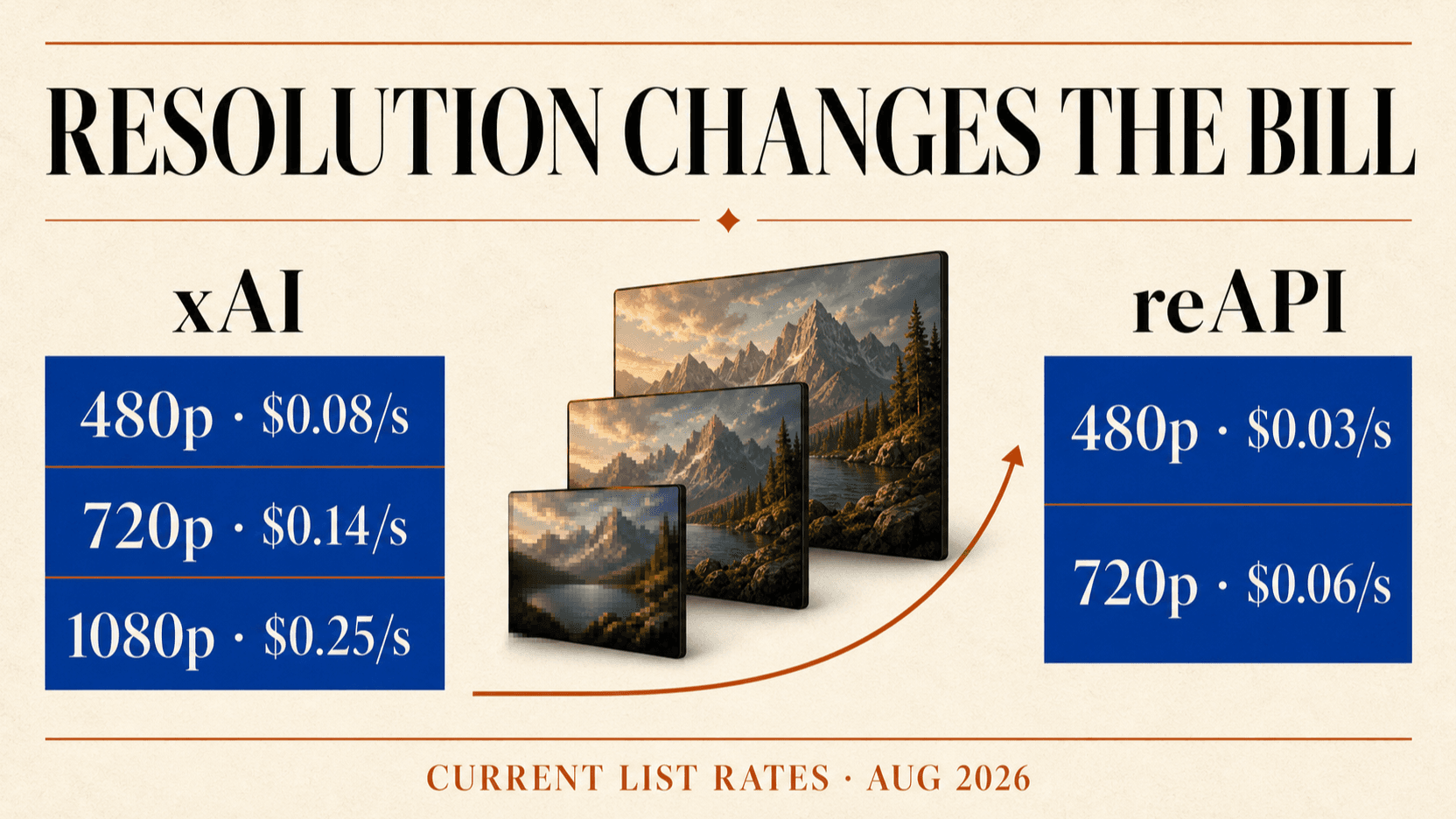
- xAI list price: $0.08/sec at 480p, $0.14/sec at 720p, and $0.25/sec at 1080p, plus $0.01 for the input image.[1]
- reAPI current recommended channel: $0.03/sec at 480p and $0.06/sec at 720p; check the live model page before budgeting.
- Native audio: supported, with an
audiotoggle on the reAPI official channel. - Maximum duration: 15 seconds.
- Main limitation: Grok Imagine Video 1.5 does not accept text-only input and the reAPI surface does not currently expose 1080p.
Grok Imagine Video 1.5 specifications
| Property | xAI API | reAPI recommended channel |
|---|---|---|
| Model ID | grok-imagine-video-1.5 | grok-imagine-video-1.5-official |
| Input | Image + prompt | One public image URL + required prompt |
| Resolutions | 480p, 720p, 1080p | 480p, 720p |
| Duration | Up to 15 seconds | 6–15 seconds |
| Aspect ratios | Vendor-supported set | 1:1, 16:9, 9:16 |
| Audio | Native | Native, toggle available |
| Billing | Per second + image input | Per second |
| Execution | Asynchronous | Asynchronous task |
xAI describes the source image as the first frame. That makes the model useful for product shots, illustrations, portraits, and keyframes where the starting composition must be preserved.[3]
Grok Imagine Video 1.5 API pricing
xAI direct pricing
| Resolution | Video rate | Input-image fee | 8-second example |
|---|---|---|---|
| 480p | $0.08/sec | $0.01 | $0.65 |
| 720p | $0.14/sec | $0.01 | $1.13 |
| 1080p | $0.25/sec | $0.01 | $2.01 |
The example is rate × 8 + $0.01. A 15-second 1080p clip therefore reaches
$3.76 before retries. Resolution is the largest price lever.[1]
reAPI pricing and channel differences
reAPI currently exposes two channels. The recommended official route lists
$0.03/sec for 480p and $0.06/sec for 720p. The beta route has a broader aspect-
ratio set and an nsfw_checker field but a higher current rate. The official
route requires a prompt, supports 6–15 seconds, and provides an audio toggle.
For an 8-second clip, the current recommended route is approximately:
| Resolution | Per-second rate | 8-second clip |
|---|---|---|
| 480p | $0.03 | $0.24 |
| 720p | $0.06 | $0.48 |
Rates are operational data, not permanent facts. Use the live Grok Imagine Video 1.5 model page before publishing a calculator or committing customer prices.
How to call Grok Imagine Video 1.5 on reAPI
The endpoint is asynchronous. Submit a job, store the task id, and poll the task endpoint until it completes.
import requests

payload = {
    "model": "grok-imagine-video-1.5-official",
    "prompt": "Slow cinematic push-in, natural hair movement, warm sunset light",
    "image_urls": ["https://your-cdn.com/keyframe.jpg"],
    "aspect_ratio": "16:9",
    "resolution": "720p",
    "duration": 8,
    "audio": True,
}

response = requests.post(
    "https://reapi.ai/api/v1/videos/generations",
    headers={
        "Authorization": "Bearer YOUR_API_KEY",
        "Content-Type": "application/json",
    },
    json=payload,
    timeout=30,
)
response.raise_for_status()
task = response.json()
print(task["id"])
Poll GET /api/v1/tasks/{id}. Completed results expose the generated video
URL, which should be copied to your own storage if the application needs a
durable asset.
Writing prompts that preserve the source image
The strongest prompts describe motion and camera behavior rather than redesigning the entire frame. The source image already supplies composition, subject, clothing, palette, and background.
Use this order:
- Subject motion: blink, turn, walk, fabric movement, product rotation.
- Camera motion: push in, dolly left, locked camera, handheld drift.
- Environment motion: wind, rain, traffic, water, particles.
- Audio: ambience, dialogue, effects, or music direction.
- Invariants: keep identity, product shape, logo placement, or framing.
Example:
The camera makes a slow 10% push-in. The subject blinks once and turns slightly
toward the window. Curtains move in a light breeze. Preserve the exact face,
clothing, room layout, and morning color palette. Quiet room tone and distant
city ambience; no dialogue.
Avoid asking for ten shots in eight seconds unless rapid montage is the goal. Short clips have little time to establish multiple camera moves and actions.
480p, 720p, or 1080p?
Use 480p for motion tests. It is the cheapest way to test identity drift, camera interpretation, and prompt timing.
Use 720p for most social and product drafts. It provides a useful balance between detail and retry cost and is the highest current reAPI option.
Use 1080p through xAI when final delivery needs it. The rate is more than three times the 480p rate, so validate motion at lower resolution first. A 1080p generation is not exposed by the current reAPI route described here.
Upscaling a successful 720p clip can be cheaper than regenerating multiple 1080p attempts, but it cannot recover missing motion detail or fix identity drift.
Limits and failure modes
- Text-only requests fail conceptually. The 1.5 endpoint requires an image.
- Temporary URLs expire. Download completed videos promptly.
- Audio adds another failure surface. Check lip sync, unwanted dialogue, clipping, and inconsistent ambience.
- Longer clips multiply cost and drift risk. Test the first six to eight seconds before using the 15-second maximum.
- Input images are billable on xAI direct. Include the $0.01 image fee in cost calculators.
- Moderation applies. Successful upload does not guarantee generation.
For identity-sensitive work, use a clean source image with one clear subject, good lighting, and no conflicting motion cues.
FAQ
Does Grok Imagine Video 1.5 support text-to-video?
No. The current 1.5 model is image-to-video. Use a source image or select a different Grok Imagine model that explicitly supports text input.
Does it generate audio?
Yes. xAI documents native audio, and reAPI's official channel exposes an
audio toggle.
How long can a video be?
Up to 15 seconds. The current reAPI recommended route uses a 6-second minimum.
Does reAPI support 1080p?
Not on the current Grok Imagine Video 1.5 route. It exposes 480p and 720p. xAI direct documents 1080p at $0.25 per second.
How much does an eight-second 720p clip cost?
xAI direct lists approximately $1.13 including the input-image fee. The current reAPI recommended route lists approximately $0.48. Check live pricing before production use.
Conclusion
The Grok Imagine Video 1.5 API is a focused keyframe animator: one image in, up to 15 seconds of video out, with native audio and resolution-based pricing. Test motion at 480p, move successful prompts to 720p, and use xAI's 1080p tier only when the delivery requirement justifies the retry cost.
References
- xAI. Grok Imagine Video 1.5 model and resolution pricing. docs.x.ai/developers/models/grok-imagine-video-1.5
- xAI. Video generation capabilities and limitations. docs.x.ai/developers/model-capabilities/video/generation
- xAI. Imagine API overview and image-to-video quickstart. docs.x.ai/developers/model-capabilities/imagine
Further reading
- reAPI. Grok Imagine Video 1.5 documentation. reapi.ai/docs/grok-imagine-video-1-5-official
- reAPI. Grok Imagine Video 1.5 model page. reapi.ai/models/grok-imagine-video-1-5
- reAPI. AI video generation API pricing. reapi.ai/blog/ai-video-generation-api-pricing
Author

Categories
More Posts

Higgsfield AI Pricing: Plans, API Costs and Is It Free?
Higgsfield AI pricing explained: subscription plans, credit costs per model, the new pay-as-you-go API, whether Higgsfield is free, and where reAPI costs less.
Kling 4.0 Release Date: Out for Everyone Since October 15
The Kling 4.0 release date was October 15, 2026, after a September 28 announcement and Flash early access. Official specs vs the leak, and where the API stands.
MiniMax M3 API: 1M Context, Pricing, and Coding Guide (2026)
Use the MiniMax M3 API for coding, agents, and multimodal work. Compare official and reAPI pricing, 1M context behavior, thinking modes, and limits.