GPT-6 Astra Context Window: Why Codex May Show 258K
Understand GPT-6 Astra's 1.05M API context window, why a Codex session may show a smaller budget, and how to measure compaction without guessing.
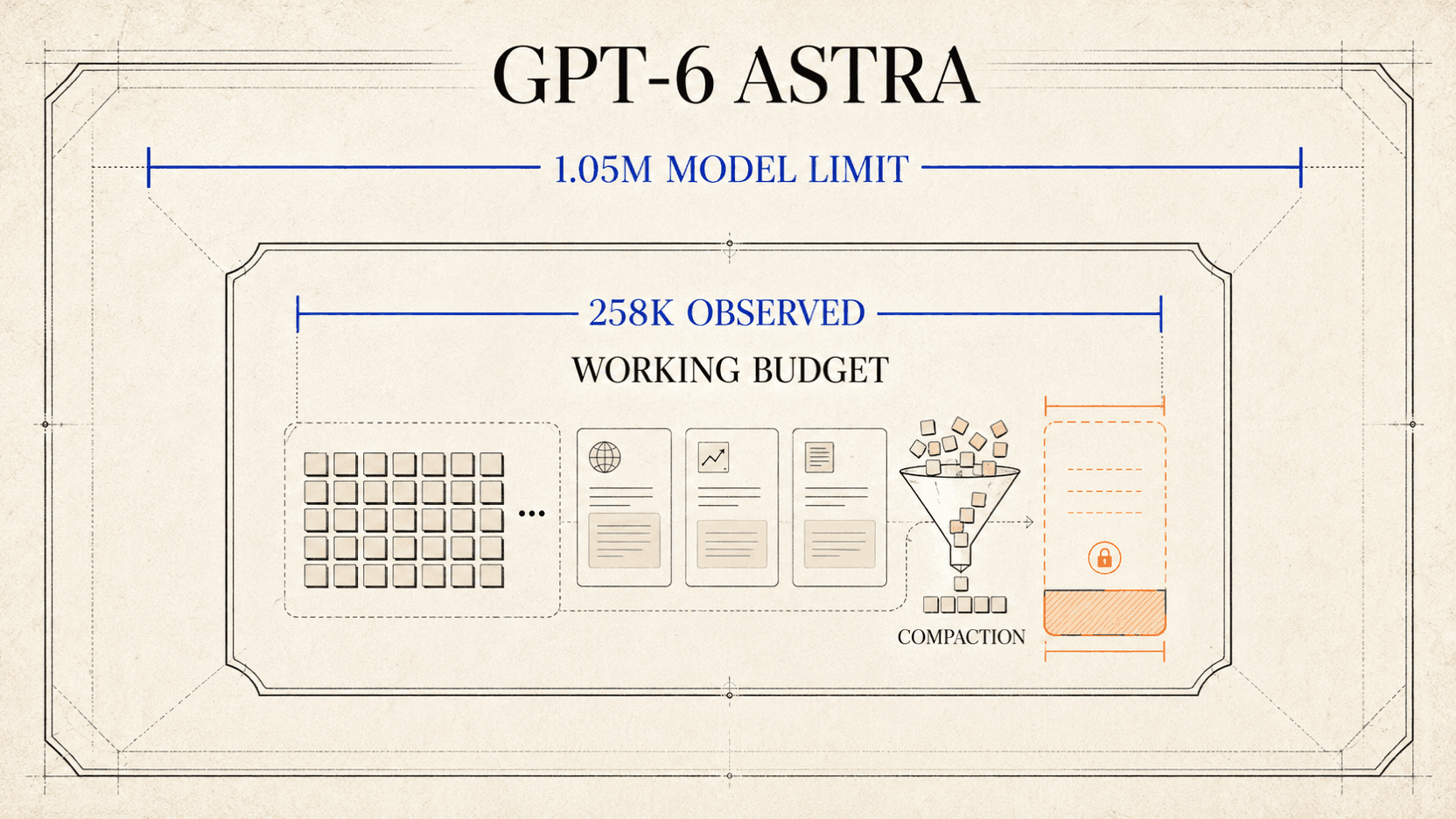
GPT-6 Astra's 1,050,000-token context window is an API model limit, not a promise that every Codex session will display 1.05M usable tokens. If Codex shows about 258K in your session and later compacts, treat those numbers as session-level product behavior. OpenAI does not publish 258K as an official Astra specification or disclose an exact allocation formula in the sources cited here.[1]
The useful response is to separate the model contract, the product's working budget, the amount already occupied, and the compaction threshold. They are different numbers. Measure the session and client version you actually have; do not infer a hidden allocation formula from a rounded counter.
Quick answer
- The Astra API model documents a 1.05M-token context window and 128K maximum output.[1]
- A Codex counter is a product working budget, not the API model limit. If it shows about 258K, treat that as a session observation, not an official spec.
- Instructions, tools, output headroom, conversation state, and compaction can all reduce the visible working set; OpenAI does not publish an exact split.
- Measure API capacity through the API, and make long Codex tasks survive compaction by saving requirements, decisions, and test results outside chat.
The three numbers people are mixing together
The phrase “context window” is used loosely in product discussions. Before debugging, name the number you are looking at.
| Number | What it means | What it does not prove |
|---|---|---|
| 1,050,000 | The context-window value in OpenAI's gpt-6-astra API model contract | That a Codex client gives one turn or session the entire amount |
| 128,000 | The model page's maximum output value | That every request reserves or produces 128,000 tokens |
| About 258K | A value your current Codex session may display | A documented, permanent Astra limit or an exact internal formula |
Two more numbers matter: the remaining budget and the compaction trigger, where the product summarizes or externalizes earlier work before a hard failure.
The model-page maximum and the product's remaining counter can both be correct. They answer different questions:
- Model contract: how much total context the API model can support under its documented contract.
- Runtime working budget: how much the current product chooses or is able to keep active for this session.
- Remaining budget: how much of that working budget remains after current instructions, history, tool material, and output headroom.
- Compaction threshold: when the product starts preserving the task in a more compact form.
Do not subtract 128K from 1.05M and declare the remainder to be the Codex budget. If a session displays 258K, do not divide it by an assumed safety percentage and declare the result to be a hidden cap. Those calculations may produce tidy numbers, but the cited OpenAI material does not document that allocation.
A practical budget model, not an internal specification
For planning, it helps to use a conceptual inequality:
active instructions
+ retained conversation
+ tool schemas
+ tool inputs and outputs
+ files or excerpts supplied to the model
+ output headroom
<= current runtime working budget
This is a bookkeeping model, not a reverse-engineered description of Codex. OpenAI has not published, in the sources cited here, the exact size of each component or the rule behind a 258K display. The value of the equation is that every item on the left can be observed or controlled during a test.
The distinction also prevents a common API mistake. A 128,000 maximum output
does not mean the API will always leave that much empty, nor does setting a
smaller output cap increase the model's published context window. It simply
sets a boundary for that response. Inspect the usage returned by the endpoint
instead of estimating it from document characters or a UI progress bar.
For the current model ID, supported modalities, and route-specific behavior, use the GPT-6 Astra API reference. The model page carries the current reAPI rate card. Those pages describe that route; they do not define the Codex app's session budget.
What compaction changes in Astra for Codex
Compaction exists because long tool-driven jobs eventually fill their active working context. Historically, OpenAI says, Codex summarized the accumulated work, which could omit details such as why a fix failed or how a component behaved. With Astra, OpenAI introduced an experimental Codex mechanism that can keep notes across context windows. Earlier windows remain searchable, so the model can retrieve a past requirement or test result even when it was not captured in those notes.[2]
That gives a long session three distinct forms of memory:
- Active context: material immediately present for the current turn.
- Cross-window notes: selected facts preserved when active context rolls over.
- Searchable earlier windows: older messages and tool results that can be retrieved when relevant.
The active context is the part we would expect a live “tokens remaining” indicator to describe. OpenAI's article does not explain how the Codex counter treats notes or searchable windows. Those two forms can help the agent recover information without keeping every byte active. Searchable history is not the same as every prior tool result occupying the model's current context at once.
OpenAI says the new mechanism can be enabled in Codex configuration and is expected to become the Astra default in the weeks following launch.[2] Because that status is time-sensitive, check the current Codex documentation and your installed version rather than copying an unverified configuration snippet. This article intentionally does not prescribe an undocumented context-window override.
Investigate a 258K display without treating it as universal
A useful test compares sessions, not memories. Start with an empty task and write down the conditions before adding material.
| Field to record | Why it matters |
|---|---|
| Date and time | Rollouts and defaults can change |
| Codex app or CLI version | Old and new clients may carry different catalogs or behavior |
| Account and workspace type | Product access and workspace controls can differ |
| Selected model label | A session may not be using the model you intended |
| New or resumed session | A resumed thread already contains retained work |
| Displayed total and remaining budget | These are the values under investigation |
| Enabled tools or integrations | Schemas and results add material to the session |
| Compaction event and time | Shows where the product acted, not merely where the meter began |
| Result after compaction | Reveals which requirements and test facts survived |
Then run a controlled sequence:
- Open a new session, select Astra, and capture the model label and displayed budget before attaching files or running tools.
- Give it a bounded, read-only repository task. Record which files are read and whether commands produce short or long output.
- Ask for the same deliverable in a second new session, but filter searches and cap logs at the source. Compare the change in the displayed budget.
- If compaction occurs, ask for the original acceptance criteria, modified files, failed approaches, and latest test result. Check each item against the repository rather than accepting a fluent recap.
- Repeat after a client update. Do not compare a resumed old session with a fresh new one and attribute every difference to the model.
This test will not reveal private implementation details. It will answer the operational question: which inputs consume the budget you see, when does this client compact, and what information must be written somewhere durable?
If your interface displays 258K, preserve the full test conditions: client version, runtime catalog, account, session age, enabled tools, and recent inputs. Without those variables and an official OpenAI specification, the number cannot be promoted to a general Codex limit.
Tool output can consume more room than the request itself
A coding task may begin with a two-sentence prompt and still become large. Recursive file listings, generated lockfiles, minified bundles, verbose test reports, database dumps, and repeated diffs can dwarf the original request. The model may need only five relevant error lines, while the tool returns five thousand.
Reduce that material before it enters the conversation:
- search for a symbol or error string before opening a whole directory;
- request the relevant line range instead of an entire generated file;
- show a focused diff, then open unchanged context only when needed;
- run the narrow failing test before the full suite;
- cap repeated stack traces and preserve the complete log as a file;
- summarize a large data result with counts, then inspect anomalous rows;
- avoid pasting the same build output into several turns.
This is not merely a way to postpone compaction. Smaller, more targeted tool results make it easier to distinguish the current error from stale failures. They also leave more room for requirements, decisions, and verification.
Keep the full artifacts outside the chat and record their paths. The agent can reopen the relevant one when needed. A path plus a concise finding is usually more useful than a transcript copied three times.
Design a long task so compaction is survivable
A million-token model is not a substitute for project state. For a repository change that may span several context windows, keep a compact ledger in the workspace or task system:
Goal:
Non-negotiable constraints:
Files intentionally changed:
Decisions and evidence:
Failed approach and why:
Checks run and exact result:
Remaining work:
Rollback point:
Update it when a decision changes, not after every command. The ledger has two jobs: it lets a compacted session recover the facts that matter, and it lets a human audit whether the agent's recap matches the actual worktree.
Use explicit acceptance criteria. “Finish the refactor” is fragile because a post-compaction session may reinterpret “finish.” “The parser accepts these three fixtures, the old endpoint remains behind a switch, and no unrelated files change” survives compression much better.
For an API migration, the GPT-6 Astra migration guide provides a discovery, canary, and rollback sequence. For product access questions, separate Codex from Chat, Work, and API using the GPT-6 Astra access matrix.
When the 1.05M API contract is the number that matters
Use an API test when the requirement is to send one deliberately assembled
large context to gpt-6-astra. Confirm the model with /v1/models, build a
representative fixture, set a bounded output limit, and store the response's
usage fields. Start well below the ceiling and increase only if the task
actually benefits.
OpenAI's Astra model guide lists compaction among the capabilities available through the API.[3] That is a separate API mechanism; it does not document the threshold or accounting used by Codex.
OpenAI's model page also states that requests with more than 272,000 input tokens use higher long-context rates, applied to the whole request under the published pricing rule.[1] That 272K pricing threshold is not evidence that Codex must expose 272K or 258K. Pricing tiers, model capacity, and an app's working budget are independent policies.
An API experiment should answer a product question, not prove that a large payload can be accepted. A compact evaluation might compare:
retention score = required facts recovered correctly / required facts queried

accepted cost = total settled cost / responses that pass every required check
Place known facts at the beginning, middle, and end of the fixture. Ask for answers that can be checked exactly. Record latency, token usage, and failures. Do not claim the model “used the full window” simply because a request returned successfully.
Troubleshooting a smaller-than-expected Codex budget
The model page says 1.05M, but a new Codex session says 258K
Record the client version, model label, and displayed value. Update through the official channel, open a new session, and check again. If the value persists, report those facts to OpenAI. Do not describe the reading as an API specification or force a third-party configuration value into production.
Compaction starts earlier than the displayed total
Check whether the interface shows total capacity or remaining capacity. Note the size of recent tool output and whether the session was resumed. The compaction trigger may include headroom that a simple visible-text count does not capture; the cited sources do not provide its exact formula.
The task forgets a requirement after compaction
Move durable constraints and acceptance checks into the task ledger. Ask the agent to restate them, then verify the statement against the file. OpenAI's cross-window notes and search can help retrieval, but they do not remove the need for a checkable source of truth.[2]
The context meter falls rapidly after a command
Inspect what the command returned. Replace broad listings, full logs, or large generated files with filtered output. Save the complete artifact outside the conversation so it remains available without staying active.
A direct API request fails below 1.05M
Verify the exact model ID, endpoint, input and output settings, and returned error. Count tokens with the tokenizer appropriate to the request rather than characters. The context figure is a model maximum, not a guarantee that every combination of payload, output request, account, and route will be accepted.
FAQ
Does GPT-6 Astra really have a one-million-token context window?
Yes for the official API model contract: OpenAI lists 1,050,000 tokens for
gpt-6-astra, with a separate 128,000-token maximum output.[1]
Is 258K the official Codex limit for Astra?
No. The official OpenAI sources cited here do not define a 258K Codex limit. If your interface shows that value, record it as behavior from that session until OpenAI documents the relevant Codex budget.
Can I change a Codex setting to force 1.05M?
Do not rely on configuration copied from comments without matching official documentation for your client version. A larger declared number does not prove the runtime accepted it, and it can change usage and compaction behavior.
Does compaction mean Codex deletes everything before it?
OpenAI says Astra can keep cross-window notes and search earlier context windows in Codex. That is different from keeping all earlier content active at once. Verify critical requirements and test outcomes after a compaction event.[2]
Do tool calls count against the working context?
Tool definitions, arguments, and returned material are part of the information the agent must process. The exact Codex accounting is not published in the cited sources, so measure the displayed change in a controlled session instead of assigning a fixed overhead to each tool.
Is the API better than Codex for long-context work?
They solve different problems. The API is the appropriate surface when your application assembles and measures a request under the documented model contract. Codex supplies a coding harness, tools, session management, and compaction. Choose based on the workflow, not the largest number in either interface.
Measure the session you have, then design for compaction
The 1.05M figure and a possible 258K session display are not competing specifications. The first is OpenAI's documented API model capacity. The second is a condition to investigate in the current Codex runtime, not a published Astra limit. Capture the runtime conditions and make tool output and project state auditable.
Then a compaction event becomes a planned handoff rather than a mystery. The session can recover its goal, constraints, decisions, and latest verification from durable evidence even when the active working set changes.
References
- OpenAI API, “GPT-6 Astra Model”, accessed September 7, 2026.
- OpenAI, “GPT-6 Astra: A new generation of intelligence”, released September 3, 2026; accessed September 7, 2026.
- OpenAI API, “Model guidance: Using GPT-6 Astra”, accessed September 7, 2026.
Author

Categories
More Posts
Is MiniMax H3 Max Real Time? Measure App Latency
Learn what MiniMax H3 Max real-time speed claims measure, why published times differ, and how to benchmark queue, inference, polling, and download.

AI Image Generation Cost vs Video: 2-9x More Per Frame
AI image generation cost per megapixel runs 2 to 9 times a frame of generated video. The per-frame math across eight video tiers and seven image models.

AI Music Video Generator API: Full Songs, Photos, and Lyrics
Turn a 10-second to 5-minute song and 1–7 reference images into a complete music video, with API examples, subtitle options, and exact cost tables.