Dreamina Seedance 2.5 Prompt Guide: References & Timing
Write better Seedance 2.5 prompts with official reference limits, 30-second stages, timestamp control, editing, extension, and keyframe templates.
The best Seedance 2.5 prompt is a production brief, not a long cinematic sentence. State the goal, assign one role to every reference, divide longer action into stages, define the visible end state of each stage, and finish with the identities, props, spatial relationships, and audio that must remain unchanged. That structure follows ByteDance's official Dreamina prompt guide and gives the model fewer relationships to guess.[1]
Dreamina's official guide also documents support for combining up to 50 reference materials—up to 30 images, 10 videos, and 10 audio clips—although using the maximum is rarely the most stable starting point.[1] This article turns those rules into reusable prompt patterns without pretending that Dreamina's creator controls are already a public Seedance 2.5 API contract.
TL;DR
- Begin with subject + action + scene. Add style, camera, and audio only when they change the result.
- Give every uploaded asset a narrow role: identity, clothing, product geometry, environment, motion, voice, ambience, or music.
- For 30-second video, write consecutive stages with one main state change and an observable end state in each stage.
- Use time ranges for pacing, an exact timestamp for a single transition, and relative timing for an event triggered by another event.
- For editing, name the source video as the master, define the smallest edit scope, and list everything to preserve.
- For extension, match the boundary frame first; describe new action second.
- For automation, Seedance 2.5 is live on reAPI as
doubao-seedance-2.5-face.[2]
The Seedance 2.5 prompting workflow
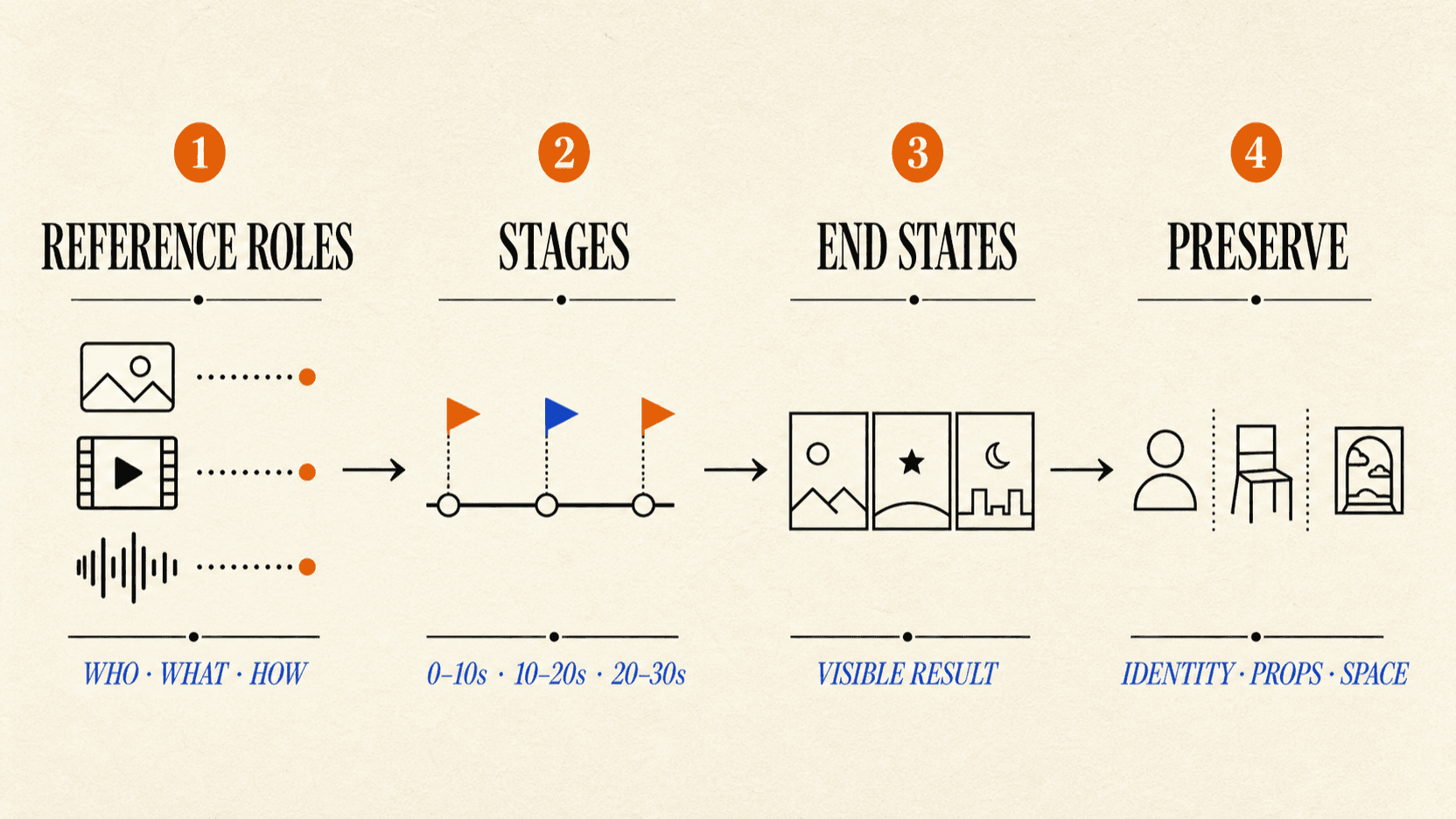
The sequence is deliberate: reference roles → stages → end states → preserve list. If the model does not know which image owns a face, no amount of camera language will rescue consistency later. If a stage has no end state, the next stage has no reliable place to begin.
Official reference limits and practical starting ranges
ByteDance's Dreamina guide distinguishes documented input ceilings from recommended ranges intended to improve stability.[1]
| Material | Official input limit | Practical starting range |
|---|---|---|
| Images | Up to 30, each no larger than 4K | Start with 1–8 distinct subjects |
| Videos | Up to 10, no more than 30 seconds combined | Start with 1–5 subjects and 5–10 seconds per motion reference |
| Audio | Up to 10, no more than 30 seconds combined | Keep only dialogue, voice, ambience, or music used by the scene |
| Video editing | One source video plus reference images | Prefer a source under 20 seconds and 1–5 reference images |
The ceiling is not a target. Ten loosely related character images can create more ambiguity than three carefully labeled views. Add a reference only when you can complete this sentence: “Use this asset for ___, and ignore ___.”
Use separate views for one subject
When several images show the same person or product, say that explicitly. Do not let the model decide whether four views represent one object or four objects.
[Product identity]
@Image 1 defines the front of the same travel speaker.
@Image 2 defines its left-side controls.
@Image 3 defines its rear ports.
All three images describe one speaker. Keep exactly one speaker in the video.
That last sentence is a useful cardinality constraint. It prevents a reference pack from becoming a cast list.
The core prompt formula
The official formula is flexible: subject, action or event, environment, visual style, camera treatment, and audio.[1] In practice, it works best in descending order of importance:
[Goal]
Create a product demonstration of a compact travel speaker unfolding on a hotel desk.

[Subject and event]
One graphite speaker opens from its folded position, powers on, and remains centered.

[Scene]
Early morning hotel room, walnut desk, soft window light, uncluttered background.

[Camera]
Locked medium shot for the opening; slow push-in only after the speaker powers on.

[Audio]
Quiet room tone, one soft power-on chime, no music.
Remove any block that does not matter. Generation controls that already exist in the interface do not need to be repeated as prose unless the wording carries creative meaning.
Assign every reference a job
The most reliable reference prompt has two halves: what to inherit and what to ignore.
[Character]
@Image 1 defines the baker's face, short dark hair, and blue apron.
Ignore the image background and camera angle.

[Product]
@Image 2 defines the shape, glaze, and pale-green label of the tea tin.
Ignore the hand holding it.

[Environment]
@Image 3 defines the bakery counter, shelf layout, and warm side light.
Do not copy any people or products from this image.

[Motion]
@Video 1 defines the pace of opening the tin and measuring tea.
Do not copy the performer, clothing, or room from the video.

[Audio]
@Audio 1 defines the baker's calm English voice.
Do not write “Images 1–4 define the characters respectively.” “Respectively” hides the mapping that the model needs. Name each subject and asset pair independently.
Create a subject profile once
For a long prompt, define the important subject once and reuse the same label:
<Baker> = face and hair from @Image 1 + blue apron from @Image 4.
<Tea Tin> = shape and label from @Image 2.
<Bakery Counter> = layout and lighting from @Image 3.
Then each scene can say which profiles it uses. This keeps the prompt readable and reduces accidental attribute swaps.
Audio, dialogue, and subtitle syntax
Natural language works, but Dreamina's guide provides compact delimiters when a prompt mixes sound categories.[1]
| Content | Syntax | Example |
|---|---|---|
| Music | ( ) | (Sparse brushed drums begin) |
| Sound effect | < > | <The shop bell rings once> |
| Dialogue | { } | {Your order is ready.} |
| Subtitle | 【 】 | 【Morning batch】 |
For non-Chinese speech, declare the language before the line. Add regional variety and delivery only if they matter:
Dialogue language: natural Mexican Spanish.
<Baker> speaks warmly and at a relaxed pace: {Tu pedido está listo.}
This is clearer than asking for “authentic speech” and hoping the model infers the language, speaker, accent, and tone.
A 30-second Seedance 2.5 prompt template
For a multi-event clip, each stage should make one principal change. The end state must be something a reviewer can see, not an abstract mood.[1]
[Goal]
Create a 30-second instructional video showing one barista preparing a cold brew order.

[0–10 seconds]
Initial state: the glass, ice scoop, and coffee carafe are on the counter.
Primary event: <Barista> fills the glass halfway with ice.
End state: the scoop is back on the tray; the half-filled glass remains centered.

[10–20 seconds]
Continue with the same person, clothing, glass, and counter layout.
Primary event: <Barista> pours cold brew to the upper mark, then stops.
End state: the carafe is upright on the left; the filled glass remains centered.

[20–30 seconds]
Primary event: <Barista> adds the lid and moves the drink to the pickup mat.
End state: the completed drink is centered on the pickup mat; both hands have left frame.

[Preserve]
Keep identity, apron, glass design, liquid color, prop ownership, screen direction,
counter geometry, camera axis, lighting, and room ambience consistent.
Notice what is absent: three actions squeezed into every second, a new camera move in every stage, and vague endings such as “the scene feels complete.” The model needs a state it can hand from one segment to the next.
Three ways to use time
The official guide treats time as a pacing budget rather than frame-accurate editing.[1]
- Time range:
0–6s,6–14s,14–22s. Use this to allocate story beats. - Exact point: “At 12 seconds, the practical light switches from blue to amber.” Use this for one transition.
- Relative timing: “Two seconds after the lid closes, the pickup bell rings.” Use this when one event triggers another.
Keep ranges consecutive and non-overlapping. A range can drift slightly around its boundary, so do not use it to demand impossible event frequency. For camera-specific troubleshooting, see Seedance 2.5 camera control.
How to prompt a video edit
Editing prompts fail when the requested change is clear but the protected content is not. Use a four-part contract:
[Edit goal]
Edit @Video 1. From 5–8 seconds, change only the desk lamp from white to orange.

[Master]
@Video 1 is the sole editing master for people, action, composition, camera,
occlusion, audio, and event order.

[Edit scope]
Modify only the lamp body and the light it casts on the desk.

[Preserve]
Keep the person's identity, clothing, expression, position, hand motion,
room geometry, camera movement, dialogue, and ambience unchanged.
For subject replacement, add two more rules: keep the number of target objects fixed, and make the replacement inherit every appearance, occlusion, movement, and exit of the original object. For background replacement, exclude the subject silhouette from the edit scope.
Dreamina's editing modes are product workflows, so their labels should not be copied into an API request. Map the conceptual prompt to the documented reAPI schema and its edit/extend constraints.[3]
How to prompt video extension
An extension has one non-negotiable job: connect at the boundary.
Forward extension
@Video 1 is the source video to extend forward.

The first extension frame continues the last source frame. Preserve the cyclist's
pose and direction, bicycle position, road geometry, camera height, afternoon light,
and forward motion.

Then the cyclist passes beneath the bridge and slows beside the orange marker.
Keep one continuous cyclist and one bicycle; do not duplicate either subject.
Backward extension
For a backward extension, describe the new preceding event first. Then define the source video's first frame as the required final state of the extension. Also list any character or effect that must not appear before the source video begins.
Boundary continuity does not mean pixel identity. Review the last frames before the join, the first frames after it, and the full extended sequence.
First frame, last frame, and multiple keyframes
In multimodal reference mode, define anchor images separately:[1]
@Image 1 is the first frame. It defines the opening composition and object positions.
@Image 2 is the last frame. It defines the final composition and object positions.
@Image 3 defines the courier's identity and orange jacket only.

The courier carries one parcel from the van to the doorway in one continuous action.
Begin from @Image 1 and arrive naturally at @Image 2.
Preserve identity, parcel count, building geometry, lighting, and camera direction.
Use the same aspect ratio for first and last frames. If several images define intermediate stages, state that they are keyframes in order, define the visible state of each one, and ask for continuous transitions between them. Independent images are usually clearer than a dense storyboard collage.
A practical prompt review checklist
Before generating, check eight things:
- Is there one clear output goal?
- Does every reference have one named role and an exclusion?
- Are repeated views explicitly identified as the same subject?
- Does each stage contain only one main state change?
- Is every end state visible and testable?
- Are dialogue language, speaker, and delivery explicit?
- Does the preserve list cover identity, count, ownership, space, camera, and audio?
- For edits or extensions, is the source video's control boundary unambiguous?
If a generation fails, remove ambiguity before adding adjectives. Reduce the reference set, narrow the edit scope, or split an overloaded stage.
Reuse the prompt structure in an automated workflow
The reference manifest, staged timeline, end states, and preserve list are useful whether a creator generates manually or a product submits tasks through an API. For automation, use Seedance 2.5 on reAPI, set model to doubao-seedance-2.5-face, and save successful prompts as an evaluation set.[2][3]
FAQ
What is the best Seedance 2.5 prompt structure?
Use goal, subject and event, scene, reference roles, staged timeline, camera, audio, end states, and a preserve list. Omit blocks that do not affect the result.
How many references can Dreamina Seedance 2.5 use?
The official prompt guide lists up to 30 images, 10 videos, and 10 audio clips—50 materials in total. Video and audio inputs each have a combined 30-second limit.[1]
Should I upload all 50 references?
Usually not. Start with the smallest set that defines identity, product, scene, motion, and audio. More assets create more relationships that must be mapped and preserved.
How do I write a 30-second prompt?
Use consecutive time ranges. Give each range one main event, an observable end state, and the state inherited from the previous range.
Can I control an action at an exact second?
You can request an exact timestamp, but treat it as direction rather than frame-accurate editing. The official guide warns that actions may land slightly around a time boundary.[1]
How do I stop reference characters from swapping?
Map each character to a specific asset, give each a unique label, state which props belong to whom, and explicitly prohibit identity, clothing, position, action, and dialogue swaps.
Is the Seedance 2.5 API available on reAPI?
Yes. Use doubao-seedance-2.5-face through reAPI's video-generation endpoint. The model page publishes live 480p/720p/1080p prices, and the API reference documents the current request limits and billing rules.[2][3]
The shorter prompt is often the more controlled prompt
Seedance 2.5 does not need more prose; it needs fewer unstated relationships. Label the inputs, give each stage one job, describe the state that survives the cut, and protect everything outside the requested change.
That is the difference between asking for a video and directing one. Keep the reference manifest and prompt template alongside the project files, then reuse them across revisions instead of rebuilding the brief from memory.
References
- ByteDance Dreamina. Dreamina Seedance 2.5 Prompt Guide. Modified July 31, 2026. Retrieved August 2, 2026 from bytedance.larkoffice.com
- reAPI. Seedance 2.5 — live production pricing. Retrieved August 17, 2026 from reapi.ai/models/seedance-2-5
- reAPI. doubao-seedance-2.5-face — request schema, task types, limits, and billing. Retrieved August 17, 2026 from reapi.ai/docs/seedance-2-5
Further reading
- reAPI. Dreamina Seedance 2.5 User Guide. reapi.ai/blog/dreamina-seedance-2-5-user-guide
- reAPI. Seedance 2.5 camera control. reapi.ai/blog/seedance-2-5-camera-control
- reAPI. Seedance 2.5 for ecommerce video. reapi.ai/blog/seedance-2-5-ecommerce-video
- reAPI. Seedream-to-Seedance handoff. reapi.ai/blog/seedream-seedance-handoff
Author

Categories
More Posts

Grok Imagine Video 1.5 API: Pricing, 1080p, and Limits (2026)
Use the Grok Imagine Video 1.5 API for image-to-video with native audio. Compare 480p, 720p, and 1080p pricing, limits, reAPI routes, and code.
Claude Fable 5.1 vs GPT-6 Astra: Choose by Workload
Compare Claude Fable 5.1 and GPT-6 Astra by context, tools, caching, retention, and task fit—then run a fair evaluation on your own workload.

GPT-6 Sol vs Astra: Price, Scores and Which Effort to Pick
GPT-6 Sol vs Astra: Sol costs one fifth of Astra per token. See published scores, effort-matched results, and why GPT-6.1 Sol is a separate question.