How to Direct Natural AI Video Acting with a Beat Sheet
Learn to plan believable AI dialogue scenes with acting beats, character states, camera progression, prompt templates, review checks, and an API example.
Believable AI video acting starts with a beat sheet, not a longer list of emotions. A beat sheet turns a scene into small changes that the model can show: a character hears a line, pauses, looks away, makes a decision, then speaks. It also defines the visible state at the end of each beat, so the next moment has somewhere concrete to begin.
This beginner tutorial builds one short dialogue scene from idea to review. You can use the method with any video model that accepts detailed prompts. The API example uses Seedance 2.5 on reAPI because it supports generated audio and clips up to 30 seconds in one request.[1]
TL;DR
- Write one sentence describing what changes emotionally during the scene.
- Give each character a stable starting state, private goal, and pressure point.
- Divide the scene into beats of roughly one action or reaction each.
- End every beat with an observable state: gaze, posture, distance, prop, or expression.
- Put dialogue, performance, blocking, camera, and sound in separate prompt blocks.
- Review speaker assignment, pauses, gaze, hands, screen direction, and the final state before accepting the clip.
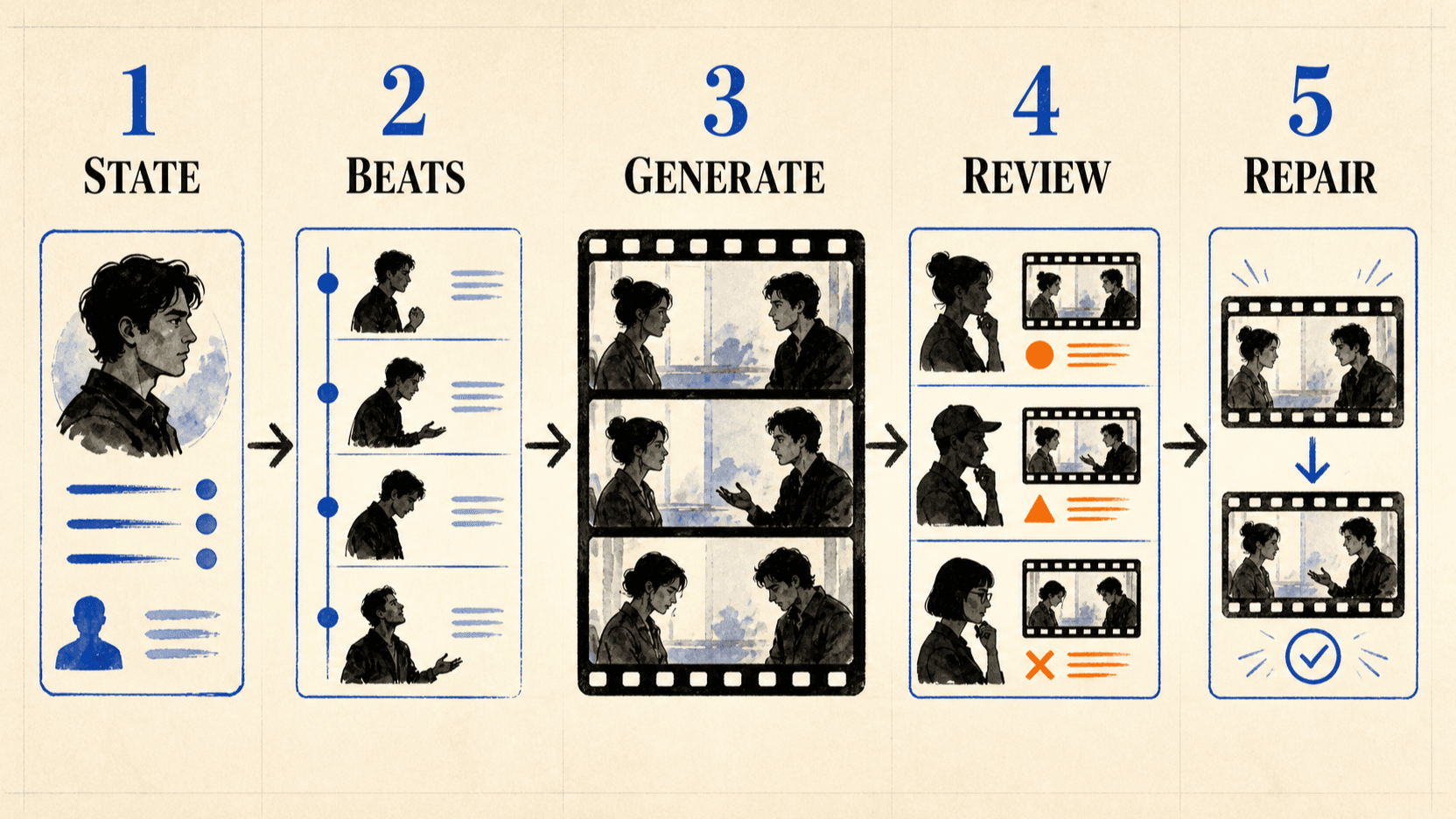
What an acting beat is
An acting beat is the smallest meaningful change in a scene. It is not simply a time range. Something has to happen that changes what a character knows, wants, or does.
Consider this line:
Maya: "You already packed?"“Maya looks sad” is weak direction because it describes a general mood. A beat is more useful:
Maya notices the suitcase before she speaks. Her shoulders stop moving. She
looks at the suitcase, then at Leo, and asks quietly, "You already packed?"
She ends the beat holding eye contact, waiting for him to answer.
The second version gives the model a trigger, a sequence, a line reading, and an end state. Those are visible instructions rather than an abstract label.
Step 1: Reduce the scene to one emotional change
Before writing dialogue, finish this sentence:
The scene begins with __________ and ends with __________ because __________.For example:
The scene begins with Maya expecting a normal goodbye and ends with her
realizing Leo planned to leave without telling her because she sees his packed
suitcase before he can hide it.
This is the spine of the scene. If a proposed camera move, gesture, or extra line does not help the viewer understand that change, remove it. Beginners often ask one generation to carry several emotional turns, a location reveal, product placement, and complicated camera choreography. The model then spreads its attention across too many jobs.
Start with one turn. Add complexity only after the simple version works.
Step 2: Write a compact character state card
A model does not need a page of biography. It needs the details that affect this scene.
{
  "maya": {
    "starting_state": "relaxed, expecting a routine goodbye",
    "goal": "get an honest explanation",
    "pressure_point": "being excluded from important decisions",
    "default_behavior": "stays quiet before confronting someone",
    "fixed_visuals": "dark bob, green coat, silver watch"
  },
  "leo": {
    "starting_state": "guarded and eager to leave",
    "goal": "end the conversation without admitting guilt",
    "pressure_point": "direct eye contact",
    "default_behavior": "handles nearby objects when uncomfortable",
    "fixed_visuals": "short brown hair, charcoal jacket, black suitcase"
  }
}
The default_behavior field is especially useful. “Nervous” can become random
blinking and exaggerated facial movement. “Turns the suitcase handle when
uncomfortable” gives the performance a physical outlet.
If likeness matters, prepare clear reference images before generation. This tutorial focuses on performance planning; the character consistency workflow covers reference preparation in more detail.
Step 3: Turn the dialogue into timed beats
Use four to six beats for a short scene. The exact seconds are guides, not a frame-accurate edit decision. What matters is order and a clear end state.
| Time | Trigger | Visible performance | Dialogue | End state |
|---|---|---|---|---|
| 0–4s | Maya sees suitcase | Walk stops; eyes move to suitcase | None | Maya still, suitcase between them |
| 4–8s | Leo notices her | Hand tightens on handle; avoids eye contact | Maya: “You already packed?” | Leo looks toward door |
| 8–13s | Silence becomes uncomfortable | Maya steps closer; Leo exhales | Leo: “It was easier this way.” | Both hold position |
| 13–19s | Maya understands | Brief look down, then steady eye contact | Maya: “For who?” | Maya calm; Leo cornered |
| 19–24s | Leo cannot answer | Hand leaves suitcase; posture softens | None | Silence, no reconciliation |
Notice that not every beat contains speech. Silence gives the model time to show a reaction. It also keeps speaker assignment clearer than continuous overlapping dialogue.
Step 4: Plan blocking before camera movement
Blocking describes where people and objects are. Camera direction describes how the audience sees that blocking. Fix the first before adding the second.
For the example scene:
- Maya starts frame left, two meters from the suitcase.
- Leo starts frame right with his right hand on the handle.
- The suitcase remains between them.
- Neither person crosses the center line.
- Maya takes one step forward during the third beat.
- Leo does not walk away before the final beat.
These constraints protect screen direction and make later cuts easier. Then add a simple camera progression:
0-8s: locked medium two-shot.
8-19s: very slow push toward a tighter two-shot.
19-24s: hold. No additional camera movement.
Do not make the camera perform every emotion. A sudden orbit, crane move, and zoom can compete with the actors. For a dialogue test, one restrained move is enough.
Step 5: Assemble the prompt in six blocks
Separate prompt blocks make mistakes easier to diagnose. If the camera is wrong, you can edit the camera block without rewriting character identity or dialogue.
REFERENCES
Image 1 is Maya's identity and wardrobe reference. Image 2 is Leo's identity
and wardrobe reference. Image 3 defines the station entrance, lighting, and
initial blocking.

CHARACTERS
Maya stays quiet before confronting someone. Leo handles the suitcase when he
is uncomfortable. Preserve their age, facial features, hair, clothing, and
body proportions throughout.

SCENE AND BLOCKING
Evening outside a train station. Maya remains frame left. Leo remains frame
right. A black suitcase stays between them. They do not cross positions.

PERFORMANCE TIMELINE
0-4s: Maya enters, notices the suitcase, stops walking, and looks from the
suitcase to Leo. End with Maya still and Leo unaware.
4-8s: Leo notices her and tightens his hand on the handle without looking at
her. Maya asks quietly, "You already packed?" End with Leo looking at the door.
8-13s: Maya takes one step closer. Leo exhales and says, "It was easier this
way." End with both holding position.
13-19s: Maya briefly looks down, regains eye contact, and asks, "For who?"
End with Maya calm and Leo unable to answer.
19-24s: Leo releases the handle and softens slightly. Neither speaks. End in
unresolved silence.

CAMERA
0-8s locked medium two-shot. 8-19s very slow push to a tighter two-shot.
19-24s hold. Keep both faces visible and preserve the left-right axis.

SOUND AND CONSTRAINTS
Natural American English. Keep the exact lines and speaker assignment. Quiet
station ambience. No narration, subtitles, extra dialogue, background music,
or exaggerated crying.
ByteDance documents that Seedance can reference composition, movement, camera language, and sound from multimodal inputs. It also notes that the model still has room to improve on multi-subject consistency and text accuracy, which is why the reference roles and review step matter.[2]
Step 6: Generate a rehearsal before the final scene
Use a short, low-risk rehearsal to test speaker order, blocking, and emotional timing. Do not judge wardrobe texture or final color yet.
On reAPI, a minimal Seedance 2.5 request looks like this:
curl https://reapi.ai/api/v1/videos/generations \
  -H "Authorization: Bearer YOUR_API_KEY" \
  -H "Content-Type: application/json" \
  -d '{
    "model": "doubao-seedance-2.5-face",
    "prompt": "PASTE_THE_SIX_BLOCK_PROMPT_HERE",
    "image_urls": [
      "https://example.com/maya.jpg",
      "https://example.com/leo.jpg",
      "https://example.com/station.jpg"
    ],
    "resolution": "720p",
    "size": "16:9",
    "duration": 24,
    "generate_audio": true
  }'
The request is asynchronous. Poll the returned task ID until the status is
completed or failed. Current field limits and billing rules belong in the
Seedance 2.5 API documentation, not in hard-coded client
assumptions.
Step 7: Review the performance in the right order
Watch the result three times with a different purpose each time.
Pass one: sound only
Listen without watching. Check exact lines, speaker assignment, line order, unwanted narration, pacing, and whether pauses exist where the beat sheet asks for them.
Pass two: picture without sound
Mute the clip. Check gaze, body position, hand behavior, facial continuity, screen direction, and whether each beat ends in the planned state.
Pass three: full scene
Now judge whether dialogue, reaction, camera, and sound support the same turn. If one layer fails, repair that layer first. Do not rewrite the whole scene because one pause is too short.
Use a simple acceptance sheet:
{
  "speaker_order": "pass",
  "exact_dialogue": "pass",
  "left_right_axis": "pass",
  "beat_3_end_state": "repair",
  "identity": "pass",
  "camera": "pass",
  "repair_note": "Leo looks at Maya too early; hold gaze on the door through 13s"
}
This is the same principle as an AI video critic loop: accept or repair against explicit evidence instead of asking whether the clip “feels good.”
Common beginner mistakes
| Mistake | Why it fails | Better move |
|---|---|---|
| Writing “sad, cinematic, emotional” | Mood words do not define behavior | Add a trigger, physical reaction, and end state |
| Giving both characters constant motion | The scene becomes busy and unclear | Let one act while the other receives |
| Filling every second with dialogue | Reactions have no time to register | Reserve beats for silence |
| Changing camera style every beat | Camera competes with performance | Use one progression and one hold |
| Regenerating everything after one defect | Good parts are lost | Repair the smallest failed block |
| Asking for exact brand text inside the scene | Generated text can be unreliable | Add critical copy in post-production |
FAQ
How many acting beats should a beginner use?
Start with four to six. Each beat should contain one main trigger or reaction. If a row needs several sentences to explain what changes, split it.
Do timecodes guarantee exact timing?
No. Treat them as pacing guidance. Check the rendered result and trim in an editor when exact delivery timing matters.
Should every emotion be visible on the face?
No. Posture, gaze, distance, hand movement, and silence often communicate more cleanly than an exaggerated expression.
Can I use this workflow without character reference images?
Yes, but visual identity will be less constrained. References become more important when a specific person or recurring fictional character must remain recognizable.
What should I fix first when a dialogue scene fails?
Fix speaker order and blocking before subtle emotion. A beautifully rendered reaction cannot save a scene in which the wrong character speaks or crosses to the wrong side.
Conclusion
An AI video acting beat sheet converts an emotional idea into observable work: triggers, reactions, dialogue, blocking, end states, and review criteria. Build one simple turn, give silence room, and keep the camera restrained. Once that version works, you can add more complex performances without losing control of the scene.
References
- ByteDance Seed. One-take Creation, Flexible Referencing: Introducing Seedance 2.5. July 31, 2026. seed.bytedance.com
- ByteDance Seed. Seedance 2.0 Official Launch. February 12, 2026. seed.bytedance.com
- reAPI. Seedance 2.5 API — Parameters, Modes & Billing. Retrieved August 27, 2026. reapi.ai
Author

Categories
More Posts

Background Removal API Pricing: Cost per Usable Image
Calculate background removal API pricing from a live 88-credit rate, then add rejected outputs, retries, storage, and review to find your usable-image cost.

FLUX 3 vs MiniMax H3: Keyframes, Audio, and Cost
Choose FLUX 3 or MiniMax H3 by duration, keyframe control, continuation, resolution, local weights, license limits, native audio, and current API cost.

Can You Tell If a Writer Used ChatGPT? Patterns, Not Proof
Can you tell if a writer used ChatGPT? Learn the recurring style signals, why no phrase proves AI authorship, and a fairer way to review suspicious text.