· reAPI Team
Topaz Video Upscaler API Guide: Pricing, Async Workflow, and Code
Integrate the Topaz Video Upscaler API with per-second cloud billing ($0.044/s–$0.077/s), 1x/2x/4x scale rules, ffmpeg prep, and TypeScript/Python async code.
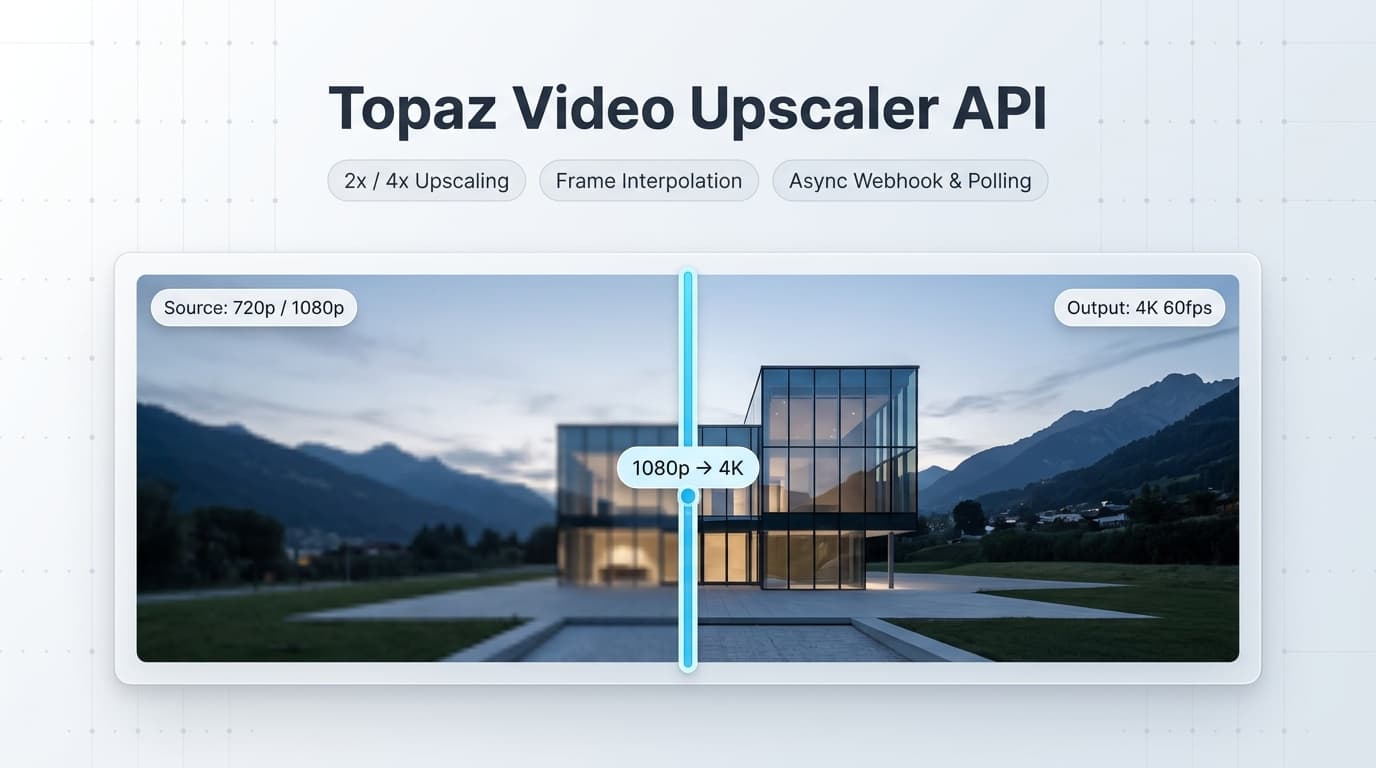
Topaz Labs' desktop app (Topaz Video, $59/month) is the gold standard for single-workstation footage restoration, yet it still leaves backend engineers stuck: a three-minute 1080p-to-4K render can tie up a local Mac or mid-range GPU for hours, and the desktop license cannot be embedded inside a SaaS product or automated media pipeline.[1][2]
Using the Topaz Video Upscaler API through reAPI turns that workstation bottleneck into a stateless, pay-per-second HTTP endpoint (POST https://api.reapi.ai/v1/videos/generations). You pass a public video_url and an upscale_factor ("1", "2", or "4"), let cloud GPUs handle super-resolution and detail restoration asynchronously, and pay strictly for the server-probed duration of your source clip—$0.044/second for 1x or 2x and $0.077/second for 4x, with automatic credit refunds if a job fails.[3][4]
API Contract at a Glance
Unlike sprawling local GUIs with twenty overlapping filter sliders, the hosted Topaz Video Upscaler API exposes a minimal, deterministic request surface designed for automated pipelines:[3]
| Parameter / Property | Specification |
|---|---|
| Endpoint | POST https://api.reapi.ai/v1/videos/generations |
| Status endpoint | GET https://api.reapi.ai/v1/tasks/{task_id} |
model (required) | "topaz-video-upscaler" |
video_url (required) | Public http:// or https:// URL to MP4, MOV, or MKV (base64 data URIs are rejected) |
upscale_factor (optional) | "1" (same-res restoration), "2" (default, 2x), or "4" (4x toward 4K) |
| Billing model | Per source-second, determined by server-side duration probe (no client duration field) |
| 1x / 2x displayed rate | $0.044 / source second ($2.64 per 60-second clip) |
| 4x displayed rate | $0.077 / source second ($4.62 per 60-second clip) |
| Failed job handling | Automatic credit refund |
Always verify live per-second rates on the Topaz Video Upscaler model page and full schema details in the Topaz Video Upscaler API docs.
Desktop vs Per-Second API vs Budget Enhancement: The Real Cost Math
Most teams evaluating a Topaz Video Upscaler API want to know two things: when does the cloud API beat Topaz's $59/month desktop subscription, and when should a pipeline drop down to a lighter cloud enhancer like Enhance Video 1.0?
| Option | Upfront / Fixed Cost | Variable Cost (60s Clip) | Hardware Needed | Best Production Fit |
|---|---|---|---|---|
| Topaz Video Upscaler API (1x / 2x) | $0 | $2.64 ($0.044/s) | None (cloud GPU) | SaaS backends, ad-creative pipelines, AI-video post-processing, bursty workloads |
| Topaz Video Upscaler API (4x) | $0 | $4.62 ($0.077/s) | None (cloud GPU) | Archival SD/480p clips or low-res AI generations going to 4K delivery |
| Enhance Video 1.0 API (1080p / 4K) | $0 | $0.25 – $0.99 ($0.0041–$0.0164/s) | None (cloud GPU) | High-volume UGC cleanup, social feeds, frame-rate (fps) interpolation |
| Topaz Video Desktop | $59/mo ($299/yr)[1] | $0 local (+ cloud credits) | 6–16 GB VRAM GPU[5] | Solo editors processing >22 min/month interactively on a workstation |
| Open Source (video2x / Real-ESRGAN) | $0 | Electricity + GPU depreciation | Local Vulkan/CUDA GPU | Offline privacy-sensitive batches with zero SaaS dependency |
The 22-Minute Break-Even Rule
At $0.044/second, Topaz's $59/month personal desktop subscription buys 1,340 seconds (~22.3 minutes) of 1x/2x cloud API footage.[4]
- If your product or agency processes under 22 minutes per month, or processes video in irregular spikes (zero minutes one week, 200 user clips during a campaign launch), the API wins on both cash flow and zero hardware maintenance.
- Even above 22 minutes per month, remember Topaz's personal desktop license restricts commercial use to organizations under $1M annual revenue, and cannot legally or technically run as a headless multi-tenant SaaS backend.[4]
- For high-volume short-form UGC where social platforms re-compress uploads anyway, routing routine 720p/1080p cleanup to Enhance Video 1.0 ($0.25/minute at 1080p) cuts enhancement spend by 90%, letting you reserve Topaz Video Upscaler for hero creatives, client deliverables, and badly degraded footage.
How the Async Video Upscaling Pipeline Works
Video super-resolution runs frame by frame on cloud GPUs, so requests never block for an inline MP4 response. Instead, every job follows a clean four-stage asynchronous lifecycle:
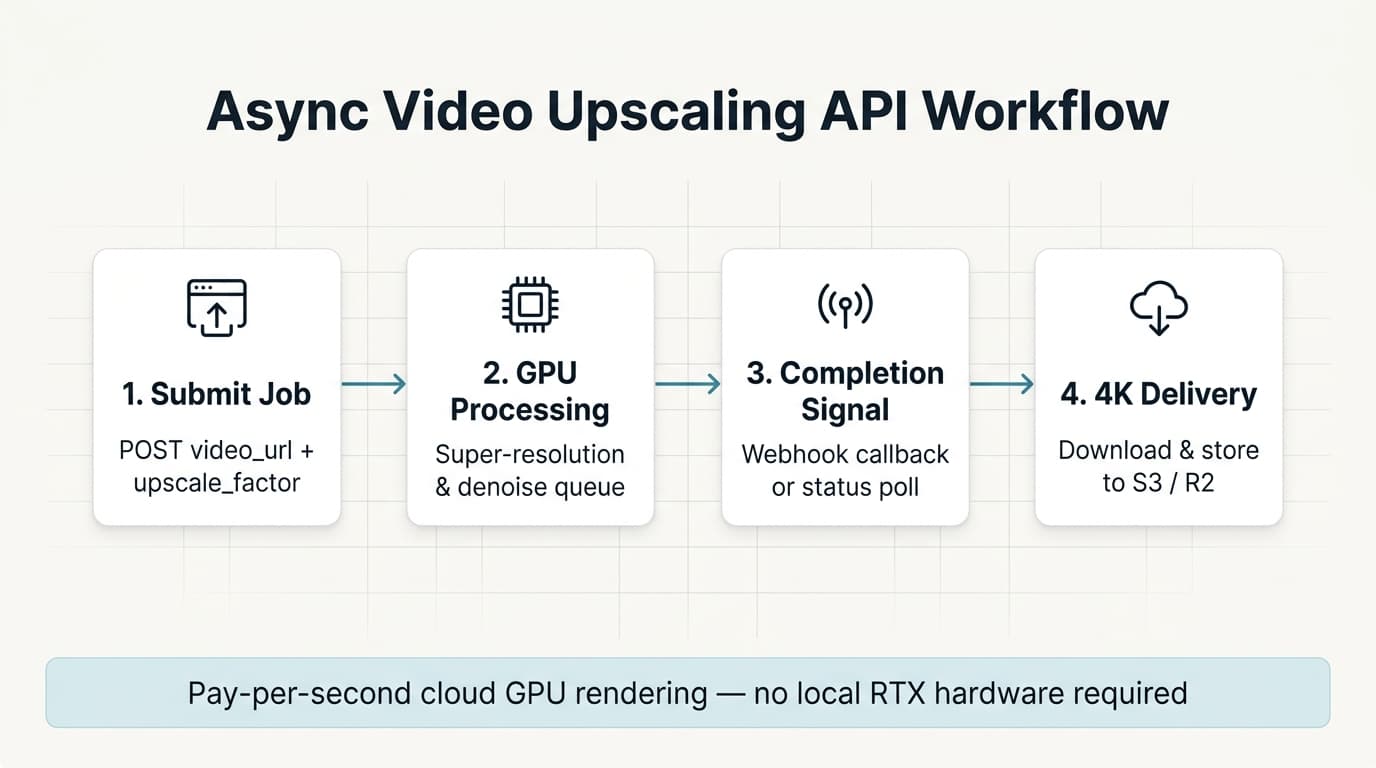
- Stage your source clip on a fast public URL: Upload the raw MP4/MOV/MKV to Cloudflare R2, AWS S3, or another CDN using a short-lived presigned
GETURL (valid for at least 30–60 minutes so the upstream worker never hits a403mid-download). Never attempt to inline base64 video payloads. - Submit the generation request: Call
POST /v1/videos/generationswithmodel: "topaz-video-upscaler",video_url, andupscale_factor. The gateway probes the clip's true duration, reserves credits, and returns a task ID immediately. - Wait via polling or webhook: Poll
GET /v1/tasks/{task_id}with exponential backoff (for example, 3s -> 5s -> 10s capped at 15s) or listen for completion callbacks in production queues so worker threads stay non-blocking. - Copy the finished output to your own bucket: Upstream result URLs should be treated as transient delivery links. As soon as
status === "completed", stream the upscaled MP4 into your own R2/S3 bucket and record the permanent asset key in your database.
Production Code: TypeScript (Node.js) and Python
Minimal curl Smoke Test
Verify your key and a short test clip in five seconds before writing queue code:
curl -X POST https://api.reapi.ai/v1/videos/generations \
  -H "Authorization: Bearer $REAPI_API_KEY" \
  -H "Content-Type: application/json" \
  -d '{
    "model": "topaz-video-upscaler",
    "video_url": "https://cdn.example.com/clips/demo-10s-720p.mp4",
    "upscale_factor": "2"
  }'
TypeScript Async Client with Backoff, Timeout, and Streamed Download
This drop-in helper submits a clip, polls cleanly with bounded backoff, handles failure states without swallowing error messages, and returns the final output URL ready for S3/R2 persistence:
type UpscaleFactor = '1' | '2' | '4';

interface UpscaleResult {
  taskId: string;
  outputUrl: string;
  elapsedMs: number;
}

const API_BASE = 'https://api.reapi.ai/v1';

export async function upscaleVideoWithTopaz(
  videoUrl: string,
  upscaleFactor: UpscaleFactor = '2',
  maxWaitMs = 15 * 60 * 1000,
): Promise<UpscaleResult> {
  const apiKey = process.env.REAPI_API_KEY;
  if (!apiKey) throw new Error('REAPI_API_KEY is not set');

  const headers = {
    Authorization: `Bearer ${apiKey}`,
    'Content-Type': 'application/json',
  };

  const startedAt = Date.now();
  const createRes = await fetch(`${API_BASE}/videos/generations`, {
    method: 'POST',
    headers,
    body: JSON.stringify({
      model: 'topaz-video-upscaler',
      video_url: videoUrl,
      upscale_factor: upscaleFactor,
    }),
  });

  if (!createRes.ok) {
    throw new Error(`Submit failed (${createRes.status}): ${await createRes.text()}`);
  }

  const created = (await createRes.json()) as { id: string };
  const taskId = created.id;
  let delayMs = 3000;

  while (Date.now() - startedAt < maxWaitMs) {
    await new Promise((r) => setTimeout(r, delayMs));
    const pollRes = await fetch(`${API_BASE}/tasks/${taskId}`, { headers });
    if (!pollRes.ok) {
      throw new Error(`Poll failed (${pollRes.status}): ${await pollRes.text()}`);
    }

    const task = (await pollRes.json()) as {
      status: string;
      output?: string | { url?: string };
      error?: string;
    };

    if (task.status === 'completed') {
      const outputUrl =
        typeof task.output === 'string' ? task.output : task.output?.url;
      if (!outputUrl) throw new Error(`Task ${taskId} completed without output URL`);
      return { taskId, outputUrl, elapsedMs: Date.now() - startedAt };
    }

    if (task.status === 'failed') {
      throw new Error(`Task ${taskId} failed: ${task.error ?? 'unknown error'}`);
    }

    delayMs = Math.min(Math.round(delayMs * 1.4), 15000);
  }

  throw new Error(`Task ${taskId} timed out after ${maxWaitMs}ms`);
}
Python Batch Processor for Multi-Clip Pipelines
When upscaling a folder of AI-generated shots (for example, 5-second Seedance or Kling clips generated at 720p that need to ship in 4K), submit jobs concurrently rather than waiting serially on each clip:
import os
import time
import concurrent.futures
import requests

API_KEY = os.environ["REAPI_API_KEY"]
HEADERS = {"Authorization": f"Bearer {API_KEY}"}
BASE = "https://api.reapi.ai/v1"


def upscale_clip(video_url: str, factor: str = "2") -> dict:
    res = requests.post(
        f"{BASE}/videos/generations",
        headers=HEADERS,
        json={
            "model": "topaz-video-upscaler",
            "video_url": video_url,
            "upscale_factor": factor,
        },
        timeout=30,
    )
    res.raise_for_status()
    task_id = res.json()["id"]

    delay = 3.0
    while True:
        time.sleep(delay)
        poll = requests.get(f"{BASE}/tasks/{task_id}", headers=HEADERS, timeout=30)
        poll.raise_for_status()
        data = poll.json()
        if data["status"] == "completed":
            return {"source": video_url, "task_id": task_id, "output": data["output"]}
        if data["status"] == "failed":
            raise RuntimeError(f"Task {task_id} failed: {data.get('error')}")
        delay = min(delay * 1.3, 15.0)


if __name__ == "__main__":
    clips = [
        "https://cdn.example.com/shots/shot-01.mp4",
        "https://cdn.example.com/shots/shot-02.mp4",
        "https://cdn.example.com/shots/shot-03.mp4",
    ]
    with concurrent.futures.ThreadPoolExecutor(max_workers=3) as pool:
        for result in pool.map(lambda u: upscale_clip(u, "2"), clips):
            print(result)
Choosing upscale_factor ("1" vs "2" vs "4") Without Wasting Budget
Picking "4" by default is the fastest way to double your bill and make footage look worse. Match upscale_factor to your source dimensions and compression quality:
| Source Footage | Recommended upscale_factor | Why It Works Best |
|---|---|---|
| Noisy / blocky 1080p or 4K (already at target size) | "1" | Runs same-resolution restoration and detail cleanup without inflating bitrate or paying the 4x tier[4] |
| Clean 720p or 1080p (AI-generated clips, screen recordings, stock video) | "2" | Doubles 1080p cleanly to 4K (or 720p to 1440p) at the $0.044/s tier with minimal hallucinated texture |
| Archival 480p / SD or 540p clips destined for 4K TV/cinema | "4" | Reaches 4K in one pass—always inspect faces and small text on a 10-second slice first |
Pre-Flight ffmpeg Normalization Checklist
Three quick ffmpeg commands prevent the most common production failures before you ever call the API:
- Slice a 10-second test segment first ($0.44 at 2x instead of $26.40 for a 10-minute mistake):
ffmpeg -ss 00:00:15 -i raw.mp4 -t 10 -c copy test-10s.mp4 - Convert variable frame rate (VFR) phone/Zoom recordings to constant frame rate (CFR) and strip broken container metadata so audio-video sync stays locked after upscaling:
ffmpeg -i zoom-vfr.mov -vsync cfr -c:v libx264 -crf 16 -c:a aac -movflags +faststart clean-cfr.mp4 - Deinterlace legacy broadcast or camcorder footage (
yadif) before upscaling, because upscaling combed interlaced lines bakes horizontal artifacts into 4K frames:ffmpeg -i legacy-interlaced.mkv -vf yadif=1 -c:v libx264 -crf 16 -c:a copy progressive.mp4
When to Pair Topaz Video Upscaler With Enhance Video 1.0
Topaz Video Upscaler focuses strictly on spatial resolution and detail restoration (1x, 2x, 4x). If your workflow also needs frame-rate interpolation (e.g., smoothing 24fps AI video to 60fps), color refinement, or scene-specific presets tuned for AI-generated footage at a lower per-second rate, route those jobs to Enhance Video 1.0—whose fps parameter is decoupled from resolution (720p, 1080p, 4k).[4] Many video SaaS products expose both behind one reAPI key: enhance-video-1-0 for the Standard plan and topaz-video-upscaler for Pro/4K Master exports.
Frequently Asked Questions
Is there a free Topaz Video Upscaler API?
No unlimited free Topaz Video Upscaler API exists. Topaz Labs' own desktop software (Topaz Video) does not offer a free trial and requires a paid subscription ($59/month or $299/year).[6] On reAPI, you pay strictly per source-second with zero monthly minimum ($0.44 for a 10-second 2x test clip), and failed jobs refund automatically. If you need zero software fees locally, use open-source video2x or Real-ESRGAN on your own GPU—see our AI video upscaling routes comparison.
Do I need a GPU to use the Topaz Video Upscaler API?
No. All neural super-resolution runs on managed cloud GPUs behind api.reapi.ai. Your backend only needs enough CPU/network bandwidth to stage the source clip on a public URL and download the resulting MP4.
How is Topaz Video Upscaler API billing calculated?
Billing is strictly per second of source footage multiplied by the upscale tier ($0.044/s for 1x or 2x, $0.077/s for 4x on reAPI). Duration is measured server-side by probing the source file directly, so you do not pass a duration parameter and cannot be misbilled by inaccurate metadata.
Does the API accept base64 video uploads or local file paths?
No. video_url must be a publicly reachable http:// or https:// URL (MP4, MOV, or MKV). Upload private clips to S3, Cloudflare R2, or GCS and pass a presigned download URL with sufficient TTL.
Should I upscale AI-generated videos (Kling, Seedance, Sora, Veo) at 2x or 4x?
Start with upscale_factor: "2". Most AI video generators output crisp 720p or 1080p clips; a 2x pass brings 1080p straight to 4K at $0.044/s ($0.22 for a 5-second shot) while keeping motion textures natural. Use "4" only on lower-resolution 480p–540p outputs.
Ready to run your first 10-second test clip? Try the interactive before-and-after playground on the Topaz Video Upscaler model page, check the full schema in Topaz Video Upscaler API docs, or generate a key in API Keys.
References
- Topaz Labs. Topaz Video — plans, personal/studio pricing, and commercial license terms. topazlabs.com/topaz-video
- Facebook Community Summary. Topaz Video AI enhancement workflow and local M1/GPU render bottlenecks. Checked November 23, 2026. facebook.com/fb-answers/topaz-video-ai-video-enhancement-interface-guide
- reAPI. Topaz Video Upscaler model page, live per-second pricing, and
/v1/videos/generationscontract. reapi.ai/models/topaz-video-upscaler - reAPI. Upscale Video with AI in 2026: Open Source, Desktop, or API (22-minute break-even and Enhance Video 1.0 comparison). reapi.ai/blog/upscale-video-with-ai
- VideoUpscalerAI. Topaz AI Video Upscaler vs VideoUpscalerAI (desktop VRAM specs and cloud trade-offs). Checked November 23, 2026. videoupscalerai.io/vs/topaz-video-ai
- AI Central Resources. Topaz Video AI Review (2026): Upscaler & Pricing (no free trial, $59/mo or $299/yr). Checked November 23, 2026. aicentralresources.com/tool/topaz-video-ai