· reAPI Team
Seedance 2.5 in ComfyUI: Set Up Your First Workflow
Set up Seedance 2.5 in ComfyUI with official workflows. Connect reference images, save a draft task ID, render a final video, and check missing-node errors.

The official text-to-video workflow for Seedance 2.5 in ComfyUI has two nodes: the generator and Save Video. For image reference, it adds Load Image. Start with one of those graphs. You don't need to assemble a checkpoint, text encoder, VAE, and sampler for the hosted Seedance step.[1]
You do need a Comfy account, credits, and an internet connection. Your local ComfyUI installation arranges the workflow; generation runs through a Partner Node. This guide follows the official templates and node definitions checked on November 4, 2026. It covers setup and connections; it does not include a paid generation test.[2]
TL;DR
- Download the official template for your starting material. Text, a first frame, and a reference image use different graphs.[1]
- Sign in through Settings → User and check Settings → Credits. A reAPI key does not replace the Comfy account credentials used by these nodes.[2][3]
- Check the model dropdown says Seedance 2.5. The node name alone doesn't settle which model is selected.[1]
- For Draft mode, save the preview's task ID, review the clip, then enable the final stage. The supplied template keeps those runs separate.[1]
Choose the Seedance 2.5 ComfyUI workflow that fits your input
Download a JSON file from the table, then load it with Ctrl+O on Windows/Linux or Cmd+O on macOS. These are ComfyUI's default shortcuts; check Settings → Keybinding if you've changed them.[4]
| What you have | Official workflow | Where the input goes |
|---|---|---|
| A written scene | Text to video JSON | The generator's prompt field |
| An image that should be the opening frame | First/last-frame JSON | first_frame; an optional ending image goes to last_frame |
| An image to guide the subject or appearance | Reference to video JSON | The reference node's image_1 socket |
| A prompt you want to preview before final rendering | Draft text-to-video JSON | Stage 1 first; Stage 2 uses its saved task ID |
These downloads come from Comfy's official template repository. The reference template contains the filename medusa_poster.png, and the first/last-frame template names two pool images. Those images are not embedded in the JSON. Select your own files after loading the graph.[1]
Decide what the image is supposed to do before connecting it. A first frame supplies the starting picture. A reference guides the new clip without declaring that picture to be its opening frame. The current nodes expose separate inputs for those jobs.[5]
Get one text-to-video graph ready
Update ComfyUI, sign in, and open the text template. If your installed release doesn't recognize a built-in node, check the installed version against Comfy's current release guidance before hunting for a similarly named community extension. Stable releases can lag newer node definitions.[2]
The text template's connection is:
ByteDance Seedance 2.5 Text to Video
  VIDEO → Save Video
Select Seedance 2.5 in the model dropdown. The supplied graph uses 720p, 16:9, five seconds, generated audio enabled, and MP4. Keep those settings for the first attempt so you have fewer controls to inspect if something fails.[1]
Replace the bundled prompt with a simple scene. Here's a practice prompt you can try:
A red ceramic mug sits on a wooden table beside a window.
The camera moves slowly closer. Morning light stays steady.
A faint room ambience, no speech, no music, no on-screen text.
Check the displayed cost estimate before running. Partner Node generations use Comfy credits even when the surrounding graph is on your computer. A second generation is another request; changing your prompt and running again isn't an edit to the file you already received.[2]
Run with Ctrl+Enter / Cmd+Enter. The generator's VIDEO output feeds Save Video. The supplied filename prefix is video/Seedance2.5_t2v; change it if you want a recognizable output name. Save the graph separately with Ctrl+S / Cmd+S. That shortcut preserves the workflow, while Save Video handles the generated media.[1][4]
Connect your image to the right socket
For a reference image, open the R2V template and select a local file in Load Image. Check this path before running:
Load Image · IMAGE
  → ByteDance Seedance 2.5 Reference to Video · image_1
  → VIDEO → Save Video
The downloaded graph already selects task_type: reference. Keep that setting when you want a new clip guided by the image. The current node is ByteDance2ReferenceNodeV2; the older implementation is labeled Legacy and has different controls. If a tutorial shows a video_editing toggle while your node shows task_type, you're looking at different implementations.[5]
Describe the action you want in the prompt and the reference's role. For the mug example, you could use a photograph of the mug as an appearance reference. If the exact photographed composition needs to start the clip, switch to the first/last-frame template instead.
In the Seedance 2.5 first/last-frame graph, connect the opening image to first_frame. The second image connects to last_frame. When you only have an opening image, disconnect the last-frame branch; the current node requires a first frame and makes the last frame optional. For Seedance 2.5, this node uses an adaptive aspect ratio rather than a separate ratio selector.[5]
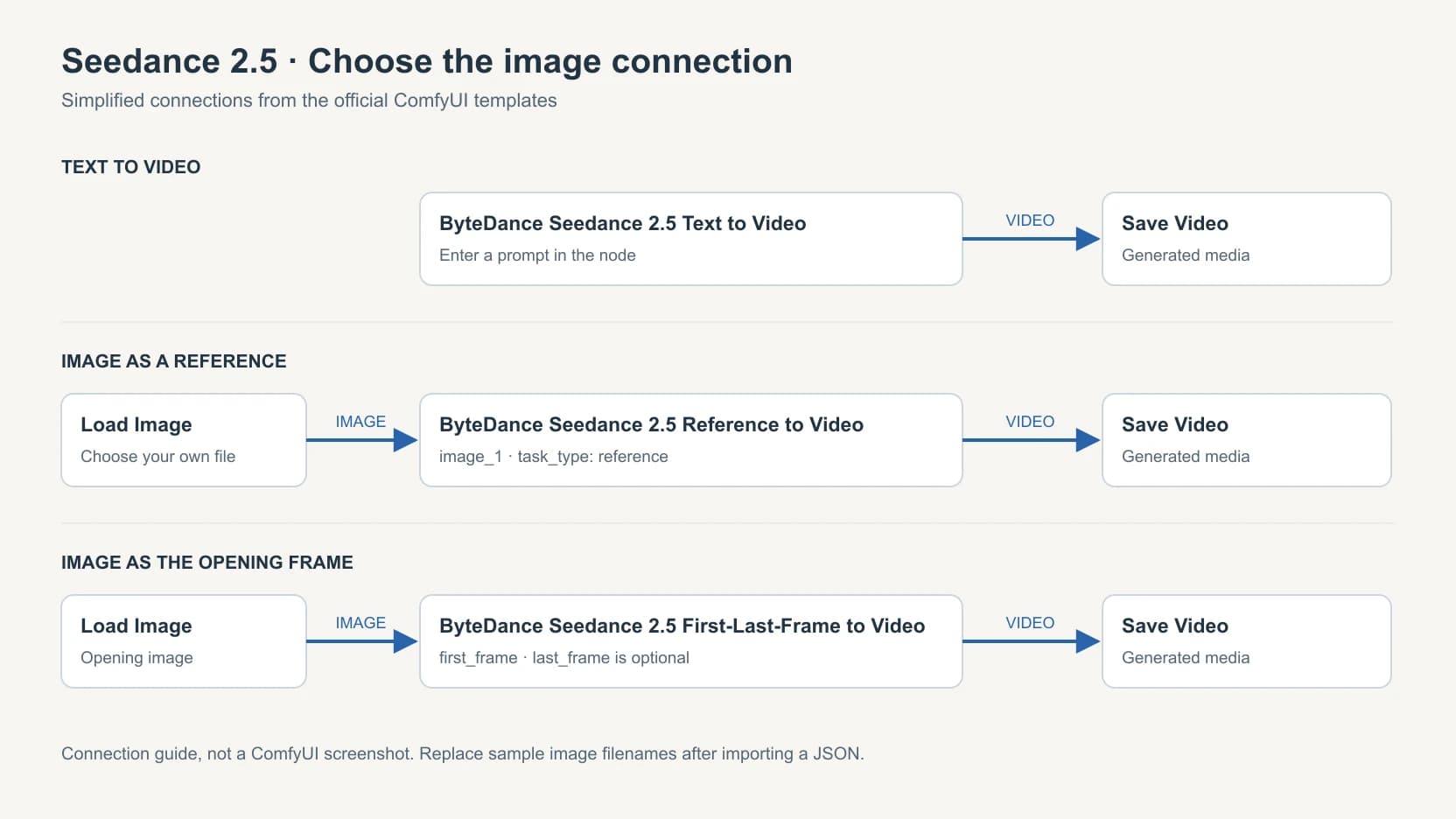
Connection diagram redrawn from the official workflow files. It is not a ComfyUI screenshot or a generated-video result.
Save this configured graph under a new name. Before adding a larger reference set, reopen it and check that the image connections are still present. An August user report describes reference connections disappearing after tab switching and saving. That issue wasn't reproduced for this guide; checking your saved graph takes only a moment.[6]
Keep the draft you chose when rendering the final
The Draft template is useful when you want to inspect a preview before requesting the final render. Its two stages are deliberately separated: Stage 1 creates a 480p preview and saves an ID; Stage 2 starts bypassed. The final node renders from that ID at 1080p.[7]
Follow the sequence in the official template:
- In Stage 1, leave the model set to Seedance 2.5 Draft, enter your prompt, and run. The video goes to Save Video. A separate
draft_task_idoutput goes to Save Text, which writes a.txtfile in the output folder. - Review the preview. If you revise the prompt and run Stage 1 again, keep track of which video belongs to which saved ID. Each Stage 1 generation creates a new draft.
- Once you've chosen a draft, select the Stage 1 nodes and press Ctrl+B / Cmd+B to bypass them. Select the Stage 2 nodes and use the same shortcut to enable them.
- Open the text file for the chosen preview. Paste its ID into
draft_task_idon ByteDance Seedance 2.5 Draft to Final Video. - Run Stage 2. It reuses the draft's prompt, duration, aspect ratio, and audio setting. The official template says to render the final within seven days of creating the draft.[7][4]
In this supplied graph, the ID is saved to a text file rather than wired straight into the final node. Preserve that arrangement while learning it. Leaving Stage 1 active can create a new preview when you intended to finish an earlier one.[7]
A normal generation's ID is not interchangeable with a draft ID. Nor does the final node accept an arbitrary downloaded MP4 for upscaling. It expects the identifier produced by a Seedance 2.5 Draft job. If you need to process an existing video file, that is a separate workflow.[5]
Check the failure before changing the graph
| What you see | What to check |
|---|---|
| An unknown built-in Seedance node | Update ComfyUI and reload the official template. Check which release contains that node; don't assume a third-party pack is required. |
| A missing example image | Select your own local image. The JSON stores sample filenames, not the image files. |
| An account or credit error | Check the signed-in Comfy account and its credits. A provider key pasted into the wrong login field won't supply Comfy credits. |
| The image isn't treated as the opening frame | Check whether it is connected to image_1 on the reference node or first_frame on the first/last-frame node. |
| A new draft appears when you wanted the final | Bypass Stage 1 and check the saved draft_task_id in Stage 2. |
| A reloaded graph has missing reference links | Compare it with the saved graph before submitting another generation. Record the ComfyUI version and a minimal graph if you report the fault. |
For an error that survives these checks, include the node name, ComfyUI version, and exact error text when asking for help. The account prerequisites and template instructions are linked below.[2][1][7]
Keep the input role separate from the creative result, too. A connected reference doesn't prove the model will preserve every visual detail. Inspect the returned clip before building the rest of a sequence around it. For more on choosing frame and reference inputs, see the Seedance 2.5 image-to-video guide.
Questions about Seedance 2.5 in ComfyUI
Can I run it locally without an API?
The official workflows here use hosted Partner Nodes. They don't download Seedance weights for offline inference. The local-use guide covers that distinction and downloadable alternatives.[2]
Is the workflow free?
Downloading the official graph doesn't include free generation. Partner Node calls require Comfy credits; check the cost estimate shown for the configured node before running it.[2]
Does the node support 1080p?
The current normal Seedance 2.5 node schema includes 480p, 720p, and 1080p. Draft uses 480p; Draft to Final produces 1080p. Older guides that describe a 720p ceiling don't match the node definitions checked for this article.[5]
Why does a node labeled 2.5 also show 2.0 models?
Comfy reuses these node classes for several Seedance variants. Select Seedance 2.5, or Seedance 2.5 Draft when following the draft workflow, rather than relying on the node's display name.[5]
Can I use a reAPI key in the official node?
Comfy's Partner Node documentation does not support substituting your own provider key. A Comfy API Key used for Comfy login belongs to a Comfy account. Using reAPI would require an adapter that implements reAPI's request and task-polling API; this guide doesn't supply or claim to have tested such a node.[2][3]
Does a fixed seed guarantee the same video?
No. The current node tooltip says results are nondeterministic regardless of seed; the seed control also governs reruns in the graph. For Draft to Final, preserve the selected draft's ID instead of trying to recreate it from a seed.[5]
Save one working graph before adding more
Start with the text template or one image, inspect the output, then save and reopen the graph. Add reference branches only when you know what each should contribute. For Draft mode, keep the preview and its text file together so the final request uses the clip you selected.
Keep this Seedance 2.5 ComfyUI workflow as your starting file. If your next task is building generation into an application, the Seedance 2.5 model page and API documentation cover the separate reAPI path.
References
- Comfy Org. Official Seedance 2.5 workflow templates. Retrieved November 4, 2026 from github.com/Comfy-Org/workflow_templates.
- Comfy. Partner Nodes overview. Retrieved November 4, 2026 from docs.comfy.org/tutorials/partner-nodes/overview.
- Comfy. Log in to your Comfy account. Retrieved November 4, 2026 from docs.comfy.org/account/login.
- Comfy. Shortcuts. Retrieved November 4, 2026 from docs.comfy.org/interface/shortcuts.
- Comfy Org. ByteDance node definitions, commit
783ab728. Retrieved November 4, 2026 from github.com/Comfy-Org/ComfyUI. - ComfyUI issue #15668. Seedance 2.5 reference-image connections disappear when switching workflow tabs and saving/reloading. User report opened August 16, 2026; retrieved November 4, 2026 from github.com/Comfy-Org/ComfyUI/issues/15668.
- Comfy Org. Seedance 2.5 Draft text-to-video template and embedded instructions. Retrieved November 4, 2026 from github.com/Comfy-Org/workflow_templates.