WaveSpeed AI Pricing: Free Trial, Tiers, and PAYG
WaveSpeed AI uses pay-as-you-go credits, not a monthly membership. Learn how its free trial, account tiers, API activation, and billing limits work.
WaveSpeed AI is pay as you go. There is no standard monthly membership: you add prepaid credits, then WaveSpeed deducts the cost of each generation from that balance. New accounts receive a $1 trial without a credit card, but some premium models are excluded, and WaveSpeed's API documentation says an API key needs a successful top-up before it will work[1][3].
That last detail changes how developers should evaluate the “free trial.” It is useful for trying supported models in WaveSpeed's web interface. It should not be treated as a permanent free API tier.
This article was checked against WaveSpeed's official pricing and account documentation on July 30, 2026. Disclosure: reAPI publishes this site and also sells pay-as-you-go AI API access. All WaveSpeed claims below link to WaveSpeed's own documentation rather than to our marketing pages.
WaveSpeed pricing at a glance
| Question | Short answer |
|---|---|
| Is there a monthly membership? | No standard consumer subscription; most accounts use prepaid credits |
| Is billing pay as you go? | Yes; the charge varies by model and generation settings |
| Is there a free trial? | Yes, $1 for new accounts, with no card required |
| Does trial credit cover every model? | No; some premium models require a paid balance |
| Can trial credit activate an API key? | WaveSpeed's authentication docs say API keys require a top-up |
| Do purchased credits expire? | No |
| Are purchased credits refundable? | No, although eligible system-side inference failures are credited back |
| What do Bronze, Silver, Gold, and Ultra mean? | They are rate-limit levels, not recurring membership plans |
WaveSpeed's public pricing page describes the service as pay per use: there are no monthly fees or commitments, and users pay for generated output[1]. Its billing documentation adds two conditions that matter when budgeting: purchased credits do not expire, and they cannot be converted back to cash[4].
How the free trial actually works
A new WaveSpeed account receives $1 in trial credit without entering a credit card. The trial reaches most of the catalog, but not every endpoint. WaveSpeed explicitly warns that some premium models are unavailable until the account has a paid balance[1].
There are therefore two separate tests:
- Web test: create an account and use the trial balance on an eligible model in the WaveSpeed interface.
- API test: create an API key for an application or script.
The second step has an extra condition. WaveSpeed's authentication page says that keys generated without a top-up will not work and instructs users to make at least one top-up to activate API access[3]. Taken together, the official pages indicate that the no-card trial is a product trial, not a promise of free API calls.
This distinction is easy to miss if you land on the pricing page first. If your evaluation requires queues, webhooks, retry handling, or production latency measurements, budget for a small paid top-up rather than assuming the trial can run that test.
WaveSpeed's refund policy says account-to-account credit transfers can be requested through support. It does not describe a self-service transfer feature or separately define trial-credit transferability, so confirm any transfer request with support before relying on it[5].
The account tiers are throughput levels
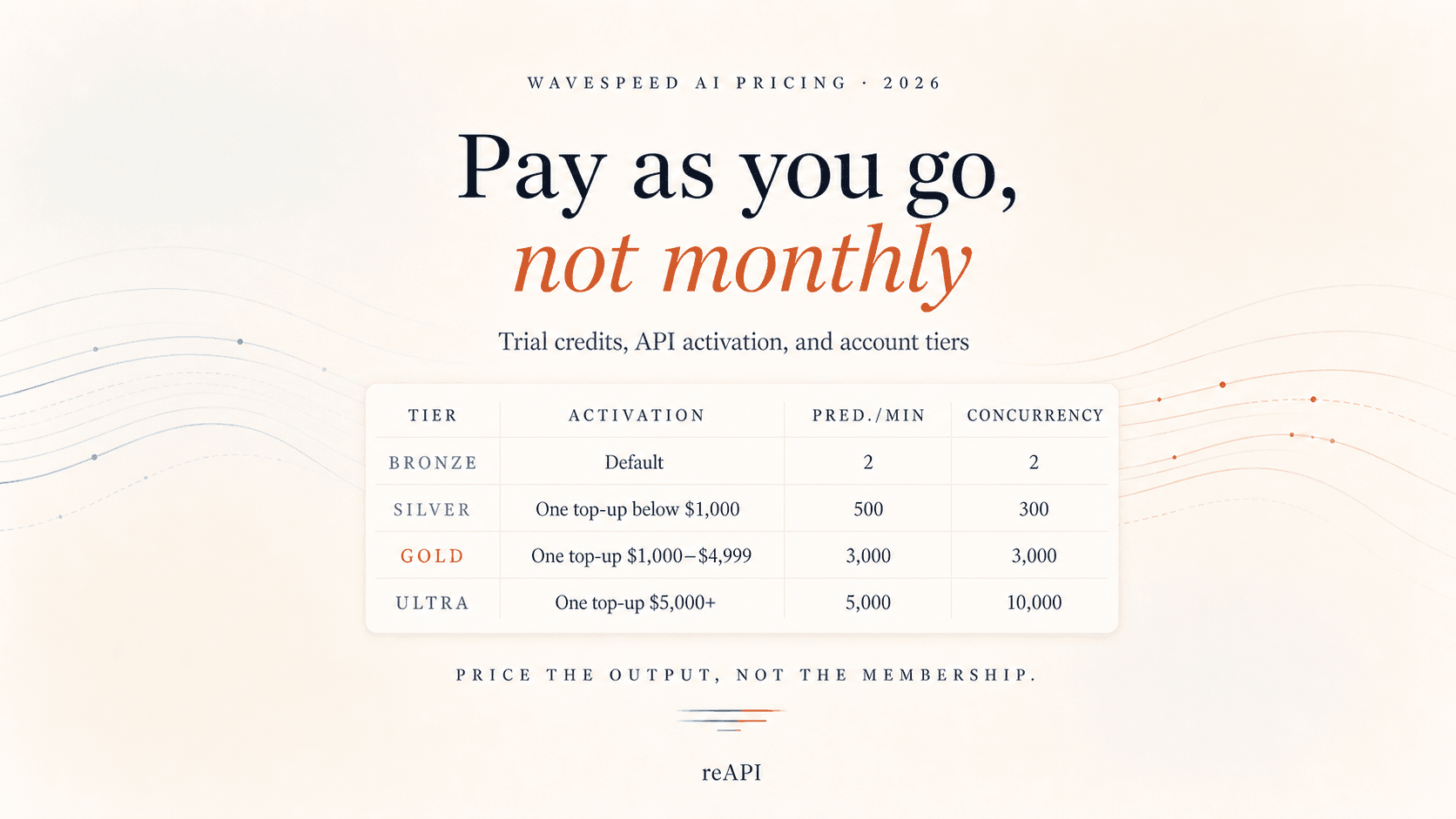
WaveSpeed calls Bronze, Silver, Gold, and Ultra “account levels.” They do not provide a monthly bundle of generations. Their main purpose is to set how many jobs an account can start per minute and how many can run at once[2].
| Account level | How it is activated | Predictions per minute | Concurrent predictions |
|---|---|---|---|
| Bronze | Default for a new account | 2 | 2 |
| Silver | A successful single top-up below $1,000 | 500 | 300 |
| Gold | A successful single top-up from $1,000 to $4,999 | 3,000 | 3,000 |
| Ultra | A successful single top-up of at least $5,000 | 5,000 | 10,000 |
The upgrade is based on the size of one successful top-up, not cumulative lifetime spend. It only moves upward: WaveSpeed says an existing higher level is not automatically downgraded[2].
That makes Silver the practical production threshold for many small applications. Bronze permits only two running tasks, while a successful paid top-up below the Gold threshold moves an unrestricted lower-level account to Silver. The top-up still becomes spendable credit; it is not a separate membership fee.
Gold and Ultra make sense when concurrency is the constraint. They do not make an expensive model cheaper by themselves. Volume pricing is a separate sales conversation, and WaveSpeed directs high-volume customers to contact its team for discounts or limits beyond Ultra[1][2].
What determines the charge for a generation
There is no single WaveSpeed rate that can be multiplied by every request. The final amount depends on the selected model and the parameters sent with the job. WaveSpeed lists four common pricing factors[4]:
- model complexity;
- output resolution;
- video duration;
- batch size or number of outputs.
This is why a model card may say “from” a particular price. A low-resolution image, a long high-resolution video, and a multi-image batch use different billing units even when they sit behind the same account balance.
WaveSpeed shows an estimated price on the Run button before a web generation, while warning that the final charge can differ slightly from the estimate[4]. For an API workflow, its pricing endpoint accepts a model ID and intended inputs so a project can estimate the task before submitting it[6].
That estimate should be part of the application, not a number copied into a spreadsheet once. Model rates and supported parameters can change. The live model page or pricing endpoint is safer than an article—including this one—for the final cost of a specific request.
Failed jobs, timeouts, and refunds
WaveSpeed says eligible inference failures caused by system errors are automatically returned to the credit balance[5]. A browser or client timeout is different.
If a synchronous HTTP request disconnects, the prediction may continue running on WaveSpeed's servers. A completed prediction can still be billable even though the client never received the initial response. WaveSpeed advises retaining the prediction ID and retrieving the result rather than assuming a timeout means the job failed[5].
For production budgeting, count accepted outputs and server-side prediction status—not only successful HTTP responses. A client that blindly resubmits after every timeout can pay for duplicate work.
How to keep PAYG spending predictable
Pay-as-you-go billing is easiest to control when every test changes one variable at a time.
- Begin at the lowest useful resolution. WaveSpeed recommends testing video prompts at lower resolution before generating the final version[6].
- Use one output while refining a prompt. Increase batch size only after the prompt is stable.
- Ask the pricing endpoint before expensive jobs. Include the same duration, resolution, and batch settings you intend to submit.
- Store prediction IDs. Poll or use a webhook after a client timeout instead of immediately creating a duplicate.
- Separate experimentation from production. WaveSpeed supports multiple API keys, so different projects can have separate credentials even though billing remains at account level[3].
- Review successful-output cost. Total spend divided by accepted outputs is more useful than the lowest advertised model rate.
Credits do not expire, so an irregular workload does not need to race a monthly reset. The trade-off is that purchased balance is non-refundable. Top up for the workload you can reasonably forecast, not for a tier label alone.
When WaveSpeed's pay-as-you-go model fits
PAYG is a good fit when usage changes from week to week, the application routes across several image or video models, or the team wants to test without taking on a monthly commitment. It also works well when a project can tolerate queueing at first and upgrade throughput only after real traffic arrives.
It is less comfortable when finance needs an identical invoice every month or when a production launch requires high concurrency from day one. In those cases, the relevant question is not whether WaveSpeed has a “Pro membership.” It is whether the necessary single top-up, enterprise agreement, or reviewed monthly credit line matches the project's cash-flow and capacity requirements.
WaveSpeed documents monthly credit lines only for reviewed AWS-login accounts. Approval is case by case, generally tied to a verifiable product or business, payment history, and repayment capacity. Standard Google and GitHub accounts continue to use prepaid top-ups[2][7].
WaveSpeed vs reAPI for an API workload
reAPI, the company publishing this article, is another pay-as-you-go AI API provider. That makes us commercially interested in the comparison. The WaveSpeed limits above come from WaveSpeed's first-party pages; the reAPI side points to live product pages so both columns can be checked before funding an account.
| Decision point | WaveSpeed | reAPI |
|---|---|---|
| Product shape | Broad, speed-first inference catalog | Curated multi-model gateway for product teams |
| Getting an API key working | Official docs say a successful top-up is required | Create the matching key for the chat or media workspace; balances are separate |
| Billing | Prepaid PAYG; price varies by model and parameters | PAYG credits; each model page shows its current billing unit |
| Failed media jobs | Eligible system-side failures are credited back | A task that finishes in failed is automatically refunded |
| Integration | OpenAI-compatible surface plus model APIs | OpenAI-compatible chat plus one asynchronous task pattern for media |
| Best fit | Teams prioritizing a very broad catalog and speed | SaaS teams prioritizing a focused catalog and predictable media-task handling |
The table is not a claim that one provider is always cheaper. Run the same model, prompt, inputs, resolution, duration, and retry policy on both, then compare total spend per accepted output. For reAPI, start with the live model catalog and use the API quickstart for the first request.
If billing is only one part of the decision, the separate WaveSpeed alternatives guide covers differences in model access, infrastructure control, and free testing. Those comparison questions are intentionally outside the scope of this pricing guide.
FAQ
How much does WaveSpeed AI cost?
WaveSpeed does not have one platform-wide generation price. It charges per use, with the amount determined by the selected model and settings such as resolution, duration, and batch size. Check the live model page or pricing endpoint before submitting a job.
Is WaveSpeed AI free?
New accounts receive $1 in free trial credit without a card. Some premium models cannot use trial credit, and the official authentication documentation says an API key requires a top-up before it works.
Does WaveSpeed have a monthly membership?
No standard monthly consumer membership is listed. Most users add prepaid credits that never expire. Bronze, Silver, Gold, and Ultra are rate-limit levels rather than recurring subscription plans.
What is the WaveSpeed Silver tier?
Silver allows 500 predictions per minute and 300 concurrent predictions. WaveSpeed says a successful single top-up below $1,000 upgrades an eligible lower-level account to Silver.
Do WaveSpeed credits expire?
Purchased credits do not expire. They are generally non-refundable, so unused balance stays in the account rather than converting back to cash.
Does WaveSpeed refund failed generations?
WaveSpeed says eligible system-side inference failures are returned to the account balance. A client timeout does not necessarily qualify because the prediction may continue and finish on the server.
Can I use the WaveSpeed API with free trial credit?
Do not assume so. Although new accounts receive trial credit, WaveSpeed's API authentication page separately says keys need a top-up to activate. Confirm the current status in your account before building an evaluation around free API access.
Is WaveSpeed pay as you go?
Yes. Standard accounts prepay credits, and WaveSpeed deducts usage as generations complete. There are no standard monthly fees or commitments on the public pricing page.
When should I choose reAPI instead of WaveSpeed?
Choose reAPI when you are building a product around a curated set of models and value live per-model billing pages and a consistent asynchronous media-task flow more than maximum catalog size. Chat and media use separate keys and balances. Choose WaveSpeed when its broader catalog or speed-focused infrastructure is the requirement. Test the exact shared models before deciding.
References
- WaveSpeed AI. Pricing. Pay-per-use billing, no monthly commitment, free trial restrictions, account-level summary, and enterprise pricing. Retrieved July 30, 2026 from wavespeed.ai/pricing
- WaveSpeed AI. Account Levels & Rate Limits. Tier activation rules, predictions per minute, concurrency, upgrades, and monthly credit-line overview. Retrieved July 30, 2026 from wavespeed.ai/docs/account-levels
- WaveSpeed AI. Authentication. API-key activation, multiple-key support, and credential guidance. Retrieved July 30, 2026 from wavespeed.ai/docs/api-authentication
- WaveSpeed AI. How Pricing Works. Pricing factors, prepaid-credit policy, and volume discounts. Retrieved July 30, 2026 from wavespeed.ai/docs/how-pricing-works
- WaveSpeed AI. Refund Policy. Credit transfers, system-side failure eligibility, and client-timeout behavior. Retrieved July 30, 2026 from wavespeed.ai/docs/refund-policy
- WaveSpeed AI. How to Reduce Costs. Lower-resolution testing, batch sizing, and the model-pricing endpoint. Retrieved July 30, 2026 from wavespeed.ai/docs/reduce-costs
- WaveSpeed AI. Payment Methods. Prepaid balance, non-expiring credits, and reviewed monthly credit lines. Retrieved July 30, 2026 from wavespeed.ai/docs/payment-methods
Author

Categories
More Posts

GPT Image 2.5 Free: ChatGPT Limits and API Access Guide
Understand GPT Image 2.5 free access in ChatGPT, Sketch and Codex, why the API has no supported free tier, and how reAPI starter credits and refunds work.
Gemini Omni API: Preview Specs, Pricing, and Limits
Google's Gemini Omni API preview explained: model ID, Interactions API, 720p output, pricing, input limits, multi-turn editing, and reAPI differences.

Gemini 4 Argon Release Date: Is It Out, and Who Can Use It?
Gemini 4 Argon is available through the Gemini API and Google AI Studio. See the announcement timeline, model ID, access routes, and output limits before use.