GPT Image 2.5 vs Nano Banana 2: Editing and API Guide
Compare GPT Image 2.5 vs Nano Banana 2 for precise edits, search grounding, reference images and output controls, using current OpenAI and Google API docs.
Choose GPT Image 2.5 when your application needs explicit controls for masked edits, transparent output and image encoding. Start with Nano Banana 2 through Google's API when generating from search-grounded information or unusually wide and tall layouts is central to the task. Those documented workflow differences give GPT Image 2.5 vs Nano Banana 2 a more useful answer than an unsupported overall quality ranking.[1][2]
The comparison below uses current OpenAI and Google documentation, checked September 13, 2026. It includes the capabilities exposed by the API and a practical evaluation brief. It does not claim results from a new side-by-side generation benchmark.
TL;DR
- Nano Banana 2 is Gemini 3.1 Flash Image. Google's current guide identifies it separately from Nano Banana Pro, Lite and the original Nano Banana. No model named “Nano Banana 2.5” appears in the official family pages reviewed for this article.[3][4]
- GPT Image 2.5 offers Flare and Sunburst. Flare emphasizes everyday speed; Sunburst emphasizes editing precision.[5][6]
- Google documents search grounding for Nano Banana 2. Its model page includes text and image search integration, making it a strong candidate for visuals that depend on external information.[2]
- OpenAI documents explicit mask, alpha and encoding controls. Those matter when an image must enter a compositing or asset-delivery pipeline.[1]
- The output geometries differ. Nano Banana 2 lists extreme aspect ratios; GPT Image 2.5 has explicit custom-dimension constraints. Check the required shape before judging sample aesthetics.[2][1]
GPT Image 2.5 vs Nano Banana 2: compare the current models
Google's image-generation guide currently names Nano Banana 2 as gemini-3.1-flash-image. Nano Banana Pro is gemini-3-pro-image. The older gemini-2.5-flash-image is the original Nano Banana, so its “2.5” does not establish the existence of a product called Nano Banana 2.5.[3]
We found no official Nano Banana 2.5 release or model entry in the Google sources reviewed. That is a dated verification limit, not a prediction about future releases. The supported comparison here remains GPT Image 2.5 against Nano Banana 2.
The following table describes the vendors' documented API capabilities. Gateway field names and supported options need a separate check before implementation.[1][2][3]
| Requirement | GPT Image 2.5 | Nano Banana 2 |
|---|---|---|
| Model selection | Flare or Sunburst | Gemini 3.1 Flash Image |
| Generation and editing | Text-driven generation and reference-image editing | Generation and conversational image editing |
| Local edit control | Explicit mask workflow | Prompt-driven editing; no equivalent mask control in the reviewed image guide |
| Transparent output | Explicit transparent background with PNG or WebP | No equivalent dedicated background control in the reviewed image guide |
| Search-grounded generation | Image model can participate in an orchestrated workflow | Google documents native search-grounding integration |
| Output configuration | Dimensions, quality, format and compression | Resolution and aspect-ratio options, including extreme ratios |
| Model output | Image | Image and text |
An omitted control is not proof that a model can never produce a particular appearance. It means the reviewed documentation does not give you the same explicit API contract. If alpha transparency is required, for example, inspect the delivered file's alpha channel; a painted checkerboard is not a transparent asset.
Editing: inspect what was supposed to stay unchanged
GPT Image 2.5 is a practical starting point for product cutouts, localized replacements and files that need a specified output format. The OpenAI guide documents masks, transparent backgrounds, PNG, JPEG and WebP, plus compression options for JPEG and WebP.[1]
These controls help express the task precisely. A merchandising application might need to replace a prop, preserve the product and headline, and deliver a transparent PNG for a page layout. That requirement combines edit selection, preservation and a file-format contract. It is more specific than asking which model makes the nicer product photograph.
Sunburst is positioned for editing precision, while Flare is the faster everyday option. Start by testing the required edit with fixed settings; evaluate Sunburst if the protected details remain the failure point.[5][6] Switching both the variant and quality setting at once makes the result harder to interpret.
Nano Banana 2 also supports conversational editing. Google's guide recommends iterating through a multi-turn conversation and using the previous interaction as context.[3] An edit workflow is therefore a valid comparison for both families, not a capability exclusive to OpenAI.
The acceptance test should be the same: did the requested region change, and did the protected content survive? Inspect adjacent edges, written text, product geometry and the relationship between objects. Keep the original and each approved version so a later edit can be compared against the correct reference.
OpenAI's guide warns that masks may not be followed with exact precision and that consistency and composition can still fail.[1] Do not turn a documented editing control into a guarantee that every unmasked pixel remains identical. If your production process requires exact preservation, review and composite the result accordingly.
Grounding and references: where Nano Banana 2 deserves a trial
Nano Banana 2 has a clear documented advantage when the application needs image generation informed by search results. Google lists search grounding and the integration of text and image search results on the model page.[2]
Consider a visual explaining a place, object or current event. The task includes finding relevant information before composing the image. Google's documented search tool gives that workflow a direct integration path. This is a reason to evaluate Nano Banana 2 first when grounded information is a requirement, even if your usual asset pipeline uses another image model.
Grounding does not remove the need to review the resulting facts. Check names, labels, dates and relationships against the retrieved sources. A diagram can be visually convincing while placing a correct label next to the wrong object. Keep the information review separate from the visual review.
OpenAI's Responses API also supports image generation as a tool in a larger workflow.[1] You can design a process that gathers information before generating an image. That is an application design, however; sending an image model ID alone does not establish that search occurred.
Give each reference an explicit role
Google documents combining up to 14 reference images in its image workflow. Its current guidance distinguishes objects, characters and style references by model, so a total input allowance should not be read as a promise of perfect identity preservation for every subject.[3]
Use role-based instructions such as “the first image defines the product,” “the second defines the room” and “the third defines the palette.” Naming what each input contributes makes a failure easier to identify. Merely attaching a folder of references leaves the desired relationship ambiguous.
For a multilingual graphic, keep the exact required copy in a separate checklist. Google's model page describes improved international text rendering, but it supplies no head-to-head result showing that Nano Banana 2 beats GPT Image 2.5 on your language or layout.[2] Review spelling, accents, reading order and line breaks for both models.
Output geometry can decide before image quality does
Nano Banana 2 documents output resolutions of 0.5K, 1K, 2K and 4K. Its model page also lists 1:4, 4:1, 1:8 and 8:1 aspect ratios.[2] Those options make it a candidate for a tall editorial strip or a very wide banner without first forcing the scene into a more conventional shape.
GPT Image 2.5 accepts custom dimensions with specific limits: edges must be divisible by 16, the aspect ratio must remain between 1:3 and 3:1, and neither edge may exceed 3840 pixels. The guide marks resolutions above 2560×1440 experimental.[1]
An 8:1 requirement therefore does not fit GPT Image 2.5's documented direct-output aspect-ratio range. You would need to alter the delivery workflow, such as composing or cropping a generated asset. Evaluate whether that extra step preserves the composition before treating the outputs as equivalent.
Similarly, the word “4K” does not specify an identical image shape across every API. Record the actual width and height required by the destination. For a website hero, presentation slide or product card, the delivery dimensions often matter more than the model's maximum resolution label.
Match the integration to the documented surface
The current OpenAI guide supports direct Image API calls and image generation inside Responses. Google's model returns image and text output, and its image guide describes a conversational integration.[1][2][3] Keep response parsing and conversation state specific to the API you use.
For GPT Image 2.5 on reAPI, the public documentation uses a shared image-generation endpoint and asynchronous tasks. Requests return a task ID; completed tasks expose image URLs.[7] The Google-direct grounding features in this article are not a promise that the same options exist as fields on that endpoint.
Pricing also requires a matched request: model, dimensions, quality, references and billing method. The GPT Image 2.5 API cost article covers that family separately. This comparison does not declare a cheapest model from unmatched example prices.
Use a shared brief before selecting a default
Build the evaluation around one real deliverable. For example, use a product image that needs a localized replacement, a factual graphic that needs source review, or a banner with a fixed extreme aspect ratio. Select the case that represents your work, rather than treating every capability as equally important.
Prepare the same prompt, exact copy and reference assets for both models. Record any required adaptation to the API, such as different output settings or conversation handling. Those adaptations are part of implementation effort and should remain visible in the comparison.
Review each candidate against these questions:
- Does it include every required object and preserve the protected details?
- Is the required text accurate and readable at the delivery size?
- Does the file have the correct dimensions, encoding and transparency?
- If search was required, are the displayed facts supported by the sources?
- How much additional editing is needed before the asset is usable?
Then record waiting time and the number of accepted outputs. Keep aesthetic preference as a separate judgment, so an attractive image does not conceal a failed technical requirement. The resulting record explains why a model became the default for that workload.
FAQ
Is Nano Banana 2.5 already available?
The Google image guide and family page reviewed on September 13, 2026 do not list that name. They identify Nano Banana 2, Pro, Lite and the original Nano Banana. Check the official model directory before treating a third-party article title as a release announcement.[3][4]
Is Nano Banana 2 the same as Nano Banana Pro?
No. Google's current guide maps Nano Banana 2 to Gemini 3.1 Flash Image and Pro to Gemini 3 Pro Image. They are distinct models.[3]
Which is better for precise image edits?
GPT Image 2.5 provides explicit masking controls, and Sunburst is positioned for editing precision. Nano Banana 2 also supports conversational editing. Test preservation on your actual references before assigning a quality winner.[1][6][3]
Which model supports Google Search grounding?
Google explicitly documents search grounding for Nano Banana 2. Verify that the API surface you use exposes the grounding feature; model availability alone does not establish field support.[2]
Can both produce transparent PNG assets?
OpenAI documents a transparent-background parameter with PNG or WebP. The Google image guide reviewed here does not document an equivalent dedicated background control. Verify the returned alpha channel before treating a Google output as a transparent production asset.[1][3]
Can both generate an 8:1 banner directly?
Nano Banana 2 lists 8:1 among its aspect ratios. GPT Image 2.5's documented custom-size range stops at 3:1, so an 8:1 deliverable requires a different composition or post-processing workflow.[2][1]
Can I reuse an older GPT Image 2 comparison?
Use the GPT Image 2 versus Nano Banana Pro article as historical context. Recheck model IDs, controls and current documentation before transferring an older comparison to the models discussed here.
Put the acceptance criteria into the request
Make GPT Image 2.5 vs Nano Banana 2 a decision about the deliverable: protected details, grounded facts, output shape and the file your application consumes. If the task calls for GPT Image 2.5, configure it on the model page and implement the request and task lifecycle in the reAPI documentation. Keep those acceptance criteria with the integration so later model changes can be evaluated against the same requirements.
References
-
OpenAI. Image generation API guide. Retrieved September 13, 2026.
-
Google. Gemini 3.1 Flash Image model reference. Retrieved September 13, 2026.
-
Google. Nano Banana image generation guide. Retrieved September 13, 2026.
-
Google DeepMind. Gemini Image model family. Retrieved September 13, 2026.
-
OpenAI. GPT Image 2.5 Flare model reference. Retrieved September 13, 2026.
-
OpenAI. GPT Image 2.5 Sunburst model reference. Retrieved September 13, 2026.
-
reAPI. GPT Image 2.5 API documentation. Retrieved September 13, 2026.
Author

Categories
More Posts
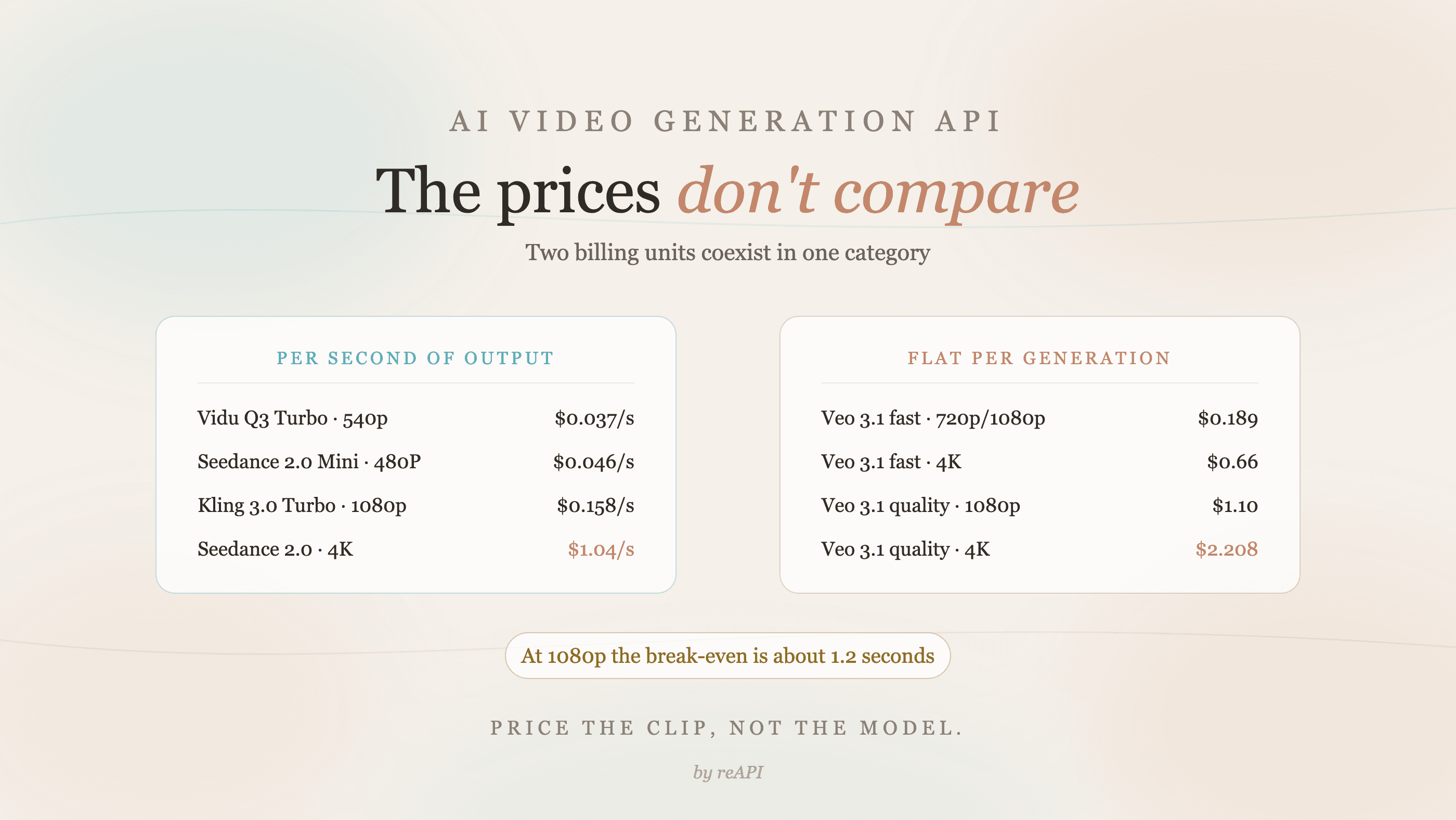
AI Video Generation API: Why the Prices Don't Compare
AI video generation API rates use two incompatible billing units: per second and flat per generation. Where the break-even sits and how to price a real clip.
Suno API Pricing: Every Operation and Your Monthly Cost
Suno API pricing by operation: see all 18 async models, whole-credit charges, two-track billing, V6 variant prices, and clear monthly music generation budgets.
Veo 3.1 vs Seedance 2.0: Picking a Video Model in 2026
Picking Veo 3.1 vs Seedance 2.0 in 2026? Two very different bets in AI video. Capability, multi-shot, audio, resolution, and price with sourced numbers.