Wan 2.7 Video API: 1080p, Audio, Pricing, and Limits (2026)
Use the Wan 2.7 Video API for text, image, reference, and video editing workflows. Learn 1080p pricing, audio controls, 2–15s limits, and code.
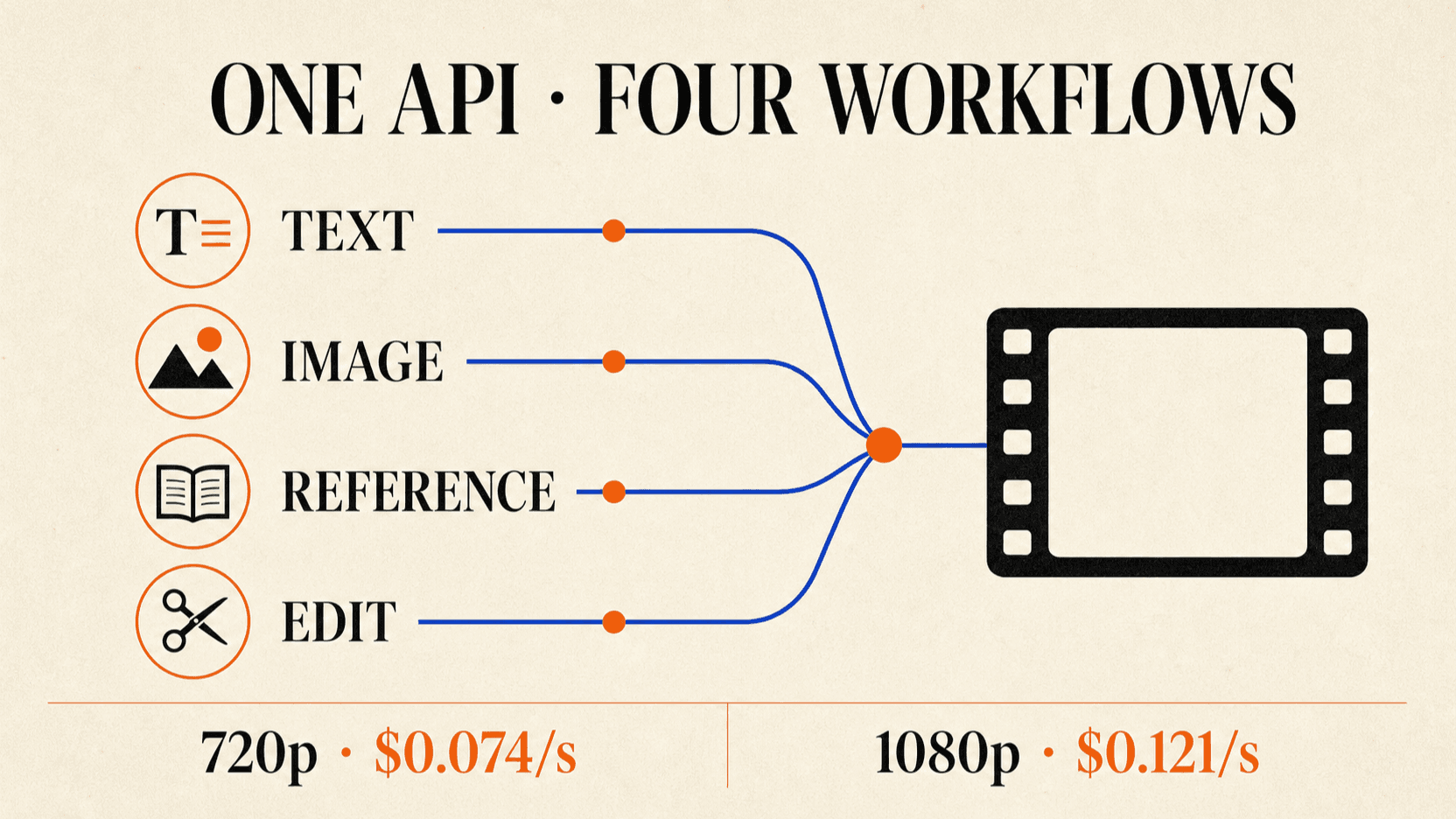
The Wan 2.7 Video API covers more than text-to-video. The same model family can generate from text, animate first and last frames, continue an existing clip, use reference images or videos, accept driving audio, and edit video. It supports 720p and 1080p output with integer durations from 2 to 15 seconds.
That breadth creates one practical problem: request shape determines the mode, and mode affects what is billable. A five-second text-to-video job is not always priced like a five-second reference-to-video or edit job.
TL;DR
- Wan 2.7 supports 720p and 1080p, five aspect ratios, and 2–15 second outputs.[1]
- Text-to-video accepts an optional audio file; without one, the model can generate matching background music or sound effects.
- reAPI currently displays $0.074/s at 720p and $0.121/s at 1080p.
- The reAPI umbrella ID is
wan2.7-video; inputs determine whether the job is text, image, reference, continuation, or edit. - Generated URLs are temporary. Download results to durable storage rather than serving the provider URL in a product.
Wan 2.7 Video API specifications
| Specification | Wan 2.7 Video |
|---|---|
| reAPI model ID | wan2.7-video |
| Output resolution | 720p, 1080p |
| Duration | Any integer from 2 to 15 seconds |
| Aspect ratios | 16:9, 9:16, 1:1, 4:3, 3:4 |
| Frame rate | 30 fps |
| Text prompt limit | 5,000 characters |
| Negative prompt limit | 500 characters |
| Custom audio | WAV or MP3, 2–30 seconds, up to 15MB |
| Prompt extension | Optional, enabled by default |
| Watermark | Optional, disabled by default |
| API pattern | Asynchronous task creation and polling |
Alibaba's official HTTP API requires asynchronous invocation for Wan 2.7. After submission, the task ID and result URL remain available for 24 hours.[1] reAPI normalizes task submission behind its video endpoint, but your application still needs to persist the returned job ID, poll with backoff, and copy the finished asset into permanent storage.
Wan 2.7 Video API pricing by resolution
Wan 2.7 uses per-second billing. The current reAPI rate card applies a 10% platform margin to a discounted upstream rate and rounds the completed request to whole credits.
| Resolution | Current reAPI display rate | Upstream list rate | 5s reAPI job | 15s reAPI job |
|---|---|---|---|---|
| 720p | $0.074/s | $0.083/s | $0.366 | $1.096 |
| 1080p | $0.121/s | $0.137/s | $0.603 | $1.809 |
The 5- and 15-second examples use aggregate request rounding, which is why they can be slightly lower than multiplying the displayed rounded rate by duration. Rates were checked on August 1, 2026.
For text-to-video and ordinary image-to-video, the billable count is the output duration. Reference-to-video and video editing can also include probed source video duration. Budget those modes from the estimator or returned usage rather than assuming the output slider is the entire bill.
How to call Wan 2.7 through reAPI
A text-to-video request is the smallest useful example:
curl https://reapi.ai/api/v1/videos/generations \
  -H "Authorization: Bearer $REAPI_API_KEY" \
  -H "Content-Type: application/json" \
  -d '{
    "model": "wan2.7-video",
    "prompt": "Generate a single shot. A paper boat drifts down a rain-soaked city street at dusk. Slow low-angle tracking camera, warm shop reflections, natural rain and distant traffic audio.",
    "negative_prompt": "text, logo, watermark, camera shake",
    "size": "16:9",
    "resolution": "1080P",
    "duration": 5,
    "prompt_extend": true,
    "watermark": false,
    "seed": 31415
  }'
The Wan 2.7 Video model page exposes the available modes, while the API documentation should be used for the current payload schema.
The mode is implicit. Do not add a fictional mode: "text-to-video" field.
Instead, supply the media fields for the workflow you want.
Choosing the correct Wan 2.7 input mode
Text-to-video
Provide prompt and common output controls. You can also pass audio_url for a
custom soundtrack. Alibaba says that when audio is omitted, Wan 2.7 can produce
matching background music or effects.[1]
First-frame or first-and-last-frame video
Use image_urls for a simple first-frame workflow or image_with_roles when
the images need explicit first_frame and last_frame roles. The first image
usually determines output composition and approximate aspect ratio.
Video continuation
Provide one source through video_urls. The source clip is continued until the
requested total duration. For example, a 3-second source with duration: 10
produces roughly seven new seconds and a ten-second combined result.
Reference-to-video
Use reference_image_urls, reference_video_urls, or reference_voice_urls
to preserve appearance, motion, or voice characteristics. The current reAPI
surface allows up to five URLs in each reference category.
Video editing
Provide video_url and an edit prompt. Up to four supporting images can guide
replacement or styling. audio_setting: "origin" favors source audio;
"auto" lets the workflow decide how audio is handled.
How to write Wan 2.7 prompts
Wan 2.7 interprets shot structure from the prompt. The older shot_type field
does not control Wan 2.7 text-to-video. To request one continuous shot, say
“Generate a single shot.” For multi-shot work, name each shot and give it a time
range.[1]
Generate a multi-shot video.
Shot 1 [0–4s]: wide shot of a quiet train platform before sunrise.
Shot 2 [4–8s]: medium tracking shot as a traveler walks beside the train.
Shot 3 [8–12s]: close-up of a paper ticket bending in the wind.
Natural station ambience, no dialogue, restrained camera motion.
Keep the timeline inside the requested duration. If three shots each imply ten
seconds but the API asks for a six-second output, the model has to compress or
drop instructions. The official prompt guide also recommends naming references
as Image 1 or Video 1 when several assets are present.[3]
Audio behavior and edge cases
Custom audio can drive timing, dialogue, or background sound, but the durations need to match. If audio is longer than the requested video, it is truncated. If it is shorter, the remainder can be silent. Pre-trim the audio when the exact ending matters.
For lip-sync or voice reference work, use clean speech with limited background noise. A soundtrack that mixes music, overlapping dialogue, and environmental noise gives the model less reliable timing evidence than a dedicated voice track.
Also remember that audio changes rights and consent obligations. A technically valid reference voice is not evidence that you have permission to clone or publish it.
Common integration mistakes
Treating generation as synchronous
Video jobs can take minutes. Store the task ID, poll with exponential backoff, handle failure states, and make the UI resumable after a page refresh.
Serving the temporary result URL
Alibaba's result URLs expire after 24 hours. Download successful results and upload them to your own object storage before returning a permanent asset URL.
Assuming 1080p is always the best test setting
Prototype prompts at 720p, then rerun selected shots at 1080p. That keeps prompt iteration cheaper while preserving final delivery quality.
Ignoring billable input duration
Reference-video and edit workflows may include source duration in the bill. Log request mode, source length, output length, resolution, and final charge.
For a broader comparison of incompatible billing units, read AI video generation API pricing. If your workflow starts from a still image and needs a different motion model, the Grok Imagine Video 1.5 API guide explains its image-to-video-only surface.
FAQ
How long can Wan 2.7 videos be?
Wan 2.7 accepts integer durations from 2 to 15 seconds for its primary text and image workflows.
Does Wan 2.7 support 1080p?
Yes. It supports 720p and 1080p. Resolution affects per-second price.
Can Wan 2.7 generate audio?
Yes. Without a custom audio file, the text-to-video route can generate matching background music or sound effects. It also accepts WAV or MP3 input.
Does Wan 2.7 support first and last frames?
Yes. Its image-to-video API supports first-frame and first-plus-last-frame workflows, along with continuation from an existing clip.
How much does a five-second Wan 2.7 video cost on reAPI?
At the rates checked on August 1, 2026, an ordinary five-second job is about $0.366 at 720p or $0.603 at 1080p. Input-billed reference and edit modes can cost more.
Conclusion
The Wan 2.7 Video API is valuable because one family covers generation, continuation, reference control, audio, and editing. The integration works best when the application determines the request mode explicitly, budgets resolution and billable duration correctly, and treats job polling and asset persistence as first-class parts of the product.
References
- Alibaba Cloud Model Studio. Wan2.7 text-to-video API reference. alibabacloud.com/help/en/model-studio/text-to-video-api-reference
- Alibaba Cloud Model Studio. Wan2.7 image-to-video API reference. alibabacloud.com/help/en/model-studio/image-to-video-general-api-reference
- Alibaba Cloud Model Studio. Wan video prompt guide. alibabacloud.com/help/en/model-studio/text-to-video-prompt
Author

Categories
More Posts

OpenRouter Pricing: Fees, Free Model Limits and a Cheaper Option
OpenRouter pricing explained: list-price tokens, the 5.5% credit fee, free model daily limits, credit expiry and refunds, and where reAPI charges less per token.
What Can reAPI Do for You? Image, Video & LLM Use Cases
What can reAPI do today? Separate chat and media APIs cover image, video, audio, and language models, with real use cases and a setup checklist.
Suno API Key: Create Credentials and Make a First Call
Get a Suno API key for reAPI, set Bearer authentication, send a first request in four languages, poll the result, and fix common key, balance, or task errors.