GPT Image 2.5 Model Not Found: Fix Codex and API Access
Fix GPT Image 2.5 model not found errors by checking model IDs, Image API versus Responses fields, Codex tools and account access before retrying requests.
For a GPT Image 2.5 model not found error, first check the exact model ID and where you put it. OpenAI documents gpt-image-2.5-flare and gpt-image-2.5-sunburst. In the Image API, that ID belongs in the request's model field. In the Responses API, it belongs inside the image generation tool configuration.[1]
Codex adds a separate question: whether its built-in image tool is available and exposes the model choice you need. OpenAI announced Images 2.5 for Codex on September 8, 2026, but the current image-generation how-to still names gpt-image-2 for built-in generation. That documentation mismatch prevents a reliable claim that every Codex session lets you select either new variant.[2][3]
TL;DR
- The API models are released. The launch announcement confirms Flare and Sunburst availability; a failed request is not evidence that the release has not happened.[2]
- Use a documented variant ID. The model pages list
gpt-image-2.5-flareandgpt-image-2.5-sunburst, with dated snapshots also available.[4][5] - Put the image model in the correct field. Responses uses a supported mainline model at the top level and an image model in
tools.[1] - Check for an actual Codex tool call. A public issue reports a session with the imagegen skill available but no callable image tool; it does not establish a universal outage or its cause.[6]
- Treat resource, permission and rate-limit errors separately. OpenAI's error guide assigns them different checks and recovery steps.[7]
Locate the GPT Image 2.5 model not found failure
Start with the surface that produced the message. An API response, a local helper script, a Codex conversation and a ChatGPT mobile screen do not expose the same configuration. Changing a model string is useful only when that string actually reaches a service that accepts it.
Capture the request URL, exact model ID, error text and whether an HTTP request was sent. Keep credentials out of the record. If a request ID is provided, retain it with the time of the failure. These details let you trace the failure to a particular request or tool.
| Where the failure appears | First check | What it can establish |
|---|---|---|
| Your Image API request | Endpoint and top-level image model ID | Whether the request follows the documented image API shape |
| Your Responses request | Mainline model and image tool's model field | Whether the two model roles are configured correctly |
| Codex before any image call | Whether a callable image tool is available | Whether generation was attempted at all |
| A local wrapper before HTTP | Its accepted options and validation error | Whether the helper rejected the request locally |
| An API permission or quota response | Key, project, organization and returned error | Which access or usage condition needs attention |
The first two checks come from OpenAI's image guide. The distinction between an unavailable Codex tool and a failed generation is illustrated by the public issue; access errors have their own documented handling.[1][6][7]
The search phrase “model not on API” does not identify a cause on its own. Check the response body before assuming a regional restriction, an unsupported account or an unreleased model. Those are different situations, and none follows merely from the wording of the search query.
Correct the model ID and API request shape
The published OpenAI variant names are:
gpt-image-2.5-flare
gpt-image-2.5-sunburst
The model pages also list gpt-image-2.5-flare-2026-09-08 and gpt-image-2.5-sunburst-2026-09-08 as dated snapshots. For a minimal first request, use a documented variant name rather than the family label GPT Image 2.5 or an invented shortened ID.[4][5]
Image API: select the image model directly
This JavaScript example follows the official Image API pattern. It requires the OpenAI SDK and an API key in the environment. The request has been checked against the documentation; no paid generation was run for this article.[1]
import OpenAI from "openai";
import { writeFile } from "node:fs/promises";

const client = new OpenAI();

const result = await client.images.generate({
  model: "gpt-image-2.5-flare",
  prompt: "A green ceramic cup on an ivory table, soft window light",
  size: "1024x1024",
  quality: "medium",
  output_format: "png",
});

const encoded = result.data?.[0]?.b64_json;
if (!encoded) throw new Error("The response did not include an image");

await writeFile("cup.png", Buffer.from(encoded, "base64"));
Keep this first request simple. Add references, masks or custom dimensions after you have established that the endpoint and account can use the model. If the SDK rejects an option before sending the request, inspect the installed SDK or wrapper's validation. A local rejection cannot tell you whether the remote model would have accepted a valid request.
Responses API: separate the conversation and image models
In Responses, the top-level model coordinates the request and calls the image generation tool. The image variant is configured inside that tool. The official guide currently demonstrates this arrangement with gpt-6-astra:[1]
const response = await client.responses.create({
  model: "gpt-6-astra",
  input: "Generate an image of a green ceramic cup on an ivory table",
  tools: [
    { type: "image_generation", model: "gpt-image-2.5-sunburst" },
  ],
});
Putting Sunburst in the top-level field does not follow this documented pattern. Correct the role of each field before troubleshooting account access. Also confirm that the mainline model you select supports the image generation tool; the guide directs readers to its model detail page for that check.[1]
Use the Codex image workflow, then inspect availability
In the desktop app, the official how-to says to request an image from the composer and attach a reference when needed. In an interactive CLI session, it documents describing the image or invoking the imagegen skill explicitly. A prompt can therefore start with:[3]
$imagegen Create a square illustration of a green ceramic cup on an
ivory table. Use soft window light and leave space for a headline.
This invokes an image workflow. It does not establish that the built-in generator will use a specific API variant. The reviewed how-to still identifies its built-in image model as gpt-image-2, while the newer release announcement includes Images 2.5 in Codex. Neither page documents a built-in Flare/Sunburst selector.[3][2]
If you need an exact variant for a comparison or reproducible integration, use the documented API model field. A successful built-in image result proves that image generation worked in that session; without model identification, it does not prove that Sunburst produced it.
A loaded skill does not prove a tool is callable
The public Codex issue describes a desktop session that could load imagegen instructions but had no callable built-in image-generation tool. No generation request was made. The reporter explicitly leaves the cause unresolved, including whether eligibility, configuration or rollout state affected the session.[6]
That report supports a useful diagnostic distinction, not a claim that Codex lacks image generation generally. Ask whether the session can actually call its image tool. If it cannot, changing artistic instructions will not diagnose the missing capability.
Record the app or CLI version, sign-in mode and the missing-tool symptom. A fresh session can help establish whether the behavior repeats, but it is a diagnostic step rather than a documented cure. If reporting the problem, distinguish “no image tool was available” from “the image tool returned an error.”
Follow the error's access checks
OpenAI distinguishes a missing resource from insufficient permission. Its error guide describes NotFoundError as a resource-identifier problem and PermissionDeniedError as an access problem requiring the correct key, organization and resource.[7]
| Returned condition | Useful next action |
|---|---|
Missing resource or NotFoundError | Recheck the exact identifier and API endpoint |
| Permission denied | Check the key, organization, project and intended resource |
| Authentication failure | Confirm the request is using the intended valid credential |
| Unsupported country or region | Read the supported-access requirements associated with that error |
| Request rate limit | Pace requests and follow the returned retry guidance |
| Balance or spend-limit error | Inspect the specific balance or limit named in the response |
These checks follow the error guide; they are not alternate explanations to assign to every “model not found” message.[7] Check identifiers and account context before repeating the request. Retain the original error so you can see whether a configuration change actually resolved it.
OpenAI also says GPT Image access may require API organization verification. Verification is only part of eligibility: its help article explains that approval for one product or access path does not necessarily activate another.[1][8] Follow the verification or access notice for the organization making the request rather than assuming that another working OpenAI product proves API eligibility.
Keep reAPI model names and responses with their endpoint
reAPI documents Flare and Sunburst on POST https://reapi.ai/api/v1/images/generations. Its public Official channel adds -official to the variant ID. That suffix belongs to the reAPI configuration; the OpenAI model pages list the unsuffixed names shown earlier.[9][4][5]
A reAPI request returns a task ID. Poll the task endpoint until it completes or fails, then read the image URLs from the completed output. Do not apply the direct OpenAI example's immediate b64_json handling to this asynchronous response.[9]
If you are updating code from the GPT Image 2 integration walkthrough, recheck model names, parameters and result handling against the current documentation. Preserve the URL, credential type and response shape as one coherent configuration.
FAQ
Has GPT Image 2.5 actually been released?
Yes. OpenAI's September 8, 2026 announcement confirms Images 2.5 and the Flare and Sunburst API models. It also announces rollout to Codex and ChatGPT.[2]
Is gpt-image-2.5 the model ID I should send?
Use a documented variant ID: gpt-image-2.5-flare or gpt-image-2.5-sunburst. Those are the IDs listed on the official model pages, alongside their dated snapshots.[4][5]
Does Codex support GPT Image 2.5?
The launch announcement includes Codex. However, its current built-in image guide still names gpt-image-2 and does not document selecting Flare or Sunburst. Use an explicit API request when variant identity matters.[2][3][1]
Why does my JavaScript request reject the model?
First check whether it is an Image API request or a Responses request. The image model occupies different fields. Then determine whether the error came from local validation or an actual API response.[1]
Does an iOS error mean the API model is unavailable?
No such conclusion follows from the device alone. ChatGPT's help page lists image access on iOS, while API access has its own endpoint and account requirements. Record which app and operation returned the error.[10][1]
Will changing the prompt fix a missing image tool?
A missing callable tool is a different problem from a rejected image prompt. The public Codex report describes a failure before any generation call, so it supplies no evidence about prompt acceptance.[6]
Should I retry every error automatically?
No. Follow the returned error. Rate limits have pacing guidance; invalid identifiers and permissions need configuration or access checks. Keep the original error available instead of replacing it with a generic retry message.[7]
Verify the request that actually failed
Resolve a GPT Image 2.5 model not found problem by identifying the endpoint, model field, credential context and actual error source. For a reAPI integration, choose the variant on the model page, then follow the current request and polling documentation. Confirm that a request reaches the documented image workflow before adding the rest of your application logic.
References
-
OpenAI. Image generation API guide. Retrieved September 13, 2026.
-
OpenAI. Introducing ChatGPT Images 2.5. Retrieved September 13, 2026.
-
OpenAI. Image generation in Codex and ChatGPT. Retrieved September 13, 2026.
-
OpenAI. GPT Image 2.5 Flare model reference. Retrieved September 13, 2026.
-
OpenAI. GPT Image 2.5 Sunburst model reference. Retrieved September 13, 2026.
-
openai/codex, GitHub user report. Issue 44039: built-in image tool unavailable on rollout day. Retrieved September 13, 2026.
-
OpenAI. API error codes and library error types. Retrieved September 13, 2026.
-
OpenAI. API Organization Verification. Retrieved September 13, 2026.
-
reAPI. GPT Image 2.5 API documentation. Retrieved September 13, 2026.
-
OpenAI. Images in ChatGPT. Retrieved September 13, 2026.
Author

Categories
gpt-image-2.5 the model ID I should send?Does Codex support GPT Image 2.5?Why does my JavaScript request reject the model?Does an iOS error mean the API model is unavailable?Will changing the prompt fix a missing image tool?Should I retry every error automatically?Verify the request that actually failedReferencesMore Posts
CLAUDE.md: The Simple File That Makes Coding Agents Better
Learn what CLAUDE.md does, why four simple coding-agent rules went viral, what belongs in the file, and how to build a concise project template that works.
Kling 4.0 Flash API: Is It Out Yet, and What to Use Now
Kling 4.0 Flash is in early access, but is there a Kling 4.0 Flash API? What Kling's API docs, price sheets, and changelog show, and what to build on today.
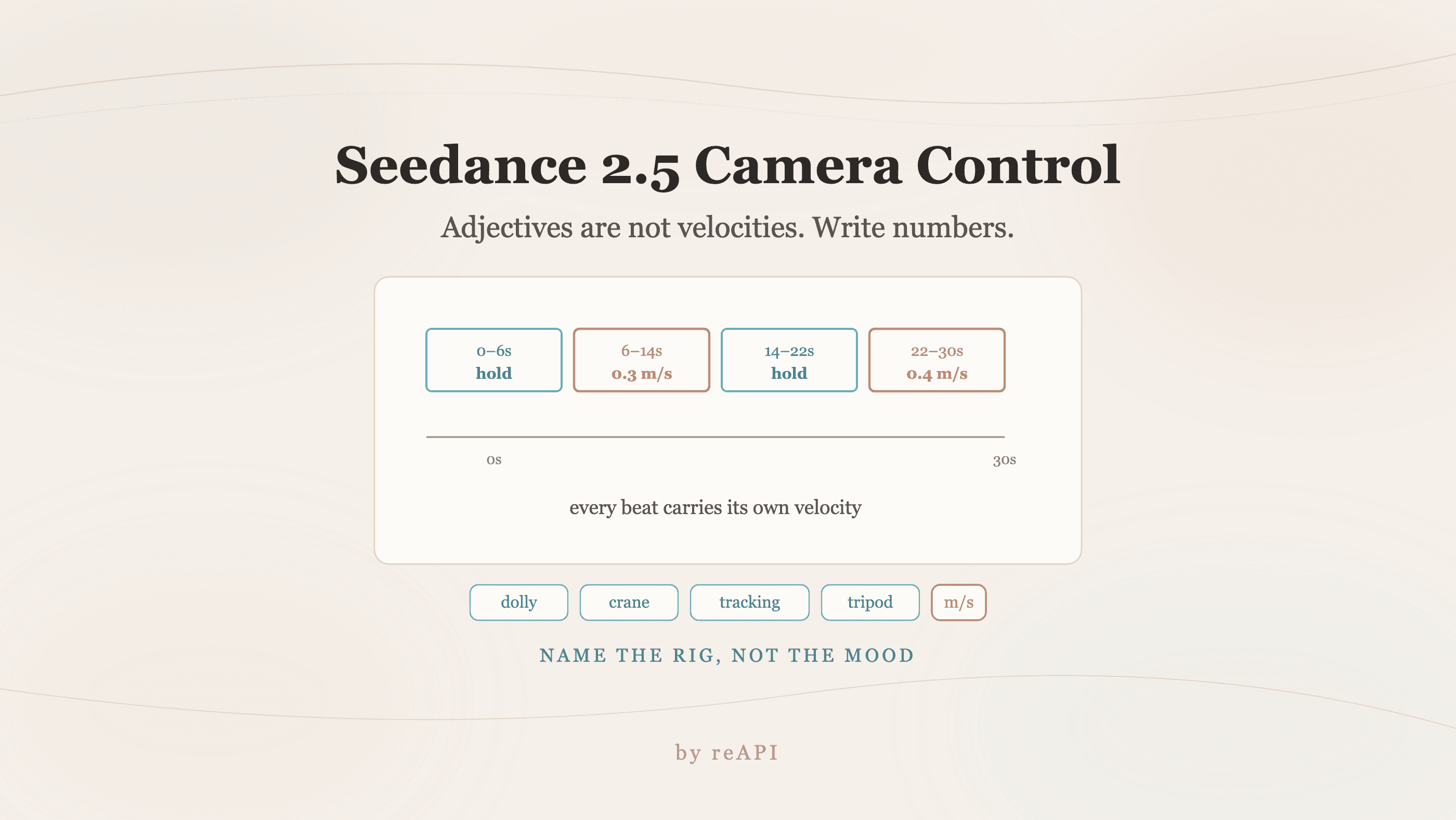
Seedance 2.5 Camera Control: Write Numbers, Not Adjectives
Seedance 2.5 camera control fails on mood words because adjectives map to fast default motion. Use explicit velocities, named rigs, and timestamped beats.