GLM-5.2 API Guide: 1M Context, Pricing, and Coding (2026)
Use the GLM-5.2 API with OpenAI-compatible code. Learn its 1M context, $1.40/$4.40 official pricing, reAPI rates, reasoning controls, and limits.
GLM-5.2 is Z.AI's open-weight flagship for long-horizon coding and agent work. The GLM-5.2 API combines a one-million-token context window, 128K maximum output, thinking that can be disabled, function calling, JSON mode, and an OpenAI-compatible request shape.[1]
Checked on October 23, 2026, Z.AI lists $1.40 per million input tokens, $0.26 for cached input, and $4.40 per million output tokens, all in USD. reAPI’s model page lists $0.90 input and $3 output per million tokens through its compatible gateway; it does not publish a separate cached-input rate.[2][4]
Before running the example, create a key for the api.reapi.ai gateway. The GLM-5.2 model page and authentication documentation, checked on October 23, 2026, specify a separate console and key for this route; a media-generation key for reapi.ai/api/v1 is not the same credential. Use https://api.reapi.ai/v1 as the SDK base URL with model="glm-5.2". reAPI does not currently offer GLM-5.3.
TL;DR
- Model id:
glm-5.2, with the dot. - Context: 1M tokens; maximum output is 131,072 tokens.
- Official price: $1.40 input, $0.26 cached input, $4.40 output per MTok.
- reAPI price: $0.90 input and $3 output per MTok.
- Thinking: enabled by default but switchable off.
- Reasoning effort: accepts seven labels but collapses to three effective
behaviors; default is
max. - Tools: up to 128 functions,
tool_choice: "auto", streamed tool-call arguments. - Main trap: the page slug is
glm-5-2, but API requests must sendglm-5.2.
GLM-5.2 specifications
| Property | GLM-5.2 |
|---|---|
| Vendor | Z.AI |
| Distribution | Open weight |
| API model id | glm-5.2 |
| Context window | 1,000,000 tokens |
| Maximum output | 131,072 tokens |
| Input/output | Text / text |
| Thinking default | Enabled |
| Reasoning default | max |
| Temperature | 0.0–1.0, default 1.0 |
| Top-p | 0.01–1.0, default 0.95 |
| Tools | Up to 128 functions |
| Structured output | JSON object mode, not JSON Schema |
Z.AI positions the model for long-horizon tasks. The long context supports large codebases and document collections, but it should not be treated as a reason to send every file on every turn. Search and context selection still reduce latency and cost.
glm 5.2 pricing
All rates below are USD per million tokens, checked on October 23, 2026. Z.AI’s pricing table marks cached-input storage as limited-time free; that is a temporary storage condition, not a promise of permanently free caching.[2]
| Route | Input / MTok | Cached input | Output / MTok |
|---|---|---|---|
| Z.AI official | $1.40 | $0.26 | $4.40 |
| reAPI | $0.90 | Not separately published | $3.00 |
For a monthly workload with 100M uncached input tokens and 20M output tokens, the simple standard-rate calculation is:
Z.AI: 100 × $1.40 + 20 × $4.40 = $228
reAPI: 100 × $0.90 + 20 × $3.00 = $150
That example assumes the same token use and no cache hits. Z.AI's $0.26 cached rate can materially change a workload with repeated system prompts, tool definitions, or stable repository context. Count cached input separately from uncached input, rather than charging both rates for the same tokens:
Z.AI token cost = uncached input MTok × $1.40
                 + cached input MTok × $0.26
                 + output MTok × $4.40
For example, if all 100M input tokens in the workload were billed at the cached rate, Z.AI’s token cost would be $114, below the $150 reAPI example. That is a hypothetical cache-hit case, not an expected hit rate: actual misses and any other billable services change the result. Compare your measured input mix, not just the uncached headline price.
The reasoning-effort labels collapse into three behaviors
GLM-5.2 accepts more effort strings than it meaningfully executes. According to Z.AI's request behavior, the values map as follows:
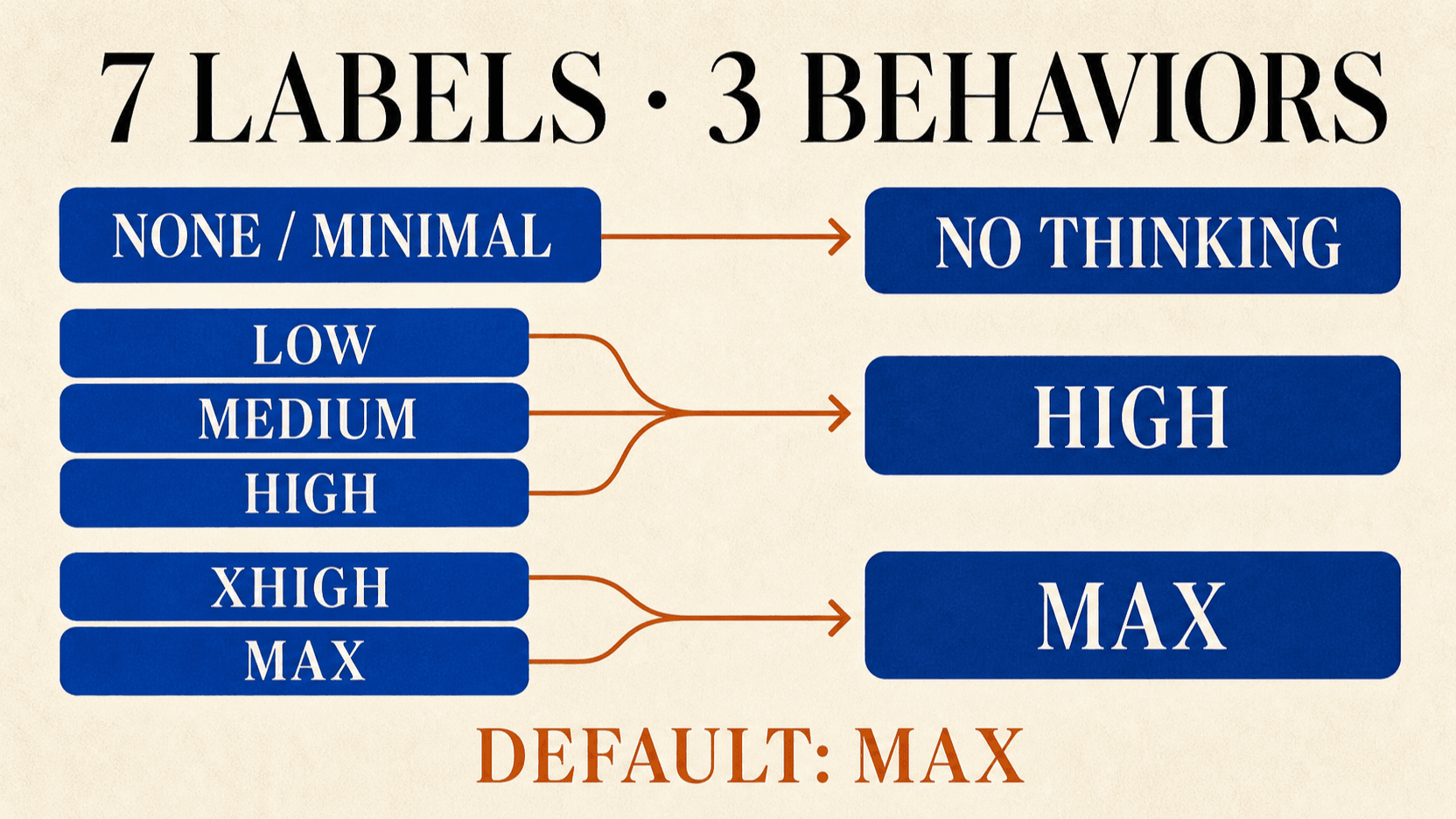
| Values sent | Effective behavior |
|---|---|
none, minimal | Skip thinking |
low, medium, high | High reasoning |
xhigh, max | Maximum reasoning |
The default is max, which is expensive for routine classification, extraction,
and simple code edits. If the task needs reasoning but not the maximum, send
high. If it is deterministic and simple, compare none with thinking
disabled.
reasoning_effort only matters while thinking is enabled. Do not expect max
to override thinking: {"type": "disabled"}.
How conversation thinking is handled
GLM-5.2 separates visible content from reasoning_content. With the default
clear_thinking: true, prior reasoning is removed rather than preserved across
turns. Set it to false only when the complete reasoning history remains
relevant and your application can replay the full ordered messages correctly.[3]
This differs from Kimi K3, where preserved thinking is mandatory. GLM-5.2 lets you choose between a cleaner context and continuity of hidden work.
glm 5.2 api key
Choose the service before creating a key. Both routes use glm-5.2, but their
credentials, balances, and base URLs belong to different accounts.
| Service | Key to create | OpenAI SDK base URL |
|---|---|---|
| Z.AI official API | Standard API Key in the Z.AI API platform | https://api.z.ai/api/paas/v4/ |
| reAPI GLM-5.2 gateway | Key from the separate api.reapi.ai console | https://api.reapi.ai/v1 |
For Z.AI, register or sign in to its API platform, create a Standard API Key in the API Keys section, and check that the account has the balance needed for your requests. Its Quick Start links the key-management and billing pages.[5]
For reAPI, open the GLM-5.2 authentication documentation,
follow its link to the separate api.reapi.ai console, and create the gateway
key there. Use that key with the reAPI base URL shown above. A Z.AI key or a
key for the reapi.ai/api/v1 service cannot be substituted for this gateway
credential. Check the matching account’s balance before sending a request.[4]
The Python example below uses the reAPI gateway. To use Z.AI directly, replace both the key and base URL together; changing only the model name does not switch the service.
Calling GLM-5.2 with the OpenAI Python SDK
from openai import OpenAI

client = OpenAI(
    api_key="YOUR_REAPI_KEY",
    base_url="https://api.reapi.ai/v1",
)

stream = client.chat.completions.create(
    model="glm-5.2",
    messages=[
        {"role": "user", "content": "Refactor this module and add tests."}
    ],
    max_tokens=8192,
    stream=True,
    extra_body={
        "thinking": {"type": "enabled"},
        "reasoning_effort": "high",
    },
)

for chunk in stream:
    delta = chunk.choices[0].delta
    reasoning = getattr(delta, "reasoning_content", None)
    if reasoning:
        print(reasoning, end="")
    if delta.content:
        print(delta.content, end="")
The model id contains a dot. glm-5-2 is the website slug and will produce an
unknown-model error if sent in the request body.
Function calling and structured output
GLM-5.2 supports up to 128 function definitions and streams tool-call arguments
when tool_stream is enabled. Its tool_choice behavior is narrower than many
OpenAI models: auto is the supported choice. Design the prompt and tool
descriptions so the model can decide when to call them.
The model supports JSON object mode through:
{
  "response_format": {"type": "json_object"}
}
This is not JSON Schema enforcement. Validate the returned object in your application and retry or repair when required fields are missing.
Temperature, top-p, and stop sequences
Unlike several reasoning models, GLM-5.2 allows temperature and top-p tuning. Z.AI recommends changing one rather than both, because two simultaneous sampling changes make output behavior harder to attribute.[1]
- Use the defaults for general agent work.
- Lower temperature for repeatable extraction or transformation.
- Use one stop string only; the API does not accept a long stop list.
- Keep
max_tokensrealistic. A 128K ceiling is not a target for every call.
For coding agents, reasoning effort and context selection usually affect cost more than small sampling changes.
glm 5.2 hardware requirements
Using either hosted API does not require a local inference GPU. Self-hosting is a different deployment decision: Z.AI publishes BF16 and FP8 checkpoints and labels GLM-5.2 as 744B total parameters, 40B active in its repository. The active count describes computation, not the size of all model weights that a deployment must store or access.[6]
Z.AI’s model card links a vLLM deployment recipe. These are configurations from that recipe, checked on October 23, 2026, rather than a universal minimum for every quantized checkpoint or serving framework:[7]
| Deployment in the vLLM recipe | Documented configuration | Scope |
|---|---|---|
| Native FP8 on a single node | 8 × H200 or H20, 141 GB per GPU | Standard FP8 serving configuration |
| Native FP8 with the full 1M context | 8 × B200, 180 GB per GPU, with FP8 KV cache | Sequence concurrency must fit the remaining cache memory |
| Full-precision BF16 | Multi-node deployment | A different memory requirement from the FP8 checkpoint |
The full-context B200 example starts --max-num-seqs at 32 and tells operators
to tune it to available memory and workload. That starting value is not a
promise that 32 simultaneous one-million-token requests fit. Model weights,
KV cache, and runtime allocations all consume memory; context length and
concurrency change the serving requirement.[7]
The model card does not give one universal minimum GPU specification. Select a particular checkpoint and framework, then check its deployment recipe at your intended context length and concurrency. Do not size the machine from 40B active parameters alone or treat the 1M API limit as proof that a smaller self-hosted configuration can serve the same workload.
The checkpoint’s MIT license permits evaluation of self-hosting, but the weights do not make inference free: GPU rental or purchase, electricity, storage, and operations remain your costs. For occasional requests, compare those costs with the API bill before committing to a cluster.[6]
When to use GLM-5.2
Use it for large-codebase work. The context window and tool support fit repository navigation, migrations, test generation, and long-running repair.
Use it for cost-sensitive agents. Its official and reAPI rates sit well below the flagship Claude and GPT tiers.
Use it when open weights matter. Teams can evaluate self-hosting or private deployment rather than depend exclusively on a closed API.
Avoid it when native image understanding is required. The documented GLM-5.2 API is text in and text out. Choose a vision model for image or video analysis.
Common integration mistakes
- Sending
glm-5-2instead ofglm-5.2. - Leaving the default
maxeffort on every low-value request. - Expecting
response_formatto enforce a JSON Schema. - Setting
tool_choiceto an unsupported forced-tool value. - Tuning temperature and top-p simultaneously.
- Reading only
contentduring streaming and discardingreasoning_contentwithout deciding whether it is needed. - Filling the 1M context window instead of retrieving relevant files.
FAQ
Is GLM-5.2 open source?
Z.AI publishes GLM-5.2’s weights under the MIT license. Its repository lists BF16 and FP8 releases. That license does not include free hardware or hosted API usage; self-hosting still carries infrastructure costs.[6]
How much does the GLM-5.2 API cost?
Z.AI lists $1.40 input, $0.26 cached input, and $4.40 output per million tokens. reAPI currently lists $0.90 input and $3 output.
Does GLM-5.2 support one million tokens?
Yes. Z.AI documents a 1M-token context window and 128K maximum output.
Can thinking be disabled?
Yes. Set thinking.type to disabled, or use a no-thinking effort value where
supported. The default is enabled with maximum reasoning.
Does GLM-5.2 support images?
No on the documented chat model surface. It accepts text and returns text.
Is the GLM-5.2 API OpenAI compatible?
The reAPI route is compatible with OpenAI Chat Completions. Vendor-specific
fields such as thinking and reasoning_effort should be passed through the
SDK's extra-body mechanism.
Conclusion
The GLM-5.2 API is compelling when a one-million-token context, open weights,
and low token prices matter more than native multimodality. The integration is
straightforward once three details are handled correctly: send glm-5.2 with
the dot, lower the default max effort for routine traffic, and treat JSON
mode as syntax—not schema validation.
References
- Z.AI. GLM-5.2 model guide and API behavior. docs.z.ai/guides/llm/glm-5.2
- Z.AI. Model pricing. docs.z.ai/guides/overview/pricing
- Z.AI. Chat Completions API reference. docs.z.ai/api-reference/llm/chat-completion
- reAPI. GLM-5.2 rendered model pricing and separate-gateway authentication. Checked October 23, 2026. Model page; API documentation.
- Z.AI. Quick Start: create a Standard API Key. Checked October 23, 2026. https://docs.z.ai/guides/overview/quick-start
- Z.AI. GLM-5.2 model card, license, and model downloads. Checked October 23, 2026. https://huggingface.co/zai-org/GLM-5.2 ; https://github.com/zai-org/GLM-5
- vLLM. GLM-5.2 deployment recipe: prerequisites and full-context serving. Checked October 23, 2026. https://recipes.vllm.ai/zai-org/GLM-5.2
Further reading
- reAPI. GLM-5.2 API documentation. reapi.ai/docs/glm-5-2
- reAPI. GLM-5.2 model page. reapi.ai/models/glm-5-2
- reAPI. Kimi K3 complete guide. reapi.ai/blog/kimi-k3-complete-guide
Author

Categories
More Posts

GPT-6 Luna vs 5.6 Luna vs 5.6 Terra: Price and Which to Use
GPT-6 Luna vs 5.6 Luna and 5.6 Terra: OpenAI list prices, the official reason Luna got cheaper, what the benchmarks and early A/B tests show, and which to pick.

FLUX 3 vs Seedance 2.5: Keyframes, Duration, and Cost
Choose FLUX 3 or Seedance 2.5 by maximum duration, ordered keyframes, references, editing, native audio, Draft workflow, resolution, and API cost.

GPT Image 2.5 vs Nano Banana 2: Editing and API Guide
Compare GPT Image 2.5 vs Nano Banana 2 for precise edits, search grounding, reference images and output controls, using current OpenAI and Google API docs.