How to Keep AI Video Continuity Across Multiple Clips
Learn to extend AI video across multiple clips with a state ledger, boundary frames, continuation prompts, API calls, continuity checks, and repair rules.
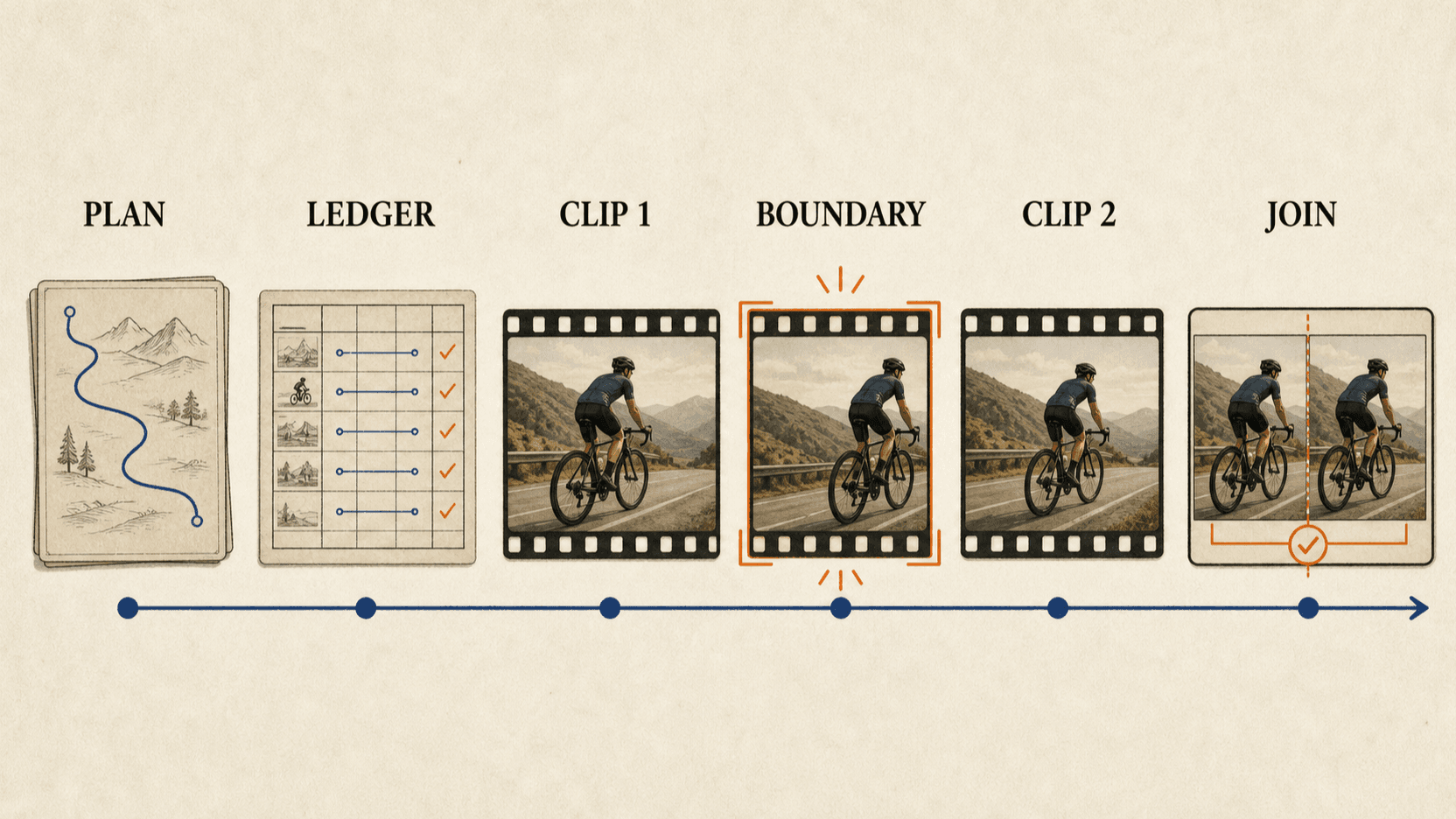
AI video continuity improves when every clip ends with a written and visual handoff to the next clip. The final frame is part of that handoff, but it is not enough. You also need a state ledger that records where characters stand, which way they face, what they hold, what has changed, and what the next shot is allowed to do.
This tutorial builds a sequence longer than one model call. The example uses two Seedance 2.5 generations because ByteDance documents clips up to 30 seconds and multi-round extension.[1] The state-ledger method also applies to shorter models and separate-shot edits.
TL;DR
- Plan the full sequence before generating the first clip.
- Split at a stable visual state, not in the middle of the hardest action.
- Record identity, position, direction, props, environment, light, camera, and unresolved action in a state ledger.
- Request the last frame of the first clip and use it as a boundary anchor.
- Begin the continuation prompt by restating the inherited state.
- Review the join frame-by-frame and then at normal speed.
- Repair only the boundary or affected clip; do not regenerate the entire story.
Why a final frame alone does not preserve continuity
A frame shows appearance and position at one instant. It does not fully explain movement direction, character intention, prop history, audio timing, or what must happen next.
Imagine a cyclist at the right edge of frame. The image does not tell the next generation whether the cyclist arrived from the left, is about to exit right, or has stopped and will turn around. The state ledger provides that missing temporal information.
Think of continuity as eight connected states:
| State | Example |
|---|---|
| Identity | same rider, helmet, blue jacket, black bicycle |
| Position | rider at right third, bicycle parallel to road |
| Direction | traveling left to right, no reversal |
| Pose/action | right foot down, hands on handlebars, decelerating |
| Props | red backpack remains on rider; water bottle in frame cage |
| Environment | wet mountain road, pine trees, morning fog |
| Light | soft backlight from upper left |
| Camera/audio | low tracking view; tire noise continues under cut |
A stable sequence preserves all eight unless the story deliberately changes one.
Step 1: Plan the complete sequence before the first call
Write the full action in plain language. Then divide it into clips based on natural handoff states.
Full sequence:
A cyclist descends through fog, brakes before a fallen branch, carries the bike
around it, remounts, and continues toward a sunlit opening.

Clip 1:
Descent and braking. End with the bicycle stopped on the right side of the road,
front wheel turned slightly left, rider's right foot on the ground.

Clip 2:
Rider dismounts, carries the bicycle around the branch, remounts, and exits
toward the sunlit opening.
The split occurs after the braking action settles. It does not occur while the front wheel is turning or the foot is moving toward the ground. Stable handoffs give the continuation less ambiguity.
Step 2: Create the master continuity bible
The continuity bible contains details that apply to the whole sequence.
{
  "character": {
    "identity": "same adult cyclist",
    "wardrobe": "matte black helmet, blue rain jacket, black pants",
    "fixed_details": "red backpack, no gloves"
  },
  "vehicle": {
    "type": "black hardtail mountain bike",
    "fixed_details": "water bottle in down-tube cage, no rear suspension"
  },
  "world": {
    "location": "wet mountain road through pine forest",
    "weather": "light fog, no active rain",
    "light": "soft morning backlight from upper left"
  },
  "camera_language": {
    "height": "low waist-height tracking",
    "lens": "moderate wide look",
    "movement": "smooth with small natural vibration",
    "screen_direction": "left to right"
  },
  "audio": {
    "bed": "tire noise, light wind, distant birds",
    "music": "none"
  }
}
Reuse this information across every clip. A separate character consistency guide covers reference design; the continuity bible records the production decisions that surround identity.
Step 3: Add a clip-specific state ledger
The ledger has three columns: inherited state, changes during this clip, and required end state.
{
  "clip_id": "01-descent-and-stop",
  "inherits": {
    "rider_position": "left third",
    "direction": "left to right",
    "speed": "moderate downhill",
    "hands": "both on handlebars",
    "bike": "upright and rolling"
  },
  "changes": [
    "fallen branch becomes visible",
    "rider brakes without reversing",
    "bike moves to right side of road",
    "right foot lowers to ground"
  ],
  "end_state": {
    "rider_position": "right third",
    "direction": "still facing right",
    "speed": "stopped",
    "right_foot": "on ground",
    "left_foot": "on pedal",
    "front_wheel": "turned slightly left",
    "hands": "both on handlebars",
    "branch": "two meters ahead",
    "camera": "stable low three-quarter view",
    "hold": "one second"
  }
}
The next clip's inherits object should match this end_state. If they differ,
you have found a continuity problem before spending on generation.
Step 4: Generate the first clip with a deliberate handoff
The prompt should devote enough attention to the final state.
The same cyclist in a matte black helmet, blue rain jacket, black pants, and red
backpack rides a black hardtail mountain bike from left to right on a wet forest
road. Low waist-height tracking camera, soft morning backlight from upper left.

The cyclist sees a fallen branch, brakes gradually without reversing, moves to
the right side of the road, and stops. The right foot lowers to the ground while
the left foot stays on the pedal. Both hands remain on the handlebars. The front
wheel points slightly left. End on a stable low three-quarter view with the
branch two meters ahead. Hold the exact final state for one second. No cut,
wardrobe change, extra rider, or direction reversal.
Request the last frame in the API call:
curl https://reapi.ai/api/v1/videos/generations \
  -H "Authorization: Bearer YOUR_API_KEY" \
  -H "Content-Type: application/json" \
  -d '{
    "model": "doubao-seedance-2.5-face",
    "prompt": "The cyclist rides left to right, brakes before a fallen branch, and stops on the right side of the road. Right foot on ground, left foot on pedal, both hands on handlebars, front wheel slightly left. Hold the exact final state for one second. Preserve rider, bicycle, wardrobe, road, light, and direction.",
    "image_urls": ["https://example.com/rider-and-bike-reference.jpg"],
    "resolution": "720p",
    "size": "16:9",
    "duration": 12,
    "generate_audio": true,
    "return_last_frame": true
  }'
When the task completes, reAPI returns the generated video URL and, when
requested, output.last_frame_url.[2]
Step 5: Audit the boundary before continuing
Do not automatically forward the last frame. Confirm that it represents the written end state.
{
  "identity": "pass",
  "screen_direction": "pass",
  "right_foot_grounded": "pass",
  "left_foot_on_pedal": "repair",
  "both_hands_on_handlebars": "pass",
  "front_wheel_direction": "pass",
  "branch_distance": "pass",
  "stable_hold": "pass"
}
If a hard continuity condition fails, repair clip one or choose an earlier valid frame. Forwarding a bad boundary makes the next generation inherit the error.
Step 6: Build the continuation request
Start the second prompt by restating the inherited state, then describe only the new changes.
Begin exactly from Image 1. The same cyclist is stopped on the right side of the
wet road, facing right. Right foot is on the ground, left foot is on the pedal,
both hands hold the handlebars, front wheel points slightly left, and the fallen
branch is two meters ahead. Preserve the same rider, helmet, blue jacket, red
backpack, black bicycle, water bottle, fog, and light direction.

The rider dismounts to the left side without turning the bicycle around, lifts
the bicycle by the frame, walks around the near end of the branch, places both
wheels back on the road facing right, remounts, and rides toward the brighter
opening. Maintain left-to-right screen direction. End with the rider exiting
frame right. No new props, wardrobe changes, weather changes, or cuts.
Use the returned image as an explicit first frame:
curl https://reapi.ai/api/v1/videos/generations \
  -H "Authorization: Bearer YOUR_API_KEY" \
  -H "Content-Type: application/json" \
  -d '{
    "model": "doubao-seedance-2.5-face",
    "prompt": "Begin exactly from Image 1. Preserve rider, wardrobe, bicycle, prop placement, fog, light, and left-to-right direction. The rider dismounts, carries the bicycle around the branch without reversing it, remounts, and exits frame right. No cuts or new objects.",
    "image_with_roles": [
      {
        "url": "LAST_FRAME_URL_FROM_CLIP_1",
        "role": "first_frame"
      }
    ],
    "resolution": "720p",
    "size": "adaptive",
    "duration": 14,
    "generate_audio": true,
    "return_last_frame": true
  }'
On the current reAPI route, first-frame roles use image_with_roles, require
adaptive sizing, and cannot be mixed with image_urls, video_urls, or
audio_urls in the same request. This is a gateway rule that should be handled
in request validation rather than discovered after submission.[2]
If you need several identity references instead of a hard first-frame role, use a reference-image workflow and describe the previous final frame as one of the ordered inputs. That provides more identity evidence but a softer boundary. The right choice depends on which failure is more expensive.
Step 7: Review the join at three speeds
Place the clips next to each other in an editor.
Frame-by-frame
Compare the final frame of clip one and first frames of clip two for body shape, wardrobe, hand position, prop position, bicycle geometry, light, and camera height.
Half speed
Check whether motion restarts unnaturally, a wheel jumps, a limb changes support, or the camera accelerates at the cut.
Normal speed
Judge whether a viewer notices the join. A small texture difference may be invisible in motion; a direction reversal will not be.
Use a boundary report:
{
  "visual_match": "pass",
  "screen_direction": "pass",
  "action_continuation": "repair",
  "camera_velocity": "pass",
  "audio_bed": "repair in edit",
  "note": "clip 2 lifts the left foot before the hands shift to the frame"
}
Step 8: Repair the smallest continuity break
Not every mismatch requires regeneration.
| Problem | Smallest practical repair |
|---|---|
| One or two bad boundary frames | Trim to a cleaner point |
| Audio ambience changes | Replace with one continuous sound bed in edit |
| Camera pauses at the join | Add a short overlap or choose a stable cut |
| Prop switches hands | Regenerate the affected continuation beat |
| Character or vehicle changes | Strengthen the boundary/reference workflow and regenerate clip two |
| Screen direction reverses | Rewrite the inherited direction and regenerate clip two |
| Lighting shifts slightly | Grade in post if identity and geometry pass |
Continuity is not pixel identity. The goal is a believable handoff where story, space, and action remain readable.
Step 9: Scale the ledger to more clips
For a longer project, store one master bible and one ledger per clip.
/sequence
  master-continuity.json
  clip-01-ledger.json
  clip-02-ledger.json
  clip-03-ledger.json
  /references
  /boundary-frames
  /generated
  /approved
Before generating clip three, compare:
clip-02.end_state == clip-03.inheritsAn agent can perform this consistency check automatically. A human should still approve identity, sensitive likenesses, narrative intent, and the final cut.
Common beginner mistakes
Splitting during fast action
Choose a stop, hold, contact, or completed gesture. Mid-motion boundaries force the next generation to infer momentum from one image.
Describing only what changes
The continuation also needs inherited facts. Restate direction, props, position, light, and camera conditions before new action.
Forwarding an invalid last frame
Review it first. A distorted hand or missing prop becomes the starting evidence for the next clip.
Solving visual continuity while ignoring audio
Use one ambience bed across the join when separate generations produce a tonal or volume change.
Regenerating every clip after a late failure
Freeze approved clips. Repair the boundary or the first failed continuation.
FAQ
Is the last frame enough to continue an AI video?
It helps with appearance and position, but not with direction, intent, prop history, or future action. Pair it with a state ledger and continuation prompt.
Where should I split a long sequence?
Split after an action settles: a stop, landing, placed object, closed door, held pose, or stable camera frame.
How many details belong in the state ledger?
Record anything whose unexplained change would distract a viewer or break the next action. Ignore decorative details that can vary safely.
Can I combine a first-frame role with other references?
Not on the current reAPI Seedance 2.5 request surface. image_with_roles cannot
be combined with the other media-reference fields, so choose between a hard
frame boundary and a broader reference set.
Should every clip use the maximum duration?
No. Choose duration around natural actions and handoffs. A shorter complete beat is easier to control than a long clip filled to its limit.
Conclusion
AI video continuity is a handoff discipline. Plan the full sequence, end each clip on a stable state, verify the boundary frame, and make the next prompt inherit a written ledger before introducing new action. This does not eliminate variation, but it turns “make it continue” into a production process you can inspect, repair, and automate.
References
- ByteDance Seed. One-take Creation, Flexible Referencing: Introducing Seedance 2.5. July 31, 2026. seed.bytedance.com
- reAPI. Seedance 2.5 API — Parameters, Modes & Billing. Retrieved August 27, 2026. reapi.ai
- ByteDance Seed. Seedance 2.0 Official Launch. February 12, 2026. seed.bytedance.com
Author

Categories
More Posts

GPT-6 Sol Pricing: API Price, Token Cost and Cache Rates
GPT-6 Sol pricing per million tokens: input, output, cache reads and writes, the 272K long-context rule, Batch, Flex and Fast mode, with worked cost examples.
How to Use GPT Image 2: Text Rendering and Thinking Mode
How to use GPT Image 2: the 99% text rendering that removes the composite step, what Thinking Mode does, where it loses to Nano Banana 2, and prompt changes.

Mammouth.ai Alternatives in 2026: 5 Tools Compared
Comparing Mammouth.ai alternatives in 2026? See how Poe, Perplexity, OpenRouter, HuggingChat, and reAPI differ on models, features, and how you use them.