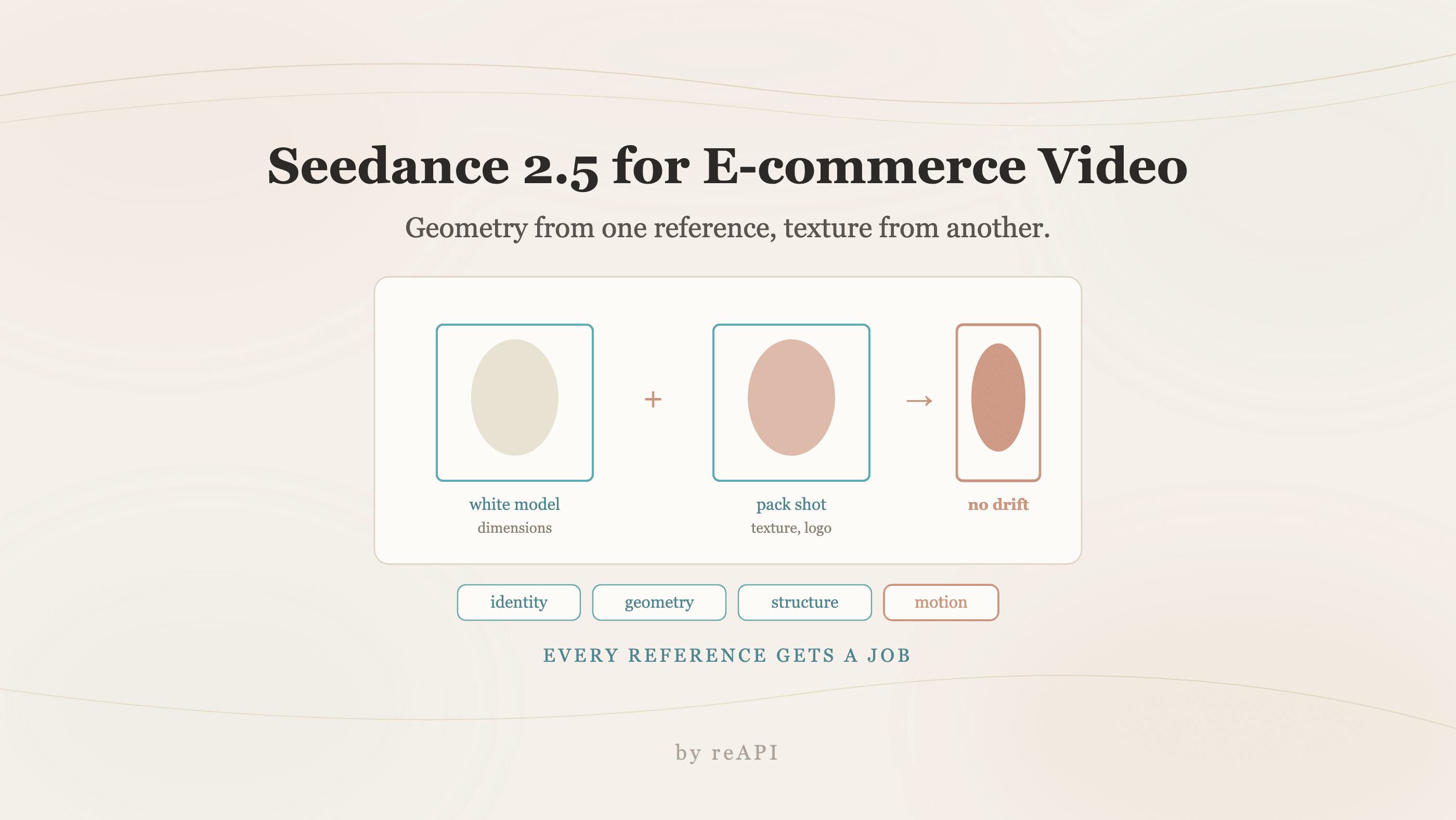
Seedance 2.5 für E-Commerce-Video: Ein echtes Workflow-Setup
Seedance-2.5-Workflow für E-Commerce-Video: Referenzen mit Rollen, Weißmodell gegen Drift, Regions statt Clips bearbeiten, Negativabfragen schreiben.
Das Fehlerszenario bei KI-Produktvideo ist nicht hässliche Ausgabe. Es ist ein Logo, das sich während einer Kamerabewegung verformt, Beleuchtung, die in der Szene springt, und Text, den das Modell erfunden und über deine Verpackung geklebt hat. Das sind die Dinge, die einen Clip für eine Anzeige unbrauchbar machen, und nichts davon wird durch ein besseres Prompt allein behoben.
Ein Seedance-2.5-E-Commerce-Video-Workflow, der im Kontakt mit einer echten Kampagne überlebt, hängt davon ab, wie du die Inputs organisierst, nicht wie du die Anfrage formulierst.
TL;DR
- Weise Rollen an Referenzen zu statt nur Dateien zu dumpen. Produktfotos sind Identitätsanker, Storyboard-Frames sind Struktur, Motion Clips sind Kamera-Orientierung.
- Ein Weißmodell-Referenz fixiert Shape Drift. Füttere eine einfache 3D-Form neben dem Produktfoto, und das Modell respektiert die echten Dimensionen des Objekts während der Kamerabewegung.
- Nutze lokalisierte Bearbeitung, um eine Region zu fixen statt einen 30-Sekunden-Clip wegen eines Beleuchtungsfehlers zu regenerieren.
- Schreibe negative Einschränkungen explizit auf. Kein erfundener Text, keine hinzugefügten Logos, keine Musik.
- Dokumentiere das Winning-Setup. Prompt, Referenzhierarchie und Bearbeitungsschritte pro Kampagne.
- Passt das Format zum Funnel-Stage. Lifestyle-Demo, technische Erklärung und Unboxing-Beweis sind unterschiedliche Briefs, nicht ein Video, das dreifach geschnitten wird.
Organisiere die Asset-Library zuerst
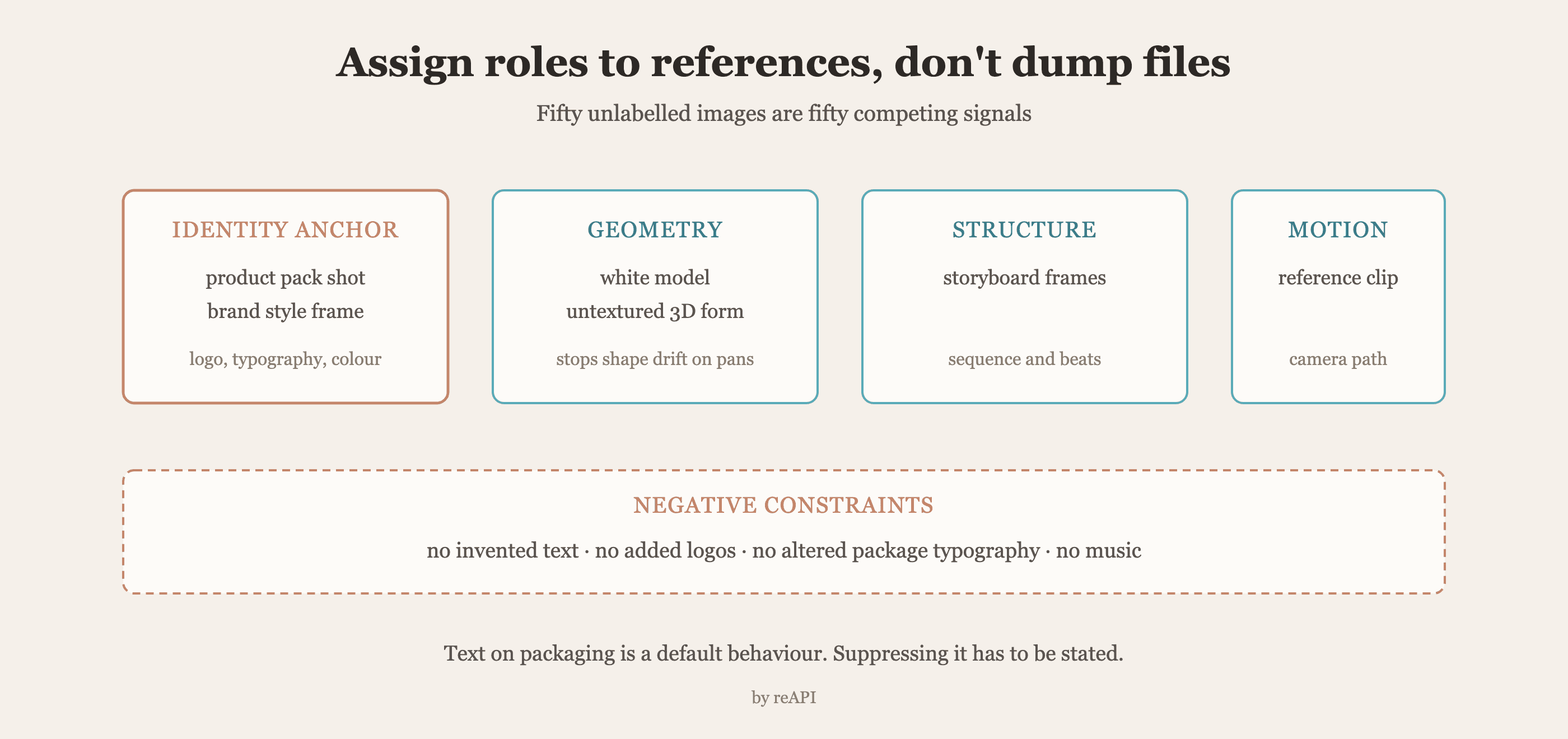
Hochkonvertierende Ausgabe scheitert an unsortierten Inputs häufiger als an schwachen Prompts. Sortiere Quellmaterial in drei Kategorien, bevor du irgendetwas schreibst.
Identity Assets. Hochauflösende Pack Shots und Brand-Style-Frames. Diese enthalten die Dinge, die nicht driften dürfen: Logo-Geometrie, Verpackungs-Typografie, exakte Farbe.
Motion References. Kurze Clips, die den Kamerapfad oder die menschliche Bewegung demonstrieren, die du widergespiegelt haben möchtest. Ein Referenzvideo ist ein deutlich stärkeres Steuerungselement als jeder Satz, der eine Dolly-Bewegung beschreibt.
Script und Ton-Cues. Was auch immer das Register des Spots festlegt, damit die 30-Sekunden-Version nicht tonal von der 6-Sekunden-Schnittfassung abweicht.
Die 50-Referenz-Kapazität ist nur ein Vorteil, wenn jede Datei einen Job hat. 50 Bilder zu dumpen gibt dem Modell 50 konkurrierende Signale. Den Produktfoto als Identity Anchor zu nennen und das Storyboard als strukturelle Orientierung gibt ihm eine Hierarchie, gegen die es sich auflöst, was es davon abhält, einen eigenen Brand Style zu erfinden.
Der White-Model-Trick gegen Shape Drift
Der schwierigste Fehler, den man mit einem Prompt wegsprechen kann, ist Motion Drift: Das Produkt ändert subtil seine Form, während die Kamera schwenkt, sodass die Flasche in Sekunde zwölf leicht falsch ist, auf eine Weise, die ein Zuschauer fühlt ohne es zu benennen.
Die Lösung ist strukturell, nicht textuell. Lade ein Weißmodell hoch, eine einfache untexturierte 3D-Form des Produkts, neben dem echten Produktfoto. Das Weißmodell gibt der Engine physische Dimensionen und räumliche Orientierung zum Respektieren, und das Foto liefert die Textur, die darauf aufgetragen wird.
Das funktioniert, weil es zwei Probleme trennt, die das Modell sonst zusammen und schlecht löst: Welche Form hat dieses Objekt, und wie sieht seine Oberfläche aus. Beantworte das erste mit Geometrie und das zweite mit einem Foto, und der Schwenk hört auf, die Verpackung zu verformen.
Repariere Regions, nicht Clips
Einen ganzen 30-Sekunden-Take zu regenerieren wegen eines harten Highlights ist der größte Effizienzverlust in dieser Pipeline.
Lokalisierte Bearbeitung isoliert eine Region des Frames und korrigiert sie, während sie die umgebende Komposition und Timing bewahrt. Ein Gesichtsausdruck einer Person, ein Specular Hit auf dem Produkt, ein Hintergrund-Element, das falsch wirkt. Der Rest des Shots, inklusive der Kamerabewegung, die du bereits genehmigt hast, bleibt intakt.
Die Workflow-Disziplin, die das ermöglicht, ist es wert, eindeutig ausgesprochen zu werden: genehmige die Bewegung zuerst, repariere dann die Details. Sobald die Kamerabewegung richtig ist, ist jedes folgende Problem eine lokale Bearbeitung statt eines neuen Glücksspiels.
Schreibe die Einschränkungen, inklusive der negativen
Produktvideo hat einen spezifischen Fehler, den das Modell unaufgefordert anbietet: Text. Erfundene Taglines, verfälschte Label-Kopie, ein Logo, das fast deines ist. Erkläre das Verbot, statt zu hoffen.
Ein Production Brief, der funktioniert, sieht näher so aus als an einer Beschreibung:
Product: [name], reference image 1 is the identity anchor.
Geometry: reference image 2 is a white model — respect these proportions exactly.
Camera: 0-4s locked medium. 4-10s slow orbit left at 0.3 m/s. 10-15s hold.
Lighting: soft key from camera left, no hard specular on the label.
Constraints: do not add text, do not add logos, do not alter package typography,
no music, no on-screen captions.
Framing: product occupies the center third throughout.
Jede Zeile dort ist eine Entscheidung, die vom Modell entfernt ist. Die negativen Einschränkungen sind keine Höflichkeit, sie sind der Unterschied zwischen einem Clip, den du versenden kannst, und einem, den die Rechtsabteilung zurücksendet.
Passe das Format an den Funnel an
Ein Hero-Video ist keine Kampagne. Kreativität brennt schnell genug aus, dass die sinnvolle Haltung darin besteht, Variationen zu produzieren und zu messen, welche überleben.
| Format | Funnel-Stage | Ziel |
|---|---|---|
| Lifestyle-Demo | Oben | Emotionale Verbindung, Brand Awareness |
| Technische Erklärung | Mitte | Aufklärung über einen spezifischen Vorteil |
| Unboxing oder Beweis | Unten | Kaufbedenken reduzieren |
Das sind drei unterschiedliche Briefs mit anderer Kamera-Logik, nicht ein Asset, das dreifach geschnitten wird. Die Lifestyle-Demo kann sich eine ambient Opening leisten; der Bottom-Funnel-Beweis-Clip nicht, weil er etwa zwei Sekunden hat, um zu etablieren, dass das Produkt echt ist.
Dokumentiere, was funktioniert hat
Die meisten Teams verlieren ihre Winning Formula, weil sie in der Session History einer Person lebte.
Halte ein Production README pro Kampagne mit dem exakten Prompt, der Referenzhierarchie inklusive welche Datei welche Rolle spielte, und den lokalen Bearbeitungsschritten, die nach der ersten Generation angewendet wurden. Diese Datei ermöglicht es dem nächsten Produktlaunch, eine Ästhetik wiederzuverwenden, die performt, statt sie aus der Ausgabe reverse-engineered zu werden.
Der Request
curl https://reapi.ai/api/v1/videos/generations \
  -H "Authorization: Bearer YOUR_API_KEY" \
  -H "Content-Type: application/json" \
  -d '{
    "model": "seedance-2-5",
    "prompt": "0-4s: [locked medium] product centered, soft key from camera left. 4-10s: [slow orbit left] 0.3 m/s, product remains centered. 10-15s: [hold] static. Do not add text, logos, or captions. Preserve package typography exactly.",
    "image_urls": [
      "https://example.com/product-packshot.jpg",
      "https://example.com/product-whitemodel.jpg",
      "https://example.com/storyboard-frame.jpg"
    ],
    "resolution": "1080p",
    "duration": 15
  }'
Mediaeingaben sind nur öffentliche http(s) URLs, kein Base64 auf irgendeinem Modell, also müssen Assets vor dem Call gehostet werden. Rates und die vollständige Request-Oberfläche sind auf reapi.ai/models/seedance-2-5.
Troubleshooting
Das Logo verformt sich während Kamerabewegungen. Füge eine Weißmodell-Referenz hinzu. Das ist ein Geometrie-Problem, nicht ein Prompt-Problem.
Das Modell erfindet Text auf der Verpackung. Füge eine explizite negative Einschränkung hinzu und starte neu. Text-Unterdrückung muss ausgesprochen werden.
Beleuchtung springt in der Mitte des Clips. Erkläre die Key-Light-Position im Prompt und halte sie über Beats, statt sie einmal zu erwähnen.
Jede Variation sieht anders aus. Die Referenzhierarchie ist nicht stabil. Fixiere, welche Datei der Identity Anchor ist, und behalte sie in der ganzen Batch ganz vorne.
Ausgabe ist technisch in Ordnung, konvertiert aber nicht. Das ist ein Format-Problem, nicht ein Generation-Problem. Überprüfe, ob der Clip seinem Funnel-Stage passt.
FAQ
Wie stoppe ich das Produkt, das während einer Kamerabewegung die Form ändert?
Lade ein Weißmodell hoch, eine einfache untexturierte 3D-Form, neben dem Produktfoto. Geometrie von einer, Textur von der anderen.
Wie viele Referenzbilde sollte ich verwenden?
Weniger mit klaren Rollen schlägt viele ohne. Weise einen Identity Anchor, eine strukturelle Orientierung und Motion References zu, statt alles Verfügbare hochzuladen.
Wie fixe ich ein Bad Detail ohne den Clip zu regenerieren?
Lokalisierte Bearbeitung korrigiert eine Region, während sie den Rest der Komposition und die Kamerabewegung, die du bereits genehmigt hast, bewahrt.
Wie stoppe ich das Modell, das Text auf meine Verpackung addiert?
Erkläre es als negative Einschränkung im Prompt. Erfundener Text ist ein Standardverhalten, nicht ein Unfall.
Wie lange sollte ein E-Commerce-Produktvideo sein?
Passe es an den Funnel-Stage an, statt an eine feste Nummer. Top-of-Funnel Lifestyle-Arbeit kann atmen; Bottom-Funnel Beweis-Clips haben etwa zwei Sekunden, um Glaubwürdigkeit zu etablieren.
Sollte ich ein Hero-Video generieren oder viele Varianten?
Viele. Kreativität brennt schnell aus, und der Wert einer schnellen Pipeline ist, Variationen zu produzieren, um zu messen, statt ein einzelnes Asset zu perfektionieren.
Was sollte ich nach einer erfolgreichen Generation aufzeichnen?
Den Prompt wörtlich, die Referenzhierarchie mit jeder Dateirole und alle lokalen Bearbeitungen, die danach angewendet wurden.
Die Pipeline als das Produkt behandeln
Der Instinkt mit einem fähigen Video-Modell ist, den Prompt immer wieder umzuschreiben, bis etwas Gutes herauskommt. Das produziert einen guten Clip und keinen wiederholbaren Prozess.
Der Seedance-2.5-E-Commerce-Video-Workflow, der skaliert, sieht anders aus: eine kuratierte Asset-Library mit zugewiesenen Rollen, Geometrie, die bereitgestellt statt beschrieben wird, negative Einschränkungen ausgesprochen, Motion genehmigt vor Detailpolish und die Winning-Konfiguration notiert. Der Prompt ist der kleinste Teil davon. Was die nächste Kampagne schnell macht, ist, dass die letzte ein README statt eines Ordners mit Renders hinterlassen hat.
Referenzen
- Volcano Engine. Seedance and the Doubao video model family. Retrieved July 2026 from volcengine.com
Further reading
- reAPI. Seedance 2.5 camera control. reapi.ai/blog/seedance-2-5-camera-control
- reAPI. Seedance 2.5 features. reapi.ai/blog/seedance-2-5-features
- reAPI. Model catalog. reapi.ai/models
Autor

Kategorien
Weitere Beiträge

GPT-6 Luna API Preise: Token-Tarife und Kostenrechner
GPT-6 Luna API Preise laut OpenAI: Input, Output, Cache-Lese- und Schreibzugriffe, die 272K-Langkontextstufe, Batch und Fast, plus Kostenbeispiele.
Glaubwürdiges AI-Video-Acting mit dem Beat Sheet planen
Natürliche KI-Dialogszenen mit Schauspiel-Beats, Charakterzustände, Kamerabahn, Prompt-Vorlagen und Revisionskultur für realistische Szenen.
Seedance 2.5 Unlimited-Pläne: Rechnung überprüfen
Überprüfe einen Seedance 2.5 Unlimited-Plan: veröffentlichtes Modell, Fenster, Warteschlange, Parallelität, Duration, Zugriff und Verbrauchskosten.