How to Stop Claude Code Asking for Permission Every Time
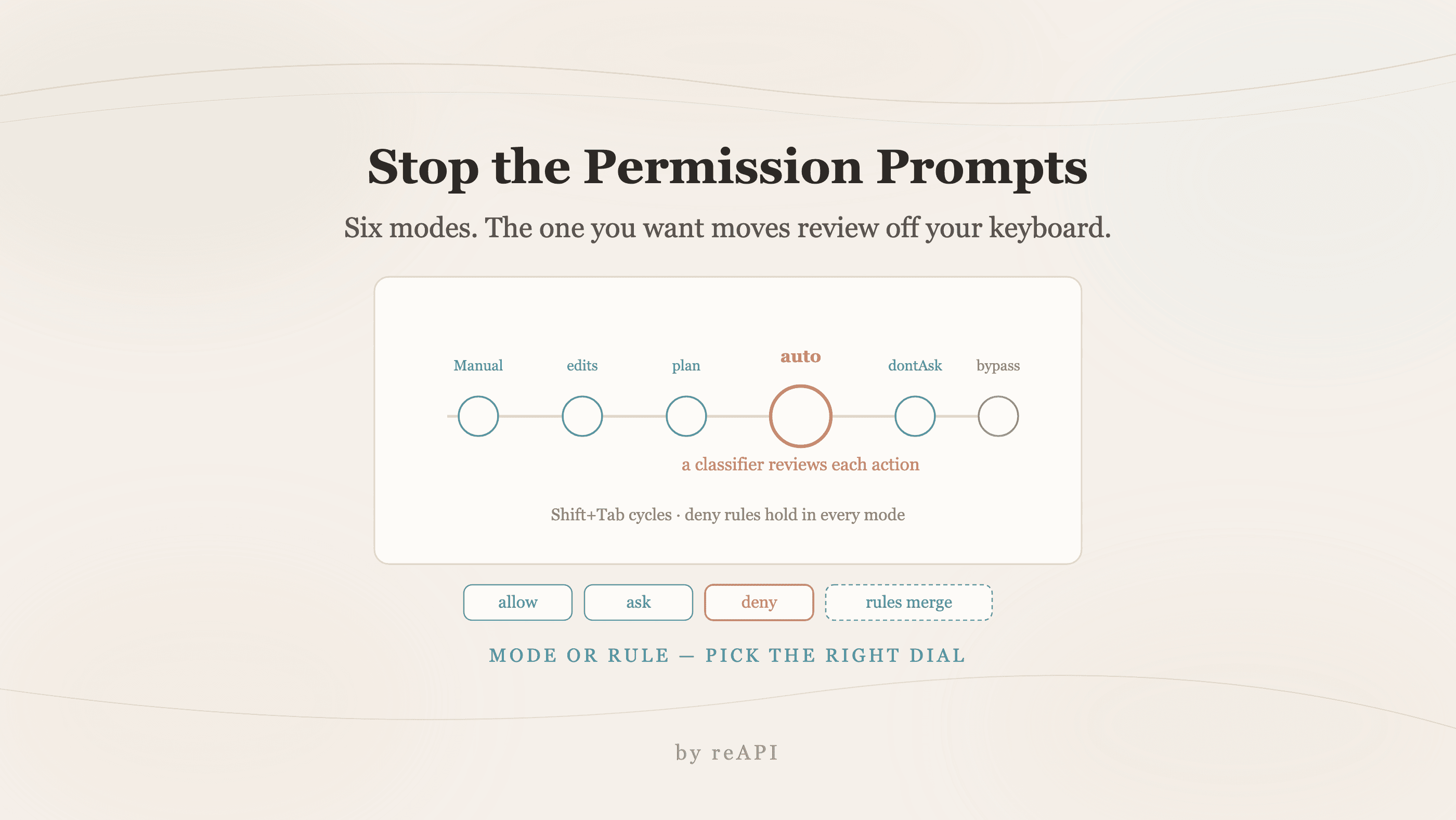
Claude Code has six permission modes. Auto mode moves review to a classifier, rules fix one repeated command, and one settings file silently ignores auto.
Claude Code asks before it acts. That is the design, and on a first pass through an unfamiliar repository it is the right default. Twenty prompts into a refactor it stops feeling like safety and starts feeling like friction.
There is an official answer, and it is not a flag that turns checking off. Claude Code ships six permission modes, and the one built for this problem routes actions through a separate classifier model instead of through you.
TL;DR
- Six modes:
default(shown as Manual),acceptEdits,plan,auto,dontAsk,bypassPermissions[1]. autois the one you want for long tasks. A classifier reviews each action; you stop seeing routine prompts[1].Shift+Tabcycles modes mid-session. The status bar shows which one is live[1].- Permission rules are the surgical fix. Pre-approve the specific commands you keep approving, with
allow, and keep everything else prompting[2]. - A real trap:
defaultMode: "auto"is ignored in.claude/settings.json. It has to live in~/.claude/settings.json[1]. bypassPermissionsis not the answer outside isolated containers and VMs[1].
The six modes
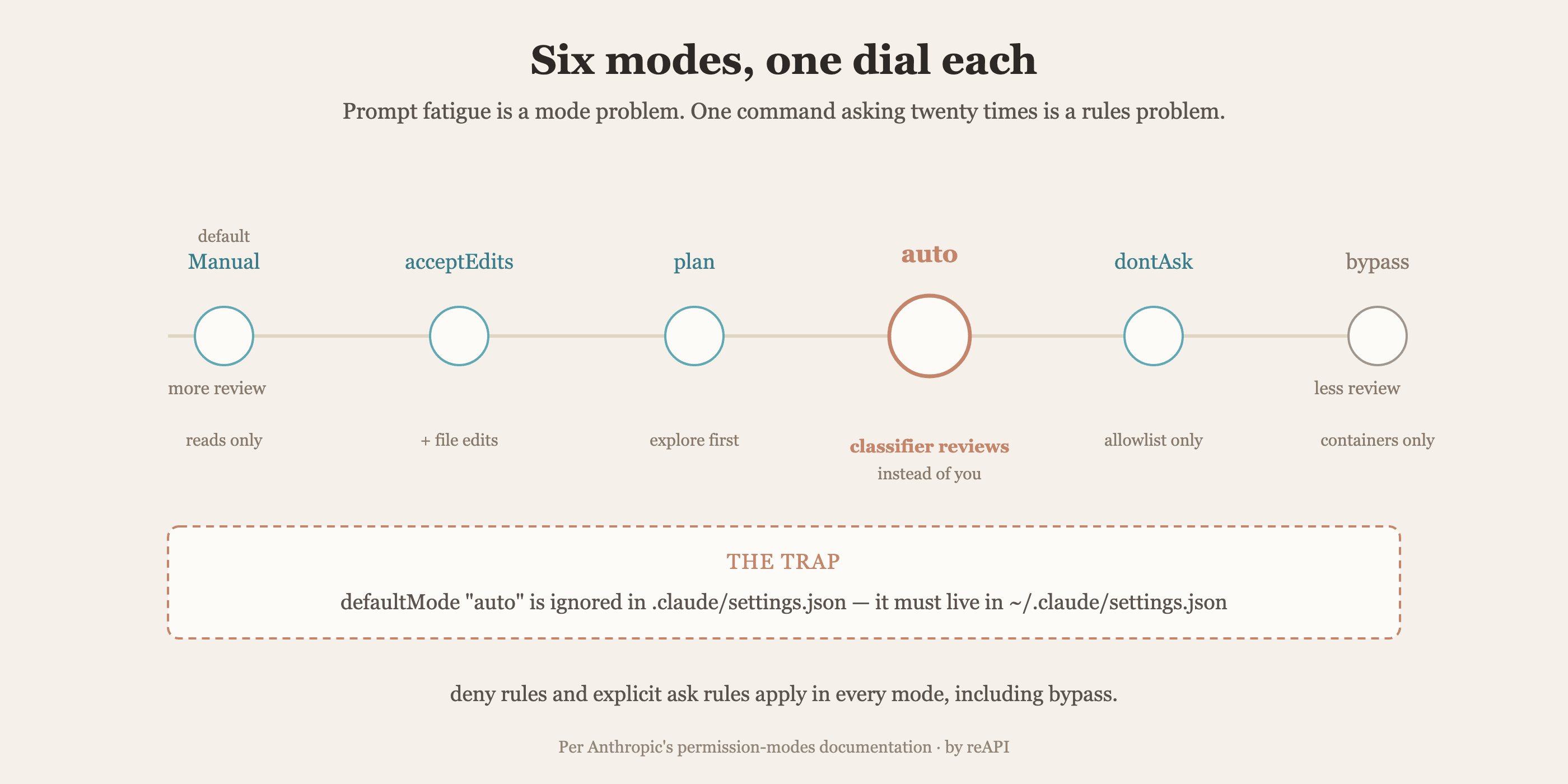
| Mode | What runs without asking | Built for |
|---|---|---|
default (Manual) | Reads only | Getting started, sensitive work |
acceptEdits | Reads plus file edits | Editing sessions you are watching |
plan | Reads, plus classifier-approved commands when auto mode is available | Exploring before changing |
auto | Everything, with background safety checks | Long tasks, reducing prompt fatigue |
dontAsk | Only pre-approved tools | Locked-down CI and scripts |
bypassPermissions | Everything | Isolated containers and VMs only |
Source is Anthropic's permission-modes documentation[1]. Note the naming: the mode that reviews every action is labeled Manual in the CLI and the extensions, while its config value stays default. manual works as an alias wherever you type the value, on v2.1.200 and later.
Switching mid-session
Press Shift+Tab to cycle default → acceptEdits → plan. The status bar shows the active mode: ⏸ manual mode on, ⏵⏵ accept edits on, ⏵⏵ auto mode on, ⏵⏵ don't ask on, or ⏵⏵ bypass permissions on[1].
Not every mode is in that cycle by default:
autoappears once your account meets its requirements, and cycling into it does not ask for confirmation.bypassPermissionsonly appears if you started with--permission-mode bypassPermissions,--dangerously-skip-permissions,--allow-dangerously-skip-permissions, or set it asdefaultMode.dontAsknever appears. Set it with--permission-mode dontAsk.
At startup, pass it as a flag:
claude --permission-mode autoAuto mode, and what it actually checks
Auto mode does not remove review. It moves review off your keyboard and onto a separate classifier model that inspects actions before they run, blocking anything that escalates beyond what you asked for, targets unrecognized infrastructure, or looks driven by hostile content Claude read[1].
Explicit ask rules still force a prompt, so anything you have deliberately marked as needing confirmation keeps confirming.
What it blocks by default[1]:
- Downloading and executing code, such as
curl | bash - Sending sensitive data to external endpoints
- Production deploys and migrations
- Mass deletion on cloud storage
- Granting IAM or repo permissions
- Force push
git reset --hard,git checkout -- .,git restore .,git clean -fd,git stash drop,git stash cleargit commit --amendwhen the HEAD commit was not created in this session, or has already been pushedterraform destroy,pulumi destroy,cdk destroy,terragrunt destroy- Irreversibly destroying files that existed before the session
- Committing or pushing a change that would send secrets outside the repository, or widen what a deploy exposes
The classifier trusts your working directory and the git remotes configured when the session started. A remote added or repointed mid-session with git remote add or git remote set-url is not trusted[1].
Anthropic states the limit plainly: auto mode reduces prompts but does not guarantee safety. It is for tasks where you trust the general direction, not a substitute for reviewing sensitive operations[1].
Requirements
Auto mode is available only when all of these hold[1]:
- Plan: all plans.
- Owner: on Team and Enterprise, an Owner must enable it in Claude Code admin settings first. Admins can also force it off with
permissions.disableAutoMode: "disable"in managed settings. - Model: on the Anthropic API, Claude Opus 4.6 or later, Sonnet 4.6 or later, or Fable 5. On Bedrock, Google Cloud's Agent Platform, and Microsoft Foundry, only Sonnet 5, Opus 4.7 or later, and Fable 5. Older models including Sonnet 4.5, Opus 4.5, Haiku, and claude-3 are unsupported everywhere.
- Provider: available by default on the Anthropic API, Claude Platform on AWS, Bedrock, Agent Platform, Foundry, and signed-in Claude apps gateway sessions.
If Claude Code reports auto mode unavailable, one of those is unmet. It is not a transient outage.
The settings trap
This one wastes real time. If you set defaultMode: "auto" and the session still starts in Manual with no error, the setting is probably in the wrong file.
From v2.1.142, Claude Code ignores auto in .claude/settings.json and .claude/settings.local.json, so a repository cannot grant itself auto mode[1]. It has to be in your user settings:
// ~/.claude/settings.json
{
  "permissions": {
    "defaultMode": "auto"
  }
}
Settings files hot-reload, so permissions changes apply to a running session without a restart[2].
The surgical fix: permission rules
Modes set a baseline. Rules are what you reach for when the same three commands keep prompting and everything else is fine as it is.
// ~/.claude/settings.json
{
  "permissions": {
    "allow": ["Bash(git diff *)", "Bash(npm test *)"],
    "ask":   ["Bash(git push *)"],
    "deny":  ["Read(./.env)", "Read(./secrets/**)", "Bash(curl *)"]
  }
}
Three things worth knowing about how these behave[2]:
Rules merge across scopes rather than override. Unlike most settings, where a project value replaces a user value, permission rules from user, project, local, and managed settings all stay in effect.
deny and explicit ask apply in every mode, including bypassPermissions. That makes deny the right place for secrets: Read(./.env) holds regardless of what mode someone switches into.
Local allow rules skip the workspace-trust step. Rules in your own .claude/settings.local.json take effect without the trust prompt that .claude/settings.json allow rules require, because that file is yours rather than the repository's. If the repo commits the file, trust applies again.
Why not just bypass everything
bypassPermissions exists and it does what the name says. Anthropic scopes it to isolated containers and VMs, and the reason is structural rather than cautious.
Writes to protected paths are never auto-approved in any mode except bypassPermissions[1]. Those protections guard repository state and Claude's own configuration against accidental corruption. Turning them off on a machine that holds anything you care about removes the last thing standing between a bad command and your working tree.
If prompt fatigue is the problem, auto solves it while keeping a classifier in the loop. Reach for bypassPermissions only when the whole environment is disposable.
Picking a setup
Working in an unfamiliar repo: stay in Manual. The prompts are doing their job.
Editing session you are actively watching: acceptEdits via Shift+Tab. File edits stop prompting, commands still do.
Long autonomous task: auto, set as defaultMode in ~/.claude/settings.json if you want it every session.
The same command prompting twenty times: an allow rule for that command, not a mode change.
CI or a script: dontAsk with an explicit allowlist, so anything unlisted fails rather than waits.
Disposable container: bypassPermissions, and only there.
FAQ
How do I stop Claude Code asking for permission?
Switch to auto mode, which routes actions through a classifier instead of prompting you. Press Shift+Tab to cycle to it in-session, start with claude --permission-mode auto, or set defaultMode: "auto" in ~/.claude/settings.json[1].
Why is my defaultMode: "auto" being ignored?
Because it is in .claude/settings.json or .claude/settings.local.json. Claude Code ignores auto from those files so a repository cannot grant itself the mode. Move it to ~/.claude/settings.json[1].
Does auto mode mean no safety checks?
No. A separate classifier reviews each action and blocks escalation, unrecognized infrastructure, destructive git operations, production deploys, and more. Explicit ask rules still prompt[1].
Why is auto mode unavailable for me?
One of the requirements is unmet: plan, an Owner enabling it on Team or Enterprise, a supported model, or a supported provider. It is not a transient failure[1].
How do I stop one specific command from prompting?
Add an allow rule for it rather than changing mode: "allow": ["Bash(npm test *)"][2].
What is the difference between Manual and default?
Nothing. default is the config value; Manual is the label shown in the CLI and extensions. manual works as an alias on v2.1.200 and later[1].
Can I block Claude from reading .env?
Yes, with a deny rule. Deny rules apply in every mode including bypassPermissions[2].
Is bypassPermissions safe on my laptop?
No. It is scoped to isolated containers and VMs, and it is the only mode where writes to protected paths are auto-approved[1].
Matching the mode to the risk
The instinct when prompts pile up is to look for the switch that turns checking off. That switch exists, and it is the wrong one for a machine you care about.
The better framing is that Claude Code gives you three separate dials: a mode that sets the baseline, rules that carve out specific tools in either direction, and a classifier that reviews what the mode would otherwise wave through. Prompt fatigue on a long task is a mode problem, solved by auto. The same command asking twenty times is a rules problem, solved by one allow line. Knowing how to stop Claude Code asking for permission is mostly knowing which of those two you actually have.
References
- Anthropic. Claude Code permission modes — the six modes, auto mode requirements, and what the classifier blocks. Retrieved July 2026 from docs.claude.com/en/docs/claude-code/permission-modes
- Anthropic. Claude Code settings — permission rules, scopes, and precedence. Retrieved July 2026 from docs.claude.com/en/docs/claude-code/settings
Further reading
- reAPI. How to use Claude Code. reapi.ai/blog/how-to-use-claude-code
- reAPI. How to use Claude Opus 5. reapi.ai/blog/how-to-use-claude-opus-5
- reAPI. Model catalog. reapi.ai/models
Author

Categories
defaultMode: "auto" being ignored?Does auto mode mean no safety checks?Why is auto mode unavailable for me?How do I stop one specific command from prompting?What is the difference between Manual and default?Can I block Claude from reading .env?Is bypassPermissions safe on my laptop?Matching the mode to the riskReferencesFurther readingMore Posts
Best Seedance 2.5 Alternatives: H3, Veo, Sora and More
Compare the best Seedance 2.5 alternatives for video generation, including MiniMax H3, Seedance 2.0, Veo 3.1, Sora 2, Runway, and Kling 3.

Suno Music Video Workflow: Full Song or Shot by Shot?
Choose a music-video workflow for a Suno song: one full-song generation, a manual shot list, or a hybrid animatic-to-hero-shot process with cost math.

Best Replicate Alternatives in 2026: 5 Options Compared
Looking for Replicate alternatives in 2026? Compare fal.ai, Together AI, RunPod, Hugging Face, and reAPI on model range, pricing, speed, and API design.