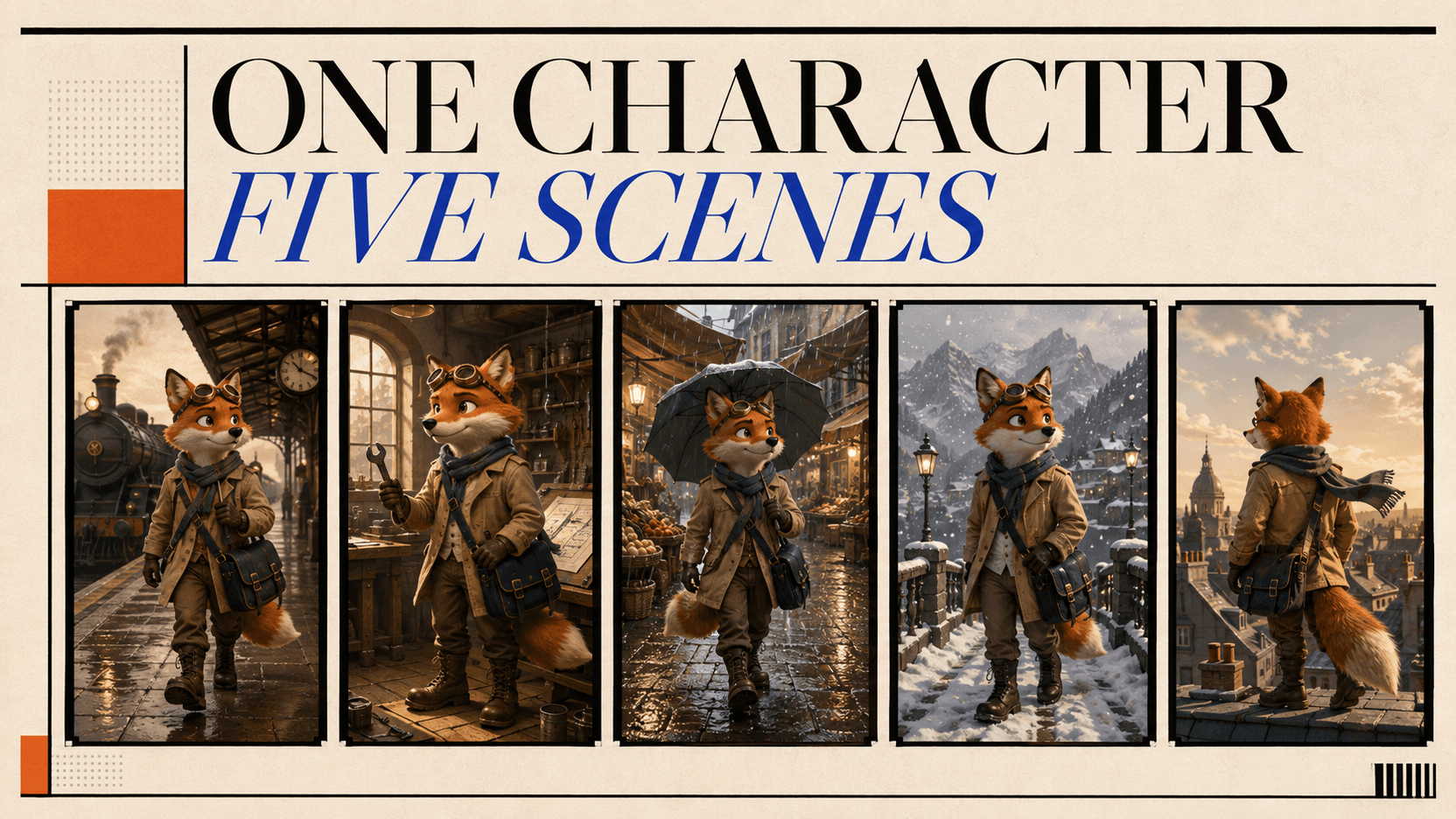
用 API 生成一致的 3D 风格人物图像,仅需 $0.143
用 Wan 2.7 搭建一致的 3D 风格角色出图流程:先出一张主图,再生成五个场景候选,全程 $0.143,并算出单张合格图的真实成本。
是的——一个 API 工作流可以在不到 15 分美金的成本内生成一个主人物和五个场景样本。 我们 9 月 3 日的测试中,主图在 32.1 秒内完成,消耗 24 分;五张场景在 59.0 秒内完成,消耗 119 分。总计 143 分,即 $0.143。[1]
但这个结果有重要限制。测试只记录任务状态、输出数量、时间和分数;不包含视觉审核。这是一个生成和成本测试,不是五张图像都通过审核的声明。下面的教程展示如何运行同样的工作流并在人工检查后计算每张接受图像的成本。
TL;DR
- 工作流使用
wan2.7-image两次:先生成候选主图,批准后再生成五张连接的场景。 - Wan 2.7 Image 通过
enable_sequential: true启用组模式;将n上限从四张提升到一个任务 12 张。[3] - 测量的 API 成本是 主图 24 分 + 五个场景 119 分 = 143 分 ($0.143)。[1]
- 下载对应的测试记录,列出两个任务 ID、设置、完成时间和最终分数,无需临时 URL。
- 五张样本的成本为每张 $0.0238。包括主图,有效成本仅在主图和全部五张都通过审核时为每张 $0.0286。
- "3D 风格"意指平面图像文件,渲染成卡通外观。此工作流不生成网格、骨架、绑定或可编辑的 3D 模型。
- 一致性不保证。参考图像、固定身份契约、组生成和审核门控可降低偏差;但都不能永久锁定人物。
一致人物 API 测试回答了什么
API 能否让一个 3D 风格的卡通角色在不同场景中保持稳定?每张图片或每批图片又要花多少钱?如果参考图已经定义了角色,剩下的问题就是如何在保留人工审核的同时完成自动化。任务显示完成,不代表图片已经达到可用标准。
这项测试把三个指标分开记录:API 是否完成、每张候选图的成本,以及每张通过审核的场景图的成本。前两项来自任务和计费记录,最后一项必须看过图片后才能确定。
Wan 2.7 Image 为何适合五场景人物集
Wan 官方产品页描述顺序故事叙述,最多 12 张图像和主题/风格连续性。[2] reAPI 路由直接暴露该特性:设置 enable_sequential 为 true,设置 n 为图像数,轮询一个任务获取有序 URL 数组。[3]
该请求形式给一个任务人物参考、身份契约和完整场景列表。五个独立文本-图像调用必须五次从文本重新发现人物。
这是工作流选择,不是普遍质量声明。Wan 提供该测试所需的组-系列控制。
第一次 API 请求前
需要四样东西:
- 存储在
REAPI_API_KEY中的 reAPI 密钥; - 你有权使用的原创虚构人物;
- 必须在每个场景中存活的简短视觉特征列表;
- 保留批准文件的地方,因为生成的 URL 是临时的。
使用你有权复制的原创人物,而不是著名人物或工作室风格。也更容易评估。
对该测试,人物契约故意具体:
人物:原创成年拟人化温暖橙色狐狸探险家
脸:奶油色鼻子,左耳小缺口
衣着:正好两条白色条纹的蓝绿色围巾
配饰:额头上的圆铜护目镜,海军绶十字背包
锚点:背包上黄色三角补丁,尾巴两个深色环,奶油色尾端
勿改:温暖橙色毛皮,奶油色鼻子,耳缺位置,围巾图案,护目镜,背包补丁,尾巴标记,紧凑运动身体比例
描述如"可爱"、"电影感"、"高级"太广泛无法审核。耳缺或两条纹围巾给审核员可观察的东西。
步骤 1:生成中立的人物主图
主图应解释人物,不讲故事。使用均匀光线、素净背景和暴露脸、衣着、包和尾巴的角度。保持参考驱动模式中的场景集规划同一纵横比;Wan 跟随最后输入图像的比例。[5]
curl https://reapi.ai/api/v1/images/generations \
  -H "Authorization: Bearer $REAPI_API_KEY" \
  -H "Content-Type: application/json" \
  -d '{
    "model": "wan2.7-image",
    "prompt": "Original stylized 3D cartoon character reference sheet for an adult anthropomorphic fox explorer. The same character shown in a clean front view and two three-quarter views. Identity anchors: a small notch in the left ear, teal scarf with exactly two white stripes, round brass goggles resting on the forehead, navy cross-body satchel with one yellow triangle patch, two dark rings on the tail and a cream tail tip. Warm orange fur, cream muzzle, compact athletic proportions, friendly alert expression. Neutral warm-gray studio background, soft even product lighting, full body visible, no text, no labels, no logo, no second character, no collage borders.",
    "size": "16:9",
    "resolution": "1K",
    "n": 1,
    "watermark": false
  }'
POST 返回任务 ID 而不是图像。轮询 GET /api/v1/tasks/{id} 直到状态变为 completed 或 failed。轮询不消耗分数。[5]
在生产工作流中,在这里停止并检查主图再生成系列。如果三个视图不同意、缺少锚点或特征难以识别,拒绝它。测量的测试没有视觉批准门控继续,所以其主图仍是完成的样本。
步骤 2:请求五个连接的场景
从完成的主图的 output.image_urls 数组中获取第一个 URL 并放在 MASTER_IMAGE_URL 中。Wan 接受公共 HTTPS 参考图像;base64 和 data: URL 不被该路由接受。[3]
export MASTER_IMAGE_URL="https://your-temporary-or-hosted-url.example/master.png"

curl https://reapi.ai/api/v1/images/generations \
  -H "Authorization: Bearer $REAPI_API_KEY" \
  -H "Content-Type: application/json" \
  -d @- <<JSON
{
  "model": "wan2.7-image",
  "prompt": "Use the reference image only to preserve the identity of the original adult fox explorer. Create a connected five-image story sequence, one separate scene per output, in the same polished stylized 3D cartoon rendering language. Preserve all identity anchors exactly: left-ear notch, teal scarf with exactly two white stripes, round brass forehead goggles, navy cross-body satchel with one yellow triangle patch, two dark tail rings, cream tail tip, muzzle shape and body proportions. Scene 1: dawn railway platform, medium-wide view, holding one red paper ticket. Scene 2: sunlit workshop, medium view, repairing a small wooden toy airplane. Scene 3: rainy night market, full-body view, carrying one yellow umbrella. Scene 4: snowy wooden footbridge at dusk, three-quarter view, holding a small warm lantern. Scene 5: rooftop at blue hour, rear three-quarter view with face still visible, looking across the city. One fox only in every image. No text, no logo, no wardrobe change, no extra limbs, no duplicate character, and do not combine scenes into a collage.",
  "image_urls": ["$MASTER_IMAGE_URL"],
  "size": "16:9",
  "resolution": "1K",
  "n": 5,
  "enable_sequential": true,
  "watermark": false
}
JSON
组和编辑模式支持最高 2K 输出。Pro 模型的 4K 选项仅限文本-图像,所以将此参考驱动请求升级到 4K 将是无效配置。[3]
步骤 3:在 Node.js 中安全运行批准门控
将下面的完整示例保存为 character-series.mjs 并使用 Node.js 18 或更新版本。第一次运行仅生成主图,打印并记录其任务 ID,然后停止。设置 APPROVED_MASTER_URL 后查看该图像并再次运行脚本以获得五场景组。
脚本重试临时 GET 失败,但永远不重试 POST。如果连接在提交期间断开,提供商可能仍然接收了请求;检查任务日志或仪表板而不是盲目创建另一个计费任务。
import { appendFile } from 'node:fs/promises';

const baseUrl = 'https://reapi.ai';
const apiKey = process.env.REAPI_API_KEY;
const approvedMasterUrl = process.env.APPROVED_MASTER_URL?.trim();
const taskLogUrl = new URL(
  './character-series-task-ids.jsonl',
  import.meta.url,
);

const masterPrompt = process.env.MASTER_PROMPT ??
  'Original stylized 3D cartoon character reference sheet for an adult anthropomorphic fox explorer. The same character shown in a clean front view and two three-quarter views. Identity anchors: a small notch in the left ear, teal scarf with exactly two white stripes, round brass goggles resting on the forehead, navy cross-body satchel with one yellow triangle patch, two dark rings on the tail and a cream tail tip. Warm orange fur, cream muzzle, compact athletic proportions, friendly alert expression. Neutral warm-gray studio background, soft even product lighting, full body visible, no text, no labels, no logo, no second character, no collage borders.';

const groupPrompt = process.env.GROUP_PROMPT ??
  "Use the reference image only to preserve the identity of the original adult fox explorer. Create a connected five-image story sequence, one separate scene per output, in the same polished stylized 3D cartoon rendering language. Preserve all identity anchors exactly: left-ear notch, teal scarf with exactly two white stripes, round brass forehead goggles, navy cross-body satchel with one yellow triangle patch, two dark tail rings, cream tail tip, muzzle shape and body proportions. Scene 1: dawn railway platform, medium-wide view, holding one red paper ticket. Scene 2: sunlit workshop, medium view, repairing a small wooden toy airplane. Scene 3: rainy night market, full-body view, carrying one yellow umbrella. Scene 4: snowy wooden footbridge at dusk, three-quarter view, holding a small warm lantern. Scene 5: rooftop at blue hour, rear three-quarter view with face still visible, looking across the city. One fox only in every image. No text, no logo, no wardrobe change, no extra limbs, no duplicate character, and do not combine scenes into a collage.";

if (!apiKey) {
  throw new Error('Set REAPI_API_KEY before running this script.');
}

for (const [name, value] of [
  ['MASTER_PROMPT', masterPrompt],
  ['GROUP_PROMPT', groupPrompt],
]) {
  if (!value.trim()) throw new Error(`${name} cannot be empty.`);
}

const headers = {
  Authorization: `Bearer ${apiKey}`,
  'Content-Type': 'application/json',
};

const sleep = (ms) => new Promise((resolve) => setTimeout(resolve, ms));

async function readJson(response) {
  const text = await response.text();
  if (!text) return {};
  try {
    return JSON.parse(text);
  } catch {
    return { raw: text };
  }
}

async function submitGeneration(body) {
  let response;

  try {
    response = await fetch(`${baseUrl}/api/v1/images/generations`, {
      method: 'POST',
      headers,
      body: JSON.stringify(body),
    });
  } catch (error) {
    const detail = error instanceof Error ? error.message : String(error);
    throw new Error(
      `POST outcome is uncertain; do not submit it again automatically. ${detail}`,
    );
  }

  const result = await readJson(response);
  if (!response.ok) {
    throw new Error(`${response.status}: ${JSON.stringify(result)}`);
  }
  if (!result.id) {
    throw new Error(
      'POST returned no task ID; do not resubmit automatically until checked.',
    );
  }
  return result;
}

function retryDelayMs(response, attempt) {
  const retryAfter = response?.headers.get('retry-after');
  if (retryAfter) {
    const seconds = Number(retryAfter);
    if (Number.isFinite(seconds)) return Math.max(0, seconds * 1000);

    const retryAt = Date.parse(retryAfter);
    if (Number.isFinite(retryAt)) return Math.max(0, retryAt - Date.now());
  }
  return Math.min(1000 * (2 ** Math.min(attempt, 5)), 30000);
}

async function getTaskWithRetry(id, attempt) {
  let response;

  try {
    response = await fetch(`${baseUrl}/api/v1/tasks/${id}`, { headers });
  } catch (error) {
    const delay = retryDelayMs(null, attempt);
    console.warn(`Task GET failed; retrying in ${delay}ms.`);
    await sleep(delay);
    return null;
  }

  if (response.status === 429 || response.status >= 500) {
    const delay = retryDelayMs(response, attempt);
    await response.text();
    console.warn(`Task GET returned ${response.status}; retrying in ${delay}ms.`);
    await sleep(delay);
    return null;
  }

  const task = await readJson(response);
  if (!response.ok) {
    throw new Error(`${response.status}: ${JSON.stringify(task)}`);
  }
  return task;
}

async function waitForTask(id, timeoutMs = 10 * 60 * 1000) {
  const deadline = Date.now() + timeoutMs;
  let transientAttempt = 0;

  while (Date.now() < deadline) {
    const task = await getTaskWithRetry(id, transientAttempt);
    if (!task) {
      transientAttempt += 1;
      continue;
    }
    transientAttempt = 0;

    if (task.status === 'completed') return task;
    if (task.status === 'failed') {
      console.error(JSON.stringify({
        taskId: id,
        status: task.status,
        usageCredits: task.usage?.credits ?? null,
        error: task.error ?? null,
      }, null, 2));
      throw new Error(`Task ${id} failed; see the record above.`);
    }

    await sleep(5000);
  }

  throw new Error(
    `Polling timed out for ${id}. The task was not cancelled; resume GET polling instead of submitting another POST.`,
  );
}

async function recordSubmission(stage, taskId) {
  const record = {
    stage,
    taskId,
    submittedAt: new Date().toISOString(),
  };
  console.log(`Submitted ${stage}: ${taskId}`);

  try {
    await appendFile(taskLogUrl, `${JSON.stringify(record)}\n`, 'utf8');
  } catch (error) {
    console.warn(`Could not write ${taskLogUrl.pathname}; keep task ID ${taskId}.`);
  }
}

function requirePublicHttpsUrl(value) {
  let parsed;
  try {
    parsed = new URL(value);
  } catch {
    throw new Error('APPROVED_MASTER_URL must be a valid public HTTPS URL.');
  }
  if (parsed.protocol !== 'https:') {
    throw new Error('APPROVED_MASTER_URL must use HTTPS.');
  }
}

async function main() {
  if (!approvedMasterUrl) {
    const submission = await submitGeneration({
      model: 'wan2.7-image',
      prompt: masterPrompt,
      size: '16:9',
      resolution: '1K',
      n: 1,
      watermark: false,
    });
    await recordSubmission('character_master', submission.id);

    const task = await waitForTask(submission.id);
    const masterUrl = task.output?.image_urls?.[0];
    if (!masterUrl) throw new Error('Master task returned no image URL.');

    console.log(JSON.stringify({
      nextStep: 'Review this master. Rerun only after setting APPROVED_MASTER_URL.',
      masterTaskId: task.id,
      usageCredits: task.usage?.credits ?? null,
      masterUrl,
    }, null, 2));
    return;
  }

  requirePublicHttpsUrl(approvedMasterUrl);
  const submission = await submitGeneration({
    model: 'wan2.7-image',
    prompt: groupPrompt,
    image_urls: [approvedMasterUrl],
    size: '16:9',
    resolution: '1K',
    n: 5,
    enable_sequential: true,
    watermark: false,
  });
  await recordSubmission('five_scene_group', submission.id);

  const task = await waitForTask(submission.id);
  const sceneUrls = task.output?.image_urls ?? [];

  console.log(JSON.stringify({
    groupTaskId: task.id,
    usageCredits: task.usage?.credits ?? null,
    returnedSceneCount: sceneUrls.length,
    sceneUrls,
  }, null, 2));
}

main().catch((error) => {
  console.error(error instanceof Error ? error.message : error);
  process.exitCode = 1;
});
首先运行 node character-series.mjs。审查返回的主图后,用 APPROVED_MASTER_URL="https://..." node character-series.mjs 再次运行。脚本将任务 ID 写入 character-series-task-ids.jsonl;其阶段结果包括已结算的 usageCredits。可用 MASTER_PROMPT 或 GROUP_PROMPT 覆盖任一嵌入式提示,但空覆盖被拒绝。
在 n8n 中,保持同样的批准边界:主分支应在人工审查步骤结束,仅批准的 URL 应进入组生成分支。
测量的 API 运行返回了什么
两个请求完成如下:[1]
| 阶段 | 任务 ID | 时间 | 分数 | 文件数 |
|---|---|---|---|---|
| 人物主图 | task_01a065451919736985878cfcbd2eb8a8 | 32.1s | 24 | 1 |
| 五场景组 | task_01a06545f23474bca896f6b98ee252bc | 59.0s | 119 | 5 |
| 合计 | — | — | 143 | 6(包括主图) |
这是两个观察的任务时间,不是延迟基准。它们没说关于 p95 性能、另一区域、不同提示或未来容量的任何事情。输出 URL 也被省略因为是临时的。
最重要的是,"返回的文件:5"意思是五个完成的样本。这不证明每个输出正确描绘狐狸、映射到意图的场景或避免视觉缺陷。
如何逐场景审查人物一致性
在每个场景旁打开主图。不要从小缩略图判断;检查脸、装备、配饰、轮廓和请求的动作在有用的缩放。
| 审查区域 | 通过条件 | 典型失败 |
|---|---|---|
| 毛皮、脸、物种 | 温暖橙色毛皮、奶油色鼻子和狐狸比例匹配 | 毛皮颜色偏移或脸变成另一物种 |
| 左耳锚点 | 当左耳可见时缺口保留在左耳 | 缺口消失或交换边 |
| 围巾 | 蓝绿色和两条白色条纹保留 | 颜色移位、条纹数改变、围巾消失 |
| 护目镜和比例 | 铜护目镜停留在额头;身体比例匹配 | 护目镜移到眼睛或身体被重新设计 |
| 背包 | 海军十字背包和黄色三角补丁保留 | 补丁改变形状或背包无故改变边 |
| 尾巴 | 当可见时两个深色环和奶油色端保留 | 标记在全身场景间改变 |
| 场景指令 | 设置、道具、动作和框架匹配指定场景 | 两个场景合并或输出变成拼贴 |
| 结构质量 | 无重复肢体、融合道具或额外主人物 | 伞、手或尾巴融入身体 |
当框架确实隐藏它时,标记锚点 N/A。不为隐藏特征授予通过,但也不称之为矛盾。仅当每个可见身份锚点正确、请求的场景呈现且无主要结构缺陷时,图像才被接受。
此标准故意简单。自动化视觉评分可帮助排序大批次,但不应无声替换新人物的发布决策。
计算每张完成和接受图像的成本
当前 Wan 2.7 Image 速率是 reAPI 上每张生成标准图像 $0.0238。分数在任务总数结算一次并向上四舍五入到整个分数:主图为 ceil($0.0238 × 1 × 1,000) = 24,组为 ceil($0.0238 × 5 × 1,000) = 119。[3][4]
对此运行:
组样本成本 = $0.119 / 5 = $0.0238
项目成本   = $0.024 + $0.119 = $0.143
接受图像成本 = $0.143 / 接受场景数| 五个样本中的接受场景 | 每张接受场景的有效成本 |
|---|---|
| 5 | $0.0286 |
| 4 | $0.0358 |
| 3 | $0.0477 |
| 2 | $0.0715 |
| 1 | $0.1430 |
如果无通过,项目产生无接受图像,所以每接受图像的数字未定义而不是零。$0.143 也仅覆盖生成。存储、编排、人工审查和后期动画属于完整生产预算。
速率改变。上面的数字在 9 月 3 日检查和测试;在放入你的产品价格前使用活 Wan 2.7 Image 模型页。
修复最小失败部分
如果主图错误,停止并再生成。基于弱参考支付五图像系列仅倍增问题。
如果一个场景缺少其道具但人物保持稳定,尝试单一 n: 1 参考驱动替换短场景提示。按测试速率,这增加约 24 分。如果多个框架重新设计人物,修改主图或移除冲突指令,然后重新运行连接组。
Wan 当前模型文档说失败和拒绝请求不计费。仍然,在每个终端任务上读 usage.credits:规范任务 API 当模型特定政策保留生成后计费时允许失败任务上的正值。[3][5] 你的团队创意拒绝的完成图像保持计费,这是为什么接受图像成本是有用生产指标。
一旦场景通过,保留它及其任务 ID、提示版本、参考版本和审查结果。生成的 URL 过期,所以尽快将批准的资产移到你控制的存储。[3]
常见初学者错误
从文本生成每个场景。 重复详细描述不能使五个独立样本共享身份。重用批准的像素。
在场景提示中改变人物契约。 "添加冬季大衣"可能是合理的故事改变,但移除简单连续锚点。先测试稳定身份;后来介绍故意服装改变。
提供太多参考。 关于脸、尾巴或衣着不同意的参考给模型多个有效答案。以一个批准的主图开始。
称每个完成的文件可用。 完成是系统状态。创意批准是审查决策。
仅发布标题价格。 说明该数字是否覆盖主图、重试、创意拒绝的完成输出、存储和人工审查。
常见问题
这个 API 生成真实的 3D 人物模型吗?
不。它返回有风格 3D 外观的图像文件。它不返回网格、绑定、纹理包、骨架或可编辑场景。
Wan 2.7 保证每张图像中的同一人物吗?
不。组模式和参考图像给模型更强的连续信号,但不创建永久人物 ID。每个场景仍需审查。
五场景批次成本多少?
组任务使用 119 分,或 $0.119,返回五个完成的样本。单独生成的主图使用 24 分,将测试总数带到 $0.143。[1]
为什么有效成本不简单是每张 $0.0238?
$0.0238 是组成本每张完成样本。项目也需要主图,一些样本可能失败视觉审查。将总项目支出除以接受场景数以获得有用数字。
可以使用我自己的人物参考图像吗?
是的,如果你拥有或有权使用它且它通过公共 HTTPS URL 可用。Wan 2.7 Image 接受最多九张参考图像,尽管单一清晰主图是明智起点。[3]
应该为每个场景使用相同的种子吗?
Wan 暴露种子,但它不是身份锁。对连接系列,批准的参考和组请求更重要。重复的种子改变输入不保证相同的脸或配饰。
可以在一个请求中生成超过五个场景吗?
是的。用 enable_sequential: true,n 可高达 12。从较小集合开始因为审查和提示复杂性随序列增长。
如何将接受的图像变成视频?
使用每个批准的场景作为图像-视频模型的受控起始框。GPT Image 2 + Seedance 2.0 人物工作流 解释分离的动画阶段;保持分离防止运动失败强制人物重新设计。
记录你实际会发送的东西
API 记录包含一个主图、一个五图像组、六个返回的文件和 $0.143 的总费用。它不包含创意接受度因为视觉评分在该测试外。
保持完成、成本和人工接受为分离字段。应用标准后,将完整项目成本除以你实际会发送的场景数。
对完整请求架构、限制和当前账单行为,使用 Wan 2.7 Image API 文档。
参考文献
- reAPI. Wan 2.7 Image 人物系列测试记录 2026 年 9 月 3 日。主图任务
task_01a065451919736985878cfcbd2eb8a8;组任务task_01a06545f23474bca896f6b98ee252bc。 - Alibaba Wan. Wan 官方产品页——多图像编辑和顺序故事叙述。 2026 年 9 月 3 日检索。 wan.video
- reAPI. Wan 2.7 Image API——组模式、参考输入、分辨率限制、任务响应和错误。 2026 年 9 月 3 日检索。 reapi.ai/docs/wan-2-7-image
- reAPI. Wan 2.7 Image 活模型页面和价格估算器。 2026 年 9 月 3 日检索。 reapi.ai/models/wan-2-7-image
- reAPI. 任务 API——异步状态和轮询行为。 2026 年 9 月 3 日检索。 reapi.ai/docs/api/tasks
延伸阅读
作者

分类
更多文章
NSFW 视频 API 指南:从 Seedream 到 Seedance
搭建可靠的 NSFW 视频生成 API 工作流:先用 Seedream 5.0 Pro 生成审核的关键帧,再用 Seedance、Wan 或 H3 动画化,并集成同意检查。

Fal AI 价格、免费额度与更便宜的替代方案
Fal AI 价格详解:fal.ai 对 Seedance、Wan 和 Nano Banana 怎么收费,免费额度如何运作,以及一个标价更低、更便宜的替代方案。
Claude Fable 5.1 vs GPT-6 Astra:按工作负载选择
从上下文、API 表面、缓存成本、保留期和实际任务角度对比 Claude Fable 5.1 和 GPT-6 Astra,帮助你选择最优方案。