Как использовать Codex для создания слайдов из исследований
Как использовать Codex для создания слайдов: семиэтапный рабочий процесс, контрольная точка структуры, которая определяет качество колоды, и её ограничения.
Codex наиболее полезен для слайд-колод, когда вход структурирован. Не «сделай мне PowerPoint», а папка с заметками исследований, анализом конкурентов, позиционированием продукта, скриншотами и существующим брендовым шаблоном, преобразованная в колоду, которая следует одним и тем же правилам каждый раз.
OpenAI документирует это напрямую: Codex может манипулировать файлами .pptx, генерировать визуальные элементы, применять повторяющиеся правила макетов, обновлять существующие колоды и создавать новые, используя навык Slides для редактирования PowerPoint и навык ImageGen для иллюстраций и обложек[1].
Обучение тому, как использовать Codex для создания слайдов, это в основном одна дисциплина: заставить его предложить структуру перед тем, как писать хоть один слайд, и сказать ему, какой текст он не может переписывать.
TL;DR
- Начните с существующей брендовой колоды и заставьте Codex резюмировать визуальные правила перед генерацией чего-либо[1].
- Требуйте структуру в первую очередь. Название слайда за слайдом, основное сообщение, источник доказательств, рекомендуемый визуальный элемент, примечание для докладчика. Одобрите её перед созданием любого PPTX.
- Закрепите утверждения, которые она не должна трогать. Одобренные сообщения, язык цен, юридические требования. Скажите ей отмечать пробелы как «требует проверки» вместо того, чтобы заполнять их.
- Сохраняйте текст редактируемым и диаграммы встроенными. Не позволяйте ей растеризовать слайды.
- Визуализируйте и проверьте перед доставкой. Колода может быть содержательно правильной и визуально сломанной.
- Используйте ImageGen для обложек и концепций, никогда для пользовательского интерфейса продукта, реальных логотипов или диаграмм данных.
Семиэтапный рабочий процесс
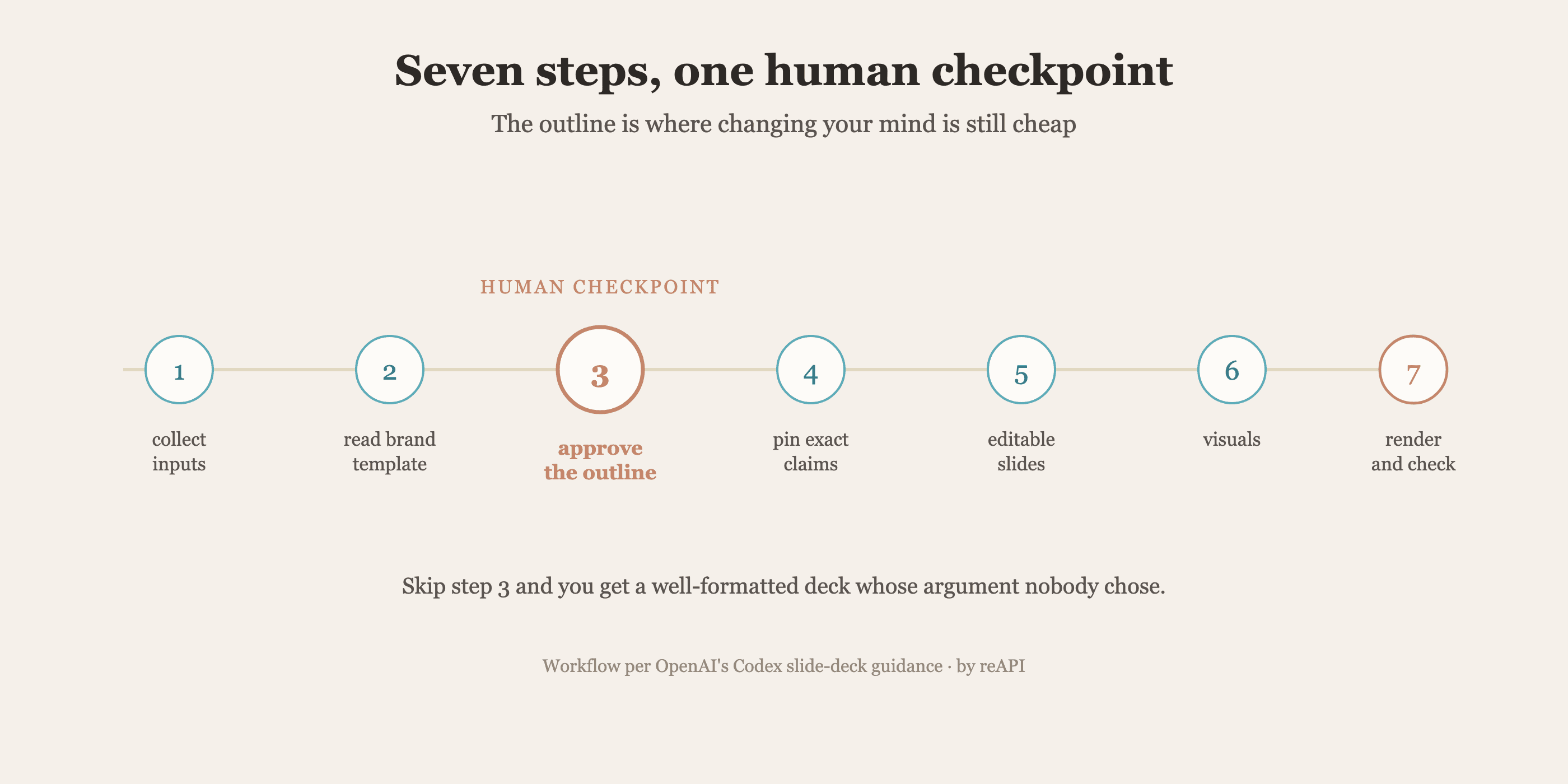
1. Собрать структурированные входные данные
Codex работает с исходным материалом, поэтому качество колоды отслеживает организацию папки. Краткое описание продукта, заметки исследований, брендовый шаблон, скриншоты, заметки конкурентов, резюме интервью, метрики кампании, фреймворк сообщений, одобренные требования, ресурсы логотипов.
2. Начните с брендового шаблона
Рекомендация OpenAI — начать с существующей колоды где возможно[1]. Заставьте модель сначала её прочитать:
Сначала проверьте существующую брендовую колоду. Определите размер слайда, стиль названия,
стиль текста тела, цветовую палитру, размещение логотипа, обработку изображения, стиль диаграммы
и правила расстояния. Резюмируйте эти правила перед генерацией новых слайдов.
3. Получите структуру перед колодой
Это шаг, который люди пропускают, и это шаг, который определяет, отстаивает ли колода что-то.
Перед созданием колоды предложите структуру слайд за слайдом. Для каждого слайда
включите название, основное сообщение, источник доказательств, рекомендуемый визуальный элемент и
примечание для докладчика. Не генерируйте PPTX, пока я не одобрю структуру.
Повествовательный поток не универсален. Колода исследования рынка, колода запуска и колода продаж не должны делить структуру, и вы узнаёте, поняла ли модель это на этапе структуры, а не после того, как она визуализировала сорок слайдов.
4. Закрепите утверждения, которые она не может переписывать
Колоды содержат одобренные сообщения, юридические требования и язык цен. Модель, которая перефразирует их, создала проблему соответствия, а не черновик.
Сохраняйте все одобренные требования продукта ровно так, как они написаны. Не изобретайте цитаты клиентов,
цены, показатели производительности или требования конкурентов. Если доказательств нет, отметьте это как
требует проверки вместо того, чтобы заполнять.
Инструкция, которая проделывает работу, это последний пункт. Столкнувшись с пробелом, модель будет его заполнять правдоподобно, если не сказано, что делать вместо этого.
5. Сгенерируйте редактируемые слайды с встроенными диаграммами
Создайте колоду в виде редактируемого PPTX. Сохраняйте текст как редактируемый текст PowerPoint.
Используйте встроенные диаграммы для простых столбиковых, линейных, круговых и гистограммных визуальных элементов, когда
практично. Не растеризуйте полные слайды. Используйте ресурсы изображений только для скриншотов,
иллюстраций и сложных визуальных элементов.
Команды пересматривают формулировки много раз. Растеризованный слайд — это тупик.
6. Используйте ImageGen целенаправленно
Определите одно визуальное направление и переиспользуйте его, вместо того чтобы позволить каждому слайду дрейфовать.
Определите единое визуальное направление для этой колоды. Используйте чистые иллюстрации в стиле SaaS,
реальный контекст продукта и полированный B2B визуальный тон.
Сохраняйте подсказки изображения, чтобы будущие слайды могли соответствовать тому же направлению.Генерируйте: обложки, иллюстрации концепций продукта, визуальные элементы тенденций рынка, диаграммы пути клиента, разделители разделов.
Не генерируйте: точные скриншоты пользовательского интерфейса продукта, юридические или нормативные требования, реальные логотипы клиентов без разрешения или диаграммы данных, которые должны остаться встроенными и редактируемыми.
7. Визуализируйте и проверьте
Визуализируйте колоду в изображения слайдов. Проверьте каждый слайд на обрезанный текст, перекрытие,
несогласованное расстояние, нечитаемые скриншоты, подмену шрифтов, смещение макета
и несоответствие визуального стиля. Исправьте все проблемы перед сохранением финального PPTX.
Колода может быть полностью правильной и при этом выглядеть сломанной. Визуализация в изображения — это как модель видит то, что вы видели бы.
Типы колод, для которых это хорошо работает
Паттерн подходит для любой колоды, структура которой стабильна, пока содержание меняется[1].
Исследование рынка. Обзор рынка, драйверы роста, сегменты клиентов, болевые точки покупателя, ландшафт конкурентов, паттерны цен, барьеры для внедрения, области возможностей, рекомендации.
Запуск продукта. Обзор продукта, проблема клиента, целевая аудитория, заявление о позиционировании, ключевые особенности, дифференциация, повествование запуска, столпы сообщений, план кампании, график, призыв к действию.
Демонстрация продукта. Цель демонстрации, проблема пользователя, обзор рабочего процесса, пошаговые скриншоты, выделение особенностей, до и после, ценность для клиента, следующие шаги.
Анализ конкурентов. Обзор конкурента, сравнение функций, сравнение цен, сравнение сообщений, сильные и слабые стороны, карта позиционирования, стратегия дифференциации, рекомендуемые речи.
Включение продаж. Персоны покупателя, болевые точки, вопросы открытия, ценностное предложение, обработка возражений, ответы конкурентов, доказательства, ход демонстрации, речь завершения.
Полная рабочая подсказка
Используйте навыки Slides и ImageGen для создания 12-слайдовой колоды исследования рынка.

Входные данные:
- прилагаемый брендовый шаблон PowerPoint
- заметки исследования рынка
- анализ конкурентов
- резюме интервью с клиентами
- скриншоты продукта

Сначала проверьте брендовый шаблон и резюмируйте визуальные правила.
Затем предложите структуру слайд за слайдом перед генерацией колоды.
Включите обзор рынка, сегменты клиентов, болевые точки, ландшафт конкурентов,
пробелы позиционирования, возможность продукта и рекомендации.

Сохраняйте одобренные требования ровно так. Отмечайте любые отсутствующие доказательства как требует
проверки вместо того, чтобы заполнять. Сохраняйте весь текст редактируемым и используйте встроенные
диаграммы. Визуализируйте в изображения и исправьте проблемы макета перед сохранением финального PPTX.
Каждый пункт в этой подсказке соответствует отказу, который этот рабочий процесс предназначен для предотвращения.
Где подход ломается
Стоит сказать откровенно, потому что режимы отказа предсказуемы.
Она не изобретёт стратегию. Codex упорядочивает и визуализирует предоставленный вами аргумент. Учитывая тонкие входные данные, она производит хорошо отформатированную колоду, которая ничего не говорит, что сложнее заметить, чем уродливую.
Непроверенные цифры — главный риск. Модель, которой нужен слайд размера рынка без источника, будет производить уверенную цифру. Инструкция «отметить как требует проверки» — это смягчение, и она работает только если вы действительно читаете для этих маркеров.
Визуальная согласованность деградирует через длинные колоды, если вы не зафиксируете направление один раз и не ссылаетесь на него, что именно шаг 6.
Нюансировка бренда остаётся человеческой. Модель может соответствовать палитре и масштабу типа. Звучит ли колода как ваша компания — это вопрос суждения.
Встраивание этого в ваш собственный продукт
Рабочий процесс выше работает внутри Codex, на вашей машине, с вашей папкой. Это правильная форма, когда колода ваша.
Это неправильная форма для другой работы: размещение генерации колод внутри программного обеспечения, которое вы отправляете. Инструмент, который превращает отчёт клиента в слайды, внутренний сервис, который собирает еженедельные обзоры, функция, которая черновиком создаёт материалы продаж из записи CRM. Ни одна из них не является разработчиком, запускающим CLI.
Эта работа нуждается в моделях напрямую. Рассуждение, которое планирует структуру и модель изображения, которая производит обложку, являются обоими вызовами API. reAPI предоставляет оба, но чат и медиа используют отдельные шлюзы, ключи и балансы:
from openai import OpenAI

client = OpenAI(api_key="YOUR_CHAT_API_KEY", base_url="https://api.reapi.ai/v1")

outline = client.chat.completions.create(
    model="gpt-5.6-terra",
    messages=[{"role": "user", "content": "Propose a 12-slide outline from this research. Mark unsupported claims."}],
    max_tokens=16000,
)
Обложка и визуальные элементы разделов используют отдельное рабочее пространство и ключ медиа на reapi.ai/models/gpt-image-2, который достаточно хорошо обрабатывает текст в изображениях для названий и меток. Полный каталог находится на reapi.ai/models.
Используйте Codex для ваших собственных колод. Используйте API, когда колода принадлежит кому-то другому.
FAQ
Может ли Codex редактировать существующий файл PowerPoint?
Да. OpenAI документирует манипулирование файлами .pptx напрямую Codex, обновление существующих презентаций, а также создание новых через навык Slides[1].
Как мне заставить Codex не изобретать статистику?
Инструктируйте это сохранять одобренные требования дословно и отмечать отсутствующие доказательства как нуждающиеся в проверке вместо того, чтобы заполнять. Затем прочитайте для этих маркеров перед отправкой колоды.
Должен ли я позволить Codex генерировать диаграммы?
Используйте встроенные диаграммы PowerPoint для простых столбиковых, линейных, круговых и гистограммных визуальных элементов, чтобы они оставались редактируемыми. Зарезервируйте сгенерированные изображения для иллюстраций и сложных визуальных элементов[1].
Почему запрашивать структуру в первую очередь?
Потому что структура повествования — это то, где колоды ломаются, и исправление её на этапе структуры стоит одного сообщения вместо полной регенерации.
Чего ImageGen не должна использоваться для?
Точные снимки экрана пользовательского интерфейса продукта, юридические или нормативные требования, реальные логотипы клиентов без разрешения и диаграммы данных, которые должны оставаться встроенными и редактируемыми.
Это работает для немаркетинговых колод?
Да. Рабочий процесс управляется структурой, поэтому он применяется к любому типу колоды, формат которой стабилен, пока содержание меняется.
Как встроить генерацию слайдов в моё собственное приложение?
Вызывайте модели через API, а не через CLI. Планирование структуры — это завершение чата; обложка и диаграммы — это генерации изображений.
Создание контрольной точки структуры
Искушение с способным агентом — это описать колоду и принять то, что возвращается. Это производит правдоподобный артефакт, чьё утверждение никто не выбирал.
Дисциплина, которая делает этот рабочий процесс надежным, мала: прочитайте брендовые правила перед генерацией, одобрите структуру перед визуализацией, закрепите предложения, которые не могут измениться, и посмотрите на визуализированные изображения перед завершением. Обучение использованию Codex для создания слайдов в основном это обучение размещению человеческой контрольной точки на структуре, где изменение своего мнения всё ещё дешево.
References
- OpenAI. Документация платформы — Codex, навыки и возможности модели. Получено в июле 2026 г. с platform.openai.com/docs
- OpenAI. Codex — репозиторий с открытым исходным кодом и документация использования. Получено в июле 2026 г. с github.com/openai/codex
Further reading
- reAPI. How to use GPT Image 2. reapi.ai/blog/how-to-use-gpt-image-2
- reAPI. How to use GPT-5.6. reapi.ai/blog/how-to-use-gpt-5-6
- reAPI. Model catalog. reapi.ai/models
Автор

Категории
Ещё статьи

Pollo AI цены: тарифы, бесплатные кредиты и более дешёвая альтернатива API
Цены Pollo AI: тарифы подписки, бесплатные и ежедневные кредиты, минимальное пополнение Pollo API на $80, можно ли доверять Pollo AI и где reAPI дешевле.

API музыкального видео: полные песни, фото и субтитры
Преобразуйте MP3 длительностью 10–300 секунд и 1–7 референс-фотографий в полноценный клип с примерами API, опциями субтитров и таблицами точных расходов.
FLUX 3 и MiniMax H3: ключевые кадры, аудио, стоимость
Выбирайте FLUX 3 или MiniMax H3 по длительности, управлению кадрами, видеопродолжению, разрешению, локальным весам, лицензиям, встроенному аудио и цене API.